
TensorFlow忽略RTX 3000系列GPU
我正在尝试训练我的模型使用RTX 3090 GPU。
为了能够使用它,我不得不安装TensorFlow==2.4.0-rc0,但是,实际使用该GPU有一个问题。
(是的,我有锁定内存,因为它在19,5千兆赫的库存运行时会变得非常棒,这就是为什么内存带宽低了60 Gbps的原因)
首先,它检测GPU,然后说:
tensorflow/core/common_runtime/gpu/gpu_device.cc:1720] Found device 0 with properties:
pciBusID: 0000:01:00.0 name: GeForce RTX 3090 computeCapability: 8.6
coreClock: 1.695GHz coreCount: 82 deviceMemorySize: 24.00GiB deviceMemoryBandwidth: 871.81GiB/s
然后上面写着:
Adding visible gpu devices: 0但是,在该消息下面的几行代码中,将显示以下消息:
Created TensorFlow device
(/job:localhost/replica:0/task:0/device:GPU:0 with 21821 MB memory) ->
physical GPU (device: 0, name: GeForce RTX 3090, pci bus id: 0000:01:00.0, compute capability: 8.6)
然后,它只是继续敲击CPU,而实际上根本不使用GPU。最重要的是,当训练完全在CPU上完成时,完成一个时代的时间大约是80秒,然而,当使用GPU时,它甚至不能完成一个时代。
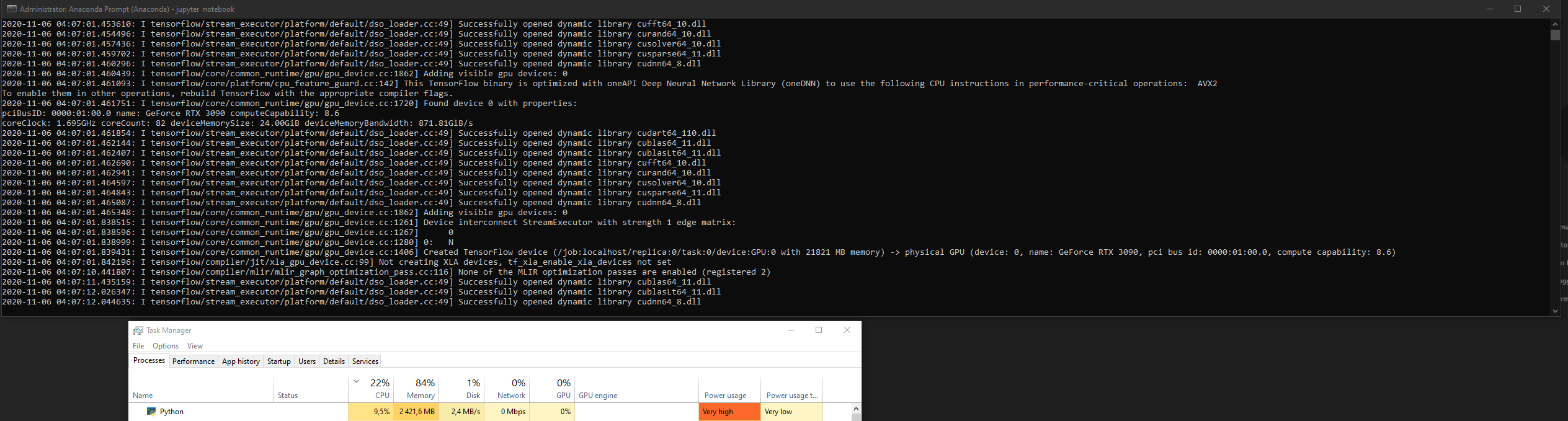
--这是我的朱庇特笔记本(运行时)的完整文本输出。
[I 04:06:47.194 NotebookApp] Kernel started: e4bec12d-3d85-4019-9b5a-67d34a45acfc
[I 04:06:50.799 NotebookApp] Starting buffering for e4bec12d-3d85-4019-9b5a-67d34a45acfc:591585a545fe4d33977dac034060b33c
[I 04:06:51.031 NotebookApp] Kernel restarted: e4bec12d-3d85-4019-9b5a-67d34a45acfc
[I 04:06:51.557 NotebookApp] Restoring connection for e4bec12d-3d85-4019-9b5a-67d34a45acfc:591585a545fe4d33977dac034060b33c
[I 04:06:51.558 NotebookApp] Replaying 3 buffered messages
2020-11-06 04:06:53.766169: I tensorflow/stream_executor/platform/default/dso_loader.cc:49] Successfully opened dynamic library cudart64_110.dll
2020-11-06 04:07:01.412837: I tensorflow/compiler/jit/xla_cpu_device.cc:41] Not creating XLA devices, tf_xla_enable_xla_devices not set
2020-11-06 04:07:01.420283: I tensorflow/stream_executor/platform/default/dso_loader.cc:49] Successfully opened dynamic library nvcuda.dll
2020-11-06 04:07:01.438547: I tensorflow/core/common_runtime/gpu/gpu_device.cc:1720] Found device 0 with properties:
pciBusID: 0000:01:00.0 name: GeForce RTX 3090 computeCapability: 8.6
coreClock: 1.695GHz coreCount: 82 deviceMemorySize: 24.00GiB deviceMemoryBandwidth: 871.81GiB/s
2020-11-06 04:07:01.438675: I tensorflow/stream_executor/platform/default/dso_loader.cc:49] Successfully opened dynamic library cudart64_110.dll
2020-11-06 04:07:01.450544: I tensorflow/stream_executor/platform/default/dso_loader.cc:49] Successfully opened dynamic library cublas64_11.dll
2020-11-06 04:07:01.450698: I tensorflow/stream_executor/platform/default/dso_loader.cc:49] Successfully opened dynamic library cublasLt64_11.dll
2020-11-06 04:07:01.453610: I tensorflow/stream_executor/platform/default/dso_loader.cc:49] Successfully opened dynamic library cufft64_10.dll
2020-11-06 04:07:01.454496: I tensorflow/stream_executor/platform/default/dso_loader.cc:49] Successfully opened dynamic library curand64_10.dll
2020-11-06 04:07:01.457436: I tensorflow/stream_executor/platform/default/dso_loader.cc:49] Successfully opened dynamic library cusolver64_10.dll
2020-11-06 04:07:01.459702: I tensorflow/stream_executor/platform/default/dso_loader.cc:49] Successfully opened dynamic library cusparse64_11.dll
2020-11-06 04:07:01.460296: I tensorflow/stream_executor/platform/default/dso_loader.cc:49] Successfully opened dynamic library cudnn64_8.dll
2020-11-06 04:07:01.460439: I tensorflow/core/common_runtime/gpu/gpu_device.cc:1862] Adding visible gpu devices: 0
2020-11-06 04:07:01.461093: I tensorflow/core/platform/cpu_feature_guard.cc:142] This TensorFlow binary is optimized with oneAPI Deep Neural Network Library (oneDNN) to use the following CPU instructions in performance-critical operations:  AVX2
To enable them in other operations, rebuild TensorFlow with the appropriate compiler flags.
2020-11-06 04:07:01.461751: I tensorflow/core/common_runtime/gpu/gpu_device.cc:1720] Found device 0 with properties:
pciBusID: 0000:01:00.0 name: GeForce RTX 3090 computeCapability: 8.6
coreClock: 1.695GHz coreCount: 82 deviceMemorySize: 24.00GiB deviceMemoryBandwidth: 871.81GiB/s
2020-11-06 04:07:01.461854: I tensorflow/stream_executor/platform/default/dso_loader.cc:49] Successfully opened dynamic library cudart64_110.dll
2020-11-06 04:07:01.462144: I tensorflow/stream_executor/platform/default/dso_loader.cc:49] Successfully opened dynamic library cublas64_11.dll
2020-11-06 04:07:01.462407: I tensorflow/stream_executor/platform/default/dso_loader.cc:49] Successfully opened dynamic library cublasLt64_11.dll
2020-11-06 04:07:01.462690: I tensorflow/stream_executor/platform/default/dso_loader.cc:49] Successfully opened dynamic library cufft64_10.dll
2020-11-06 04:07:01.462941: I tensorflow/stream_executor/platform/default/dso_loader.cc:49] Successfully opened dynamic library curand64_10.dll
2020-11-06 04:07:01.464597: I tensorflow/stream_executor/platform/default/dso_loader.cc:49] Successfully opened dynamic library cusolver64_10.dll
2020-11-06 04:07:01.464843: I tensorflow/stream_executor/platform/default/dso_loader.cc:49] Successfully opened dynamic library cusparse64_11.dll
2020-11-06 04:07:01.465087: I tensorflow/stream_executor/platform/default/dso_loader.cc:49] Successfully opened dynamic library cudnn64_8.dll
2020-11-06 04:07:01.465348: I tensorflow/core/common_runtime/gpu/gpu_device.cc:1862] Adding visible gpu devices: 0
2020-11-06 04:07:01.838515: I tensorflow/core/common_runtime/gpu/gpu_device.cc:1261] Device interconnect StreamExecutor with strength 1 edge matrix:
2020-11-06 04:07:01.838596: I tensorflow/core/common_runtime/gpu/gpu_device.cc:1267]      0
2020-11-06 04:07:01.838999: I tensorflow/core/common_runtime/gpu/gpu_device.cc:1280] 0:   N
2020-11-06 04:07:01.839431: I tensorflow/core/common_runtime/gpu/gpu_device.cc:1406] Created TensorFlow device (/job:localhost/replica:0/task:0/device:GPU:0 with 21821 MB memory) -> physical GPU (device: 0, name: GeForce RTX 3090, pci bus id: 0000:01:00.0, compute capability: 8.6)
2020-11-06 04:07:01.842196: I tensorflow/compiler/jit/xla_gpu_device.cc:99] Not creating XLA devices, tf_xla_enable_xla_devices not set
2020-11-06 04:07:10.441807: I tensorflow/compiler/mlir/mlir_graph_optimization_pass.cc:116] None of the MLIR optimization passes are enabled (registered 2)
2020-11-06 04:07:11.435159: I tensorflow/stream_executor/platform/default/dso_loader.cc:49] Successfully opened dynamic library cublas64_11.dll
2020-11-06 04:07:12.026347: I tensorflow/stream_executor/platform/default/dso_loader.cc:49] Successfully opened dynamic library cublasLt64_11.dll
2020-11-06 04:07:12.044635: I tensorflow/stream_executor/platform/default/dso_loader.cc:49] Successfully opened dynamic library cudnn64_8.dll
[I 04:08:47.169 NotebookApp] Saving file at /train_model.ipynb
2020-11-06 04:13:24.212460: I tensorflow/stream_executor/cuda/cuda_blas.cc:1838] TensorFloat-32 will be used for the matrix multiplication. This will only be logged once.
P.S.更新#1
使用GPU完成单个时代只需579秒,而在CPU上完成则只需80秒。
回答 4
Stack Overflow用户
发布于 2020-11-09 05:18:05
这是因为rtx 3090具有安培体系结构,并且与库达-11和cuDNN-8兼容,而TensorFlow在2.3版中还没有满足库达-11的要求。
我面临着同样的问题,但我发现这是兼容性问题,也许等待2.4是最好的选择。否则,您可以尝试从源代码编译TensorFlow。
Stack Overflow用户
发布于 2020-11-08 13:32:03
Adding visible gpu devices: 0具有误导性,实际上意味着增加了一个设备。冒号后面的部分是以逗号分隔的设备列表,而不是设备数量。
设置环境变量TF_CPP_MIN_VLOG_LEVEL=10将显示大量信息,其中一些信息可能会帮助您调试这种情况。
假设您的日志显示设备是可用的,加载了cuBLAS库,没有显示其他相关的错误消息,而且有一个非常明显的时间变化,最可能的答案是Tensorflow没有忽略您的GPU,您的模型只是没有经过优化以在GPU上快速运行。
接下来我推荐的步骤是查看VLOGs,看看GPU是否被用于执行任何操作。虽然我认为不太可能,但也有可能表明存在库不匹配的问题,导致CPU仍在使用,而不是您的GPU,同时进程也意识到了这个问题。
在确认GPU正在使用之后,我建议在这里查看一下,以确认您希望在GPU上运行的所有操作,并调试为什么您的模型在GPU:角化上不能很好地工作。
Stack Overflow用户
发布于 2020-11-11 07:47:37
昨天我自己也遇到了类似的问题,我决定尝试一些博客的[1][2]信息,我只是安装了版本,这些版本应该与RTX 3090兼容(或者查看第二个链接或官方兼容性矩阵):
- CUDA 11.1
- cuDNN 8.4.0.30
我正在使用Windows 10,并通过conda env运行python 3.8.6。然后,我安装了tf快照的最新版本(而不是稳定版本) tf-nightly-gpu=2.5.0.dev20201110。这使我遇到了类似tensorflow问题跟踪器[3]上报告的类似错误。
Could not load dynamic library 'cusolver64_10.dll'; dlerror: cusolver64_10.dll not found但是,这是通过在11个安装的基础上安装CUDA 10.2来解决的;请注意,没有安装CUDNN版本的CUDNN版本,只需安装CUDA 10.2来提供丢失的文件(第11个版本中不存在cusolver64_10.dll,但cusolver64_11.dll存在)。这个问题上的一些用户暗示,将缺失的DLL移动到11.1版本文件夹(bin)中是可行的,但是在11上面安装就可以了( windows中现在有三个CUDA路径,CUDA_PATH设置为第10个版本,可以安全地返回,然后每个版本都有一个cuda路径)。TF将尝试从11.1版本加载DLL,然后在较低版本路径中查找缺少的DLL。
它起作用了吗?至少我觉得是的。我使用Tensorflow Keras和Tensorflow使用函数api构建模型,我的网络运行得很好,产生了预期的结果。加速是我从我的科技飞跃中预料到的。
https://stackoverflow.com/questions/64707562
复制相似问题
腾讯云开发者

Copyright © 2013 - 2026 Tencent Cloud. All Rights Reserved. 腾讯云 版权所有
深圳市腾讯计算机系统有限公司 ICP备案/许可证号:粤B2-20090059  粤公网安备44030502008569号
腾讯云计算(北京)有限责任公司 京ICP证150476号 | 京ICP备11018762号