
使用stat_fit_tb()在ggpmisc & ggplot中编辑*行*表格显示的名称
虽然stat_poly_eq()允许使用eq.with.lhs和eq.x.rhs更改变量名,但根据我对ggpmisc文档的阅读,类似的功能似乎在stat_fit_tb()中不可用。
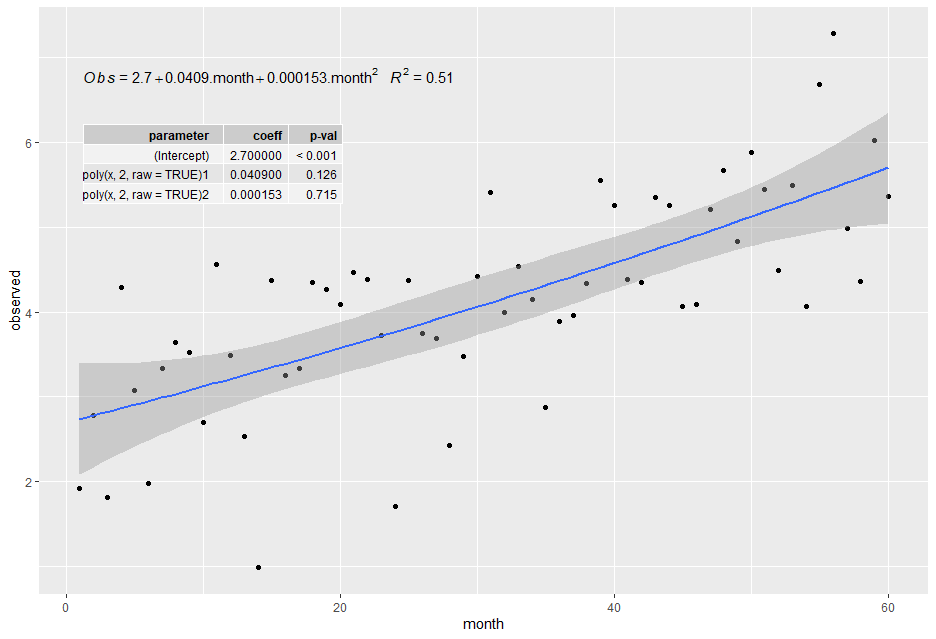
下面的示例中是否有一种修改plt对象的方法,以强制表显示显示参数名称,这些参数名称更容易查看,并且更符合等式和轴标签?
## dummy data
set.seed(1)
df <- data.frame(month = c(1:60))
df$observed <- 2.5 + 0.05*df$month + rnorm(60, sd = 1)## min plot example
my.formula <- y ~ poly(x,2,raw=TRUE) ## formula with generic variable names
plt <- ggplot(df, aes(x=month, y=observed)) +
geom_point() +
## show fit and CI
geom_smooth(method = "lm", se=TRUE, level=0.95, formula = my.formula) +
## display equation with useful variable names (i.e. not x and y)
stat_poly_eq(eq.with.lhs = "italic(Obs)~`=`~",
eq.x.rhs = ".month",
aes(label = paste(..eq.label.., ..rr.label.., sep = "~~~")),
parse = TRUE,
formula = my.formula, label.y = 0.9) +
## show table of each coefficient's p-value
stat_fit_tb(method.args = list(formula = my.formula),
tb.vars = c(parameter = "term", ## can change column headings
coeff = "estimate",
"p-val" = "p.value"),
label.y = 0.8, label.x = "left")
plt
回答 3
Stack Overflow用户
发布于 2020-11-09 21:30:11
更新的'ggpmisc‘(>= 0.3.7)使这个答案成为可能,在我看来应该是首选的答案。
## ggpmisc (>= 0.3.7)
library(ggpmisc)

## dummy data
set.seed(1)
df <- data.frame(month = c(1:60))
df$observed <- 2.5 + 0.05*df$month + rnorm(60, sd = 1)

## min plot example
my.formula <- y ~ poly(x,2,raw=TRUE) ## formula with generic variable names

plt <- ggplot(df, aes(x=month, y=observed)) +
  geom_point() +
  ## show fit and CI
  geom_smooth(method = "lm", se=TRUE, level=0.95, formula = my.formula) +
  ## display equation with useful variable names (i.e. not x and y)
  stat_poly_eq(eq.with.lhs = "italic(Obs)~`=`~",
               eq.x.rhs = '" month"',
               aes(label = paste(..eq.label.., ..rr.label.., sep = "~~~")),
               parse = TRUE,
               formula = my.formula, label.y = 0.9) +
  ## show table of each coefficient's p-value
  stat_fit_tb(method.args = list(formula = my.formula),
              tb.vars = c(parameter = "term", ## can change column headings
                          coeff = "estimate",
                          "p-val" = "p.value"),
              tb.params = c(1, month = 2, "month^2" = 3), ##
              label.y = 0.8, label.x = "left",
              parse = TRUE)

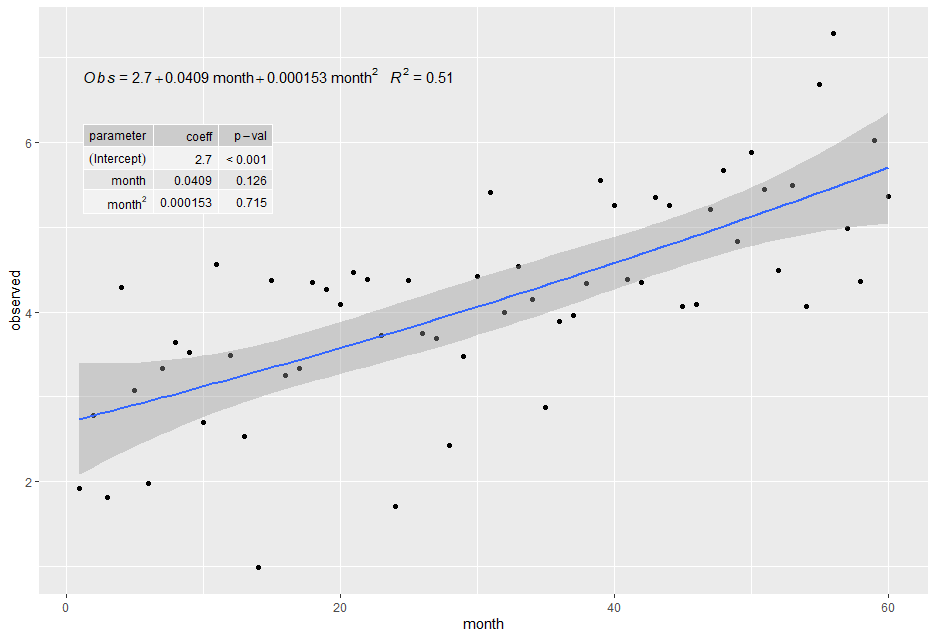
plt给出下面的情节。(我也把论点改成了eq.x.rhs,虽然不是问题的直接部分。P-值更好的格式是在新版本的“ggpmisc”包中实现的。)
Stack Overflow用户
发布于 2020-11-04 09:23:41
在将plt转换成grob对象之后,这可能会被黑客攻击,但是现在我喜欢解决一次问题&用它来解决问题,所以我用底层的ggproto对象进行了黑客攻击。
运行以下代码(注释中显示了原始代码中的更改):
library(ggpmisc)

StatFitTb2 <- ggproto(
  "StatFitTb2",
  StatFitTb,
  compute_panel = function (data, scales, method, method.args, tb.type, tb.vars,
                            tb.row.names, digits, npc.used = TRUE, label.x, label.y) {
    force(data)
    if (length(unique(data$x)) < 2) {
      return(data.frame())
    }
    panel.idx <- as.integer(as.character(data$PANEL[1]))
    if (length(label.x) >= panel.idx) {
      label.x <- label.x[panel.idx]
    }
    else if (length(label.x) > 0) {
      label.x <- label.x[1]
    }
    if (length(label.y) >= panel.idx) {
      label.y <- label.y[panel.idx]
    }
    else if (length(label.y) > 0) {
      label.y <- label.y[1]
    }
    method.args <- c(method.args, list(data = quote(data)))
    if (is.character(method))
      method <- match.fun(method)
    mf <- do.call(method, method.args)
    if (tolower(tb.type) %in% c("fit.anova", "anova")) {
      mf_tb <- broom::tidy(stats::anova(mf))
    }
    else if (tolower(tb.type) %in% c("fit.summary", "summary")) {
      mf_tb <- broom::tidy(mf)
    }
    else if (tolower(tb.type) %in% c("fit.coefs", "coefs")) {
      mf_tb <- broom::tidy(mf)[c("term", "estimate")]
    }
    num.cols <- sapply(mf_tb, is.numeric)
    mf_tb[num.cols] <- signif(mf_tb[num.cols], digits = digits)
    if (!is.null(tb.vars)) {
      mf_tb <- dplyr::select(mf_tb, !!tb.vars)
    }

    # new condition for modifying row names, if they are specified
    if(!is.null(tb.row.names)) {
      mf_tb[, 1] <- tb.row.names
    }

    z <- tibble::tibble(mf_tb = list(mf_tb))
    if (npc.used) {
      margin.npc <- 0.05
    }
    else {
      margin.npc <- 0
    }
    if (is.character(label.x)) {
      label.x <- switch(label.x, right = (1 - margin.npc),
                        center = 0.5, centre = 0.5,
                        middle = 0.5, left = (0 + margin.npc))
      if (!npc.used) {
        x.delta <- abs(diff(range(data$x)))
        x.min <- min(data$x)
        label.x <- label.x * x.delta + x.min
      }
    }
    if (is.character(label.y)) {
      label.y <- switch(label.y, top = (1 - margin.npc), center = 0.5,
                        centre = 0.5, middle = 0.5, bottom = (0 + margin.npc))
      if (!npc.used) {
        y.delta <- abs(diff(range(data$y)))
        y.min <- min(data$y)
        label.y <- label.y * y.delta + y.min
      }
    }
    if (npc.used) {
      z$npcx <- label.x
      z$x <- NA_real_
      z$npcy <- label.y
      z$y <- NA_real_
    }
    else {
      z$x <- label.x
      z$npcx <- NA_real_
      z$y <- label.y
      z$npcy <- NA_real_
    }
    z
  })

stat_fit_tb2 <- function(mapping = NULL, data = NULL, geom = "table_npc",
                         method = "lm", method.args = list(formula = y ~ x),
                         tb.type = "fit.summary", tb.vars = NULL, digits = 3,
                         tb.row.names = NULL, # new parameter for row names (defaults to NULL)
                         label.x = "center", label.y = "top", label.x.npc = NULL,
                         label.y.npc = NULL, position = "identity", table.theme = NULL,
                         table.rownames = FALSE, table.colnames = TRUE, table.hjust = 1,
                         parse = FALSE, na.rm = FALSE, show.legend = FALSE, inherit.aes = TRUE,
                         ...) {
  if (!is.null(label.x.npc)) {
    stopifnot(grepl("_npc", geom))
    label.x <- label.x.npc
  }
  if (!is.null(label.y.npc)) {
    stopifnot(grepl("_npc", geom))
    label.y <- label.y.npc
  }
  ggplot2::layer(stat = StatFitTb2, # reference modified StatFitTb2 instead of the original
                 data = data, mapping = mapping,
                 geom = geom, position = position, show.legend = show.legend,
                 inherit.aes = inherit.aes,
                 params = list(method = method, method.args = method.args,
                               tb.type = tb.type, tb.vars = tb.vars,
                               tb.row.names = tb.row.names, # new parameter here
                               digits = digits, label.x = label.x, label.y = label.y,
                               npc.used = grepl("_npc", geom), table.theme = table.theme,
                               table.rownames = table.rownames, table.colnames = table.colnames,
                               table.hjust = table.hjust, parse = parse, na.rm = na.rm,
                               ...))
}
用法:
ggplot(df, aes(x=month, y=observed)) +
  geom_point() +
  ## show fit and CI
  geom_smooth(method = "lm", se=TRUE, level=0.95, formula = my.formula) +
  ## display equation with useful variable names (i.e. not x and y)
  stat_poly_eq(eq.with.lhs = "italic(Obs)~`=`~",
               eq.x.rhs = ".month",
               aes(label = paste(..eq.label.., ..rr.label.., sep = "~~~")),
               parse = TRUE,
               formula = my.formula, label.y = 0.9) +
  ## show table of each coefficient's p-value
  stat_fit_tb2(method.args = list(formula = my.formula),
              tb.vars = c(parameter = "term", ## can change column headings
                          coeff = "estimate",
                          "p-val" = "p.value"),
              tb.row.names = c("(Intercept)", "month", "month^2"),
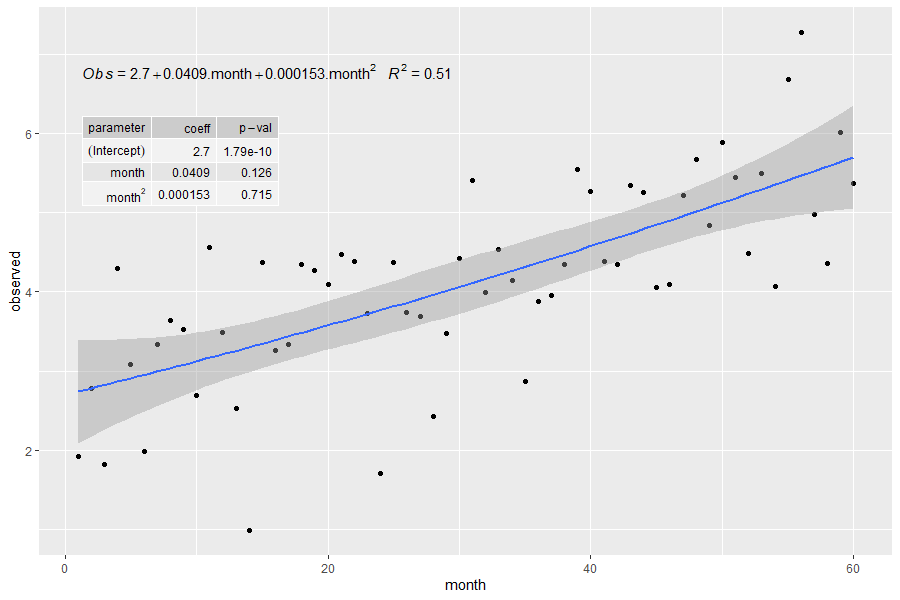
label.y = 0.8, label.x = "left", parse = TRUE)注意:parse = TRUE使month^2行名看起来更好看,但它也会影响表中的所有其他值(例如p值的破折号变成减号,数字被四舍五入到不同的数字数,等等)。
Stack Overflow用户
发布于 2020-11-04 23:44:03
注意:如果您仍然使用'ggpmisc‘(<= 0.3.6),这个答案可能是有用的。否则,请参见使用“ggpmisc”(>= 0.3.7)的单独答案。
在将其内置到包中之前,一种相当简单的方法是在aes()中动态编辑tibble。为了避免代码混乱,我首先定义了一个函数。
library(ggpmisc)

## dummy data
set.seed(1)
df <- data.frame(month = c(1:60))
df$observed <- 2.5 + 0.05*df$month + rnorm(60, sd = 1)

## min plot example
my.formula <- y ~ poly(x,2,raw=TRUE) ## formula with generic variable names

## define function for renaming parameters in tibble(s) returned by the stat
## walk through the list an operate on all the tibbles found so that
## grouping and facets are also supported.
set_param_names <- function(x, names) {
  for (i in seq_along(x)) {
   x[[i]][[1]] <- names
  }
  x
}

plt <- ggplot(df, aes(x=month, y=observed)) +
  geom_point() +
  ## show fit and CI
  geom_smooth(method = "lm", se=TRUE, level=0.95, formula = my.formula) +
  ## display equation with useful variable names (i.e. not x and y)
  stat_poly_eq(eq.with.lhs = "italic(Obs)~`=`~",
               eq.x.rhs = ".month",
               aes(label = paste(..eq.label.., ..rr.label.., sep = "~~~")),
               parse = TRUE,
               formula = my.formula, label.y = 0.9) +
  ## show table of each coefficient's p-value
  stat_fit_tb(method.args = list(formula = my.formula),
              tb.vars = c(parameter = "term", ## can change column headings
                          coeff = "estimate",
                          "p-val" = "p.value"),
              label.y = 0.8, label.x = "left",
              aes(label = set_param_names(stat(mf_tb),
                                          c("intercept", "month", "month^2"))),
              parse = TRUE)

plt
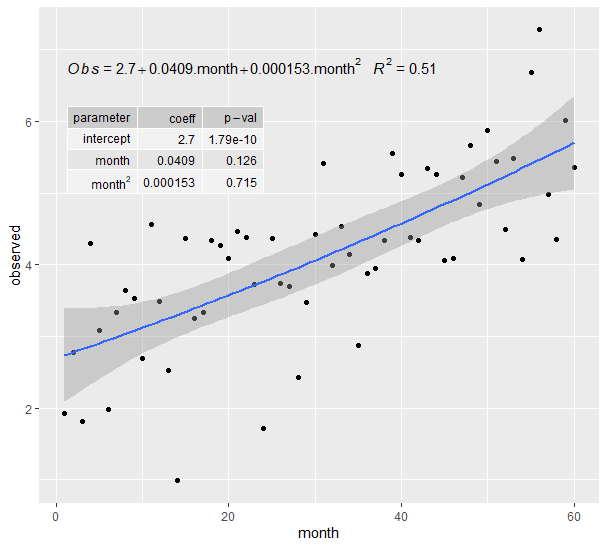
这意味着:
https://stackoverflow.com/questions/64665345
复制相似问题
腾讯云开发者

Copyright © 2013 - 2026 Tencent Cloud. All Rights Reserved. 腾讯云 版权所有
深圳市腾讯计算机系统有限公司 ICP备案/许可证号:粤B2-20090059  粤公网安备44030502008569号
腾讯云计算(北京)有限责任公司 京ICP证150476号 | 京ICP备11018762号