
如何将文本从shell转换为html?
也许这是个简单而愚蠢的问题,但我是Python的新手,所以要处理好它
我需要做的??在shell中执行命令并输出为telegra.ph页面。
问题- telegra.ph API忽略\n在一行中的所有外部文本
已使用的Python包装器- https://github.com/python273/telegraph
我理解它需要将我的文本转换为html,并删除标记,我尝试了一些脚本,但是我的程序给了我错误:
telegraph.exceptions.NotAllowedTag: span tag is not allowed所以,我删除了所有的span标记,并得到了相同的结果,就像我不进行转换就把
然后我试着用replace("\n", "<p>")但是塞进了关闭标签..。
代码:
import subprocess

from telegraph import Telegraph

telegraph = Telegraph()
telegraph.create_account(short_name='1111')

tmp = subprocess.run("arp", capture_output=True, text=True, shell=True).stdout

print( '\n\n\n'+tmp+'\n\n\n\n')   ### debug line


response = telegraph.create_page(
    'Random',
    html_content= '<p>' + tmp + '</p>'
)

print('https://telegra.ph/{}'.format(response['path']))回答 3
Stack Overflow用户
发布于 2020-10-30 17:17:44
与\n最接近的html是"hard break"
tag。
它不需要关闭,因为它不包含任何内容,并且直接表示换行。
假设它得到了telegra.ph的支持,您可以简单地:
tmp.replace('\n', '<br/>');Stack Overflow用户
发布于 2020-10-30 17:16:26
添加此行以将所有中间换行符转换为单个-sections:
tmp = "</p><p>".join(tmp.split("\n"))tmp.split("\n")将字符串拆分为一个行数组。
"</p><p>".join(...)再次将所有东西粘合在一起,关闭以前的-section并启动一个新的。
这样,该示例对我有效,并在页面上正确地显示换行符。
编辑:正如另一个答案所暗示的,当然你也可以使用
标签。这取决于你想要实现什么!
Stack Overflow用户
发布于 2020-10-30 17:40:19
我不清楚为什么telegraph模块用空格替换换行符。在这种情况下,禁用此功能似乎是合理的。
import subprocess
import re

import telegraph
from telegraph import Telegraph

telegraph.utils.RE_WHITESPACE = re.compile(r'([ ]{10})', re.UNICODE)

telegraph = Telegraph()
telegraph.create_account(short_name='1111')

tmp = subprocess.run("/usr/sbin/arp",
                     capture_output=True,
                     text=True,
                     shell=True).stdout

response = telegraph.create_page(
    'Random',
    html_content = '<pre>' + tmp + '</pre>'
)

print('https://telegra.ph/{}'.format(response['path']))
会输出
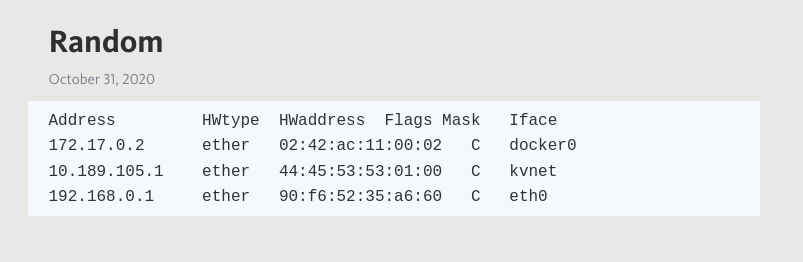
这接近于实际格式化的arp输出。
https://stackoverflow.com/questions/64612846
复制相似问题
腾讯云开发者

Copyright © 2013 - 2026 Tencent Cloud. All Rights Reserved. 腾讯云 版权所有
深圳市腾讯计算机系统有限公司 ICP备案/许可证号:粤B2-20090059  粤公网安备44030502008569号
腾讯云计算(北京)有限责任公司 京ICP证150476号 | 京ICP备11018762号