
GeoServer不承认复制的gwc层文件。
GeoServer不承认复制的gwc层文件。
提问于 2020-10-28 21:49:26
我想为GeoServer生成一个对接映像,添加我在本地运行的GeoServer实例的gwc层。为此,我从本地data_dir复制了GeoServer,并创建了以下Dockerfile:
FROM kartoza/geoserver

COPY data_dir/user_projections/epsg.properties /opt/geoserver/data_dir/user_projections/
COPY data_dir/workspaces /opt/geoserver/data_dir/workspaces
COPY data_dir/security /opt/geoserver/data_dir/security
COPY data_dir/styles /opt/geoserver/data_dir/styles
COPY data_dir/gwc-layers /opt/geoserver/data_dir/gwc-layers
我在gwc-layers文件夹中定义的文件如下所示:
<GeoServerTileLayer>
  <id>LayerInfoImpl--6dbd5e0d:1753f922e52:-6c1c</id>
  <enabled>true</enabled>
  <inMemoryCached>true</inMemoryCached>
  <name>myworkspace:parcels</name>
  <mimeFormats>
    <string>application/vnd.mapbox-vector-tile</string>
    <string>image/png</string>
    <string>image/jpeg</string>
  </mimeFormats>
  <gridSubsets>
    <gridSubset>
      <gridSetName>EPSG:4326</gridSetName>
    </gridSubset>
    <gridSubset>
      <gridSetName>EPSG:900913</gridSetName>
    </gridSubset>
  </gridSubsets>
  <metaWidthHeight>
    <int>4</int>
    <int>4</int>
  </metaWidthHeight>
  <expireCache>0</expireCache>
  <expireClients>0</expireClients>
  <parameterFilters>
    <styleParameterFilter>
      <key>STYLES</key>
      <defaultValue></defaultValue>
      <availableStyles class="sorted-set"/>
      <defaultStyle>generic</defaultStyle>
    </styleParameterFilter>
  </parameterFilters>
  <gutter>0</gutter>
</GeoServerTileLayer>请注意,所有层都具有通过application/vnd.mapbox-vector-tile.定义的MVT平铺图像格式。
但是,在构建了Docker映像并运行它之后,我的所有工作区、数据存储层都被正确列出,但是没有一个层有选项application/vnd.mapbox-Vector-Tiles选中。
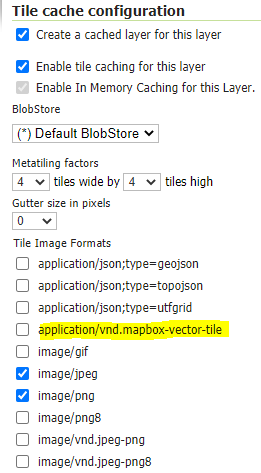
似乎gwc层中的文件正在被修改或忽略/重新生成。
回答 1
Stack Overflow用户
回答已采纳
发布于 2020-10-30 09:52:49
默认的平铺格式存储在gwc-gs.xml文件中(在顶级数据dir中),因此您也需要对其进行复制。
页面原文内容由Stack Overflow提供。腾讯云小微IT领域专用引擎提供翻译支持
原文链接:
https://stackoverflow.com/questions/64581811
复制相关文章
相似问题
腾讯云开发者

Copyright © 2013 - 2026 Tencent Cloud. All Rights Reserved. 腾讯云 版权所有
深圳市腾讯计算机系统有限公司 ICP备案/许可证号:粤B2-20090059  粤公网安备44030502008569号
腾讯云计算(北京)有限责任公司 京ICP证150476号 | 京ICP备11018762号