
工具提示被div纯CSS切断。
工具提示被div纯CSS切断。
提问于 2020-10-22 21:39:08
.color-palette {
  border-top: 2px solid lightgrey;
  max-height: 32vh;
  z-index: 1;
  background: rgba(0, 0, 0, 0.75);
  width: 90vw;
  bottom: 2.75rem;
  border-radius: 10px;
  display: flex;
  flex-flow: row wrap;
  justify-content: center;
  align-items: flex-end;
  padding: 0.75rem 0.5rem;
  position: absolute;
  overflow-y: auto;
  overflow-x: hidden;
  box-shadow: 0px 5px 10px black;
  animation-name: zoomIn;
  animation-duration: 0.5s;
  }

button {
  font-family: inherit;
  font-size: 0.8rem;
  line-height: 0.9;
  width: 3.75rem;
  height: 3.75rem;
  margin: 0.45rem 0.3rem;
  display: flex;
  align-items: center;
  justify-content: center;
  border-radius: 50%;
  transition: all 0.5s;
  border: none;
  outline: none;
  text-decoration: none;
  text-align: center;
  text-shadow: 0 -1px 0px rgba(0, 0, 0, 0.3);
  box-shadow: inset 0px 1px 0px grey, 0px 3px 0px 0px lightgrey,
    0px 8px 5px #999;
}

.tooltip {
  position: relative;
  display: inline-block;
}

.tooltip .tooltiptext {
  visibility: hidden;
  font-family: "Comic Neue", cursive;
  width: 8.5rem;
  font-size: 1rem;
  background-color: black;
  color: #fff;
  text-align: center;
  border-radius: 6px;
  padding: 5px 0;
  position: absolute;
  z-index: 500;
  bottom: 110%;
  left: 35%;
  margin-left: -60px;
}

span {
  display: none;
}

.tooltip .tooltiptext::after {
  content: "";
  position: absolute;
  top: 100%;
  left: 50%;
  margin-left: -5px;
  border-width: 5px;
  border-style: solid;
  border-color: black transparent transparent transparent;
}

.tooltip:hover .tooltiptext {
  visibility: visible;
  display: block;
}<div class="color-palette">
<button class="tooltip">
<span class="tooltiptext">Cannot duplicate</span>
</button>
</div>
我从https://www.w3schools.com/css/css_tooltip.asp获得了工具提示代码。我在这里试过答案:CSS tooltip getting cut off
并且已经在我的color-palette上应用了color-palette而不是overflow-y: auto; overflow-x: hidden;,但是发生了这样的事情:
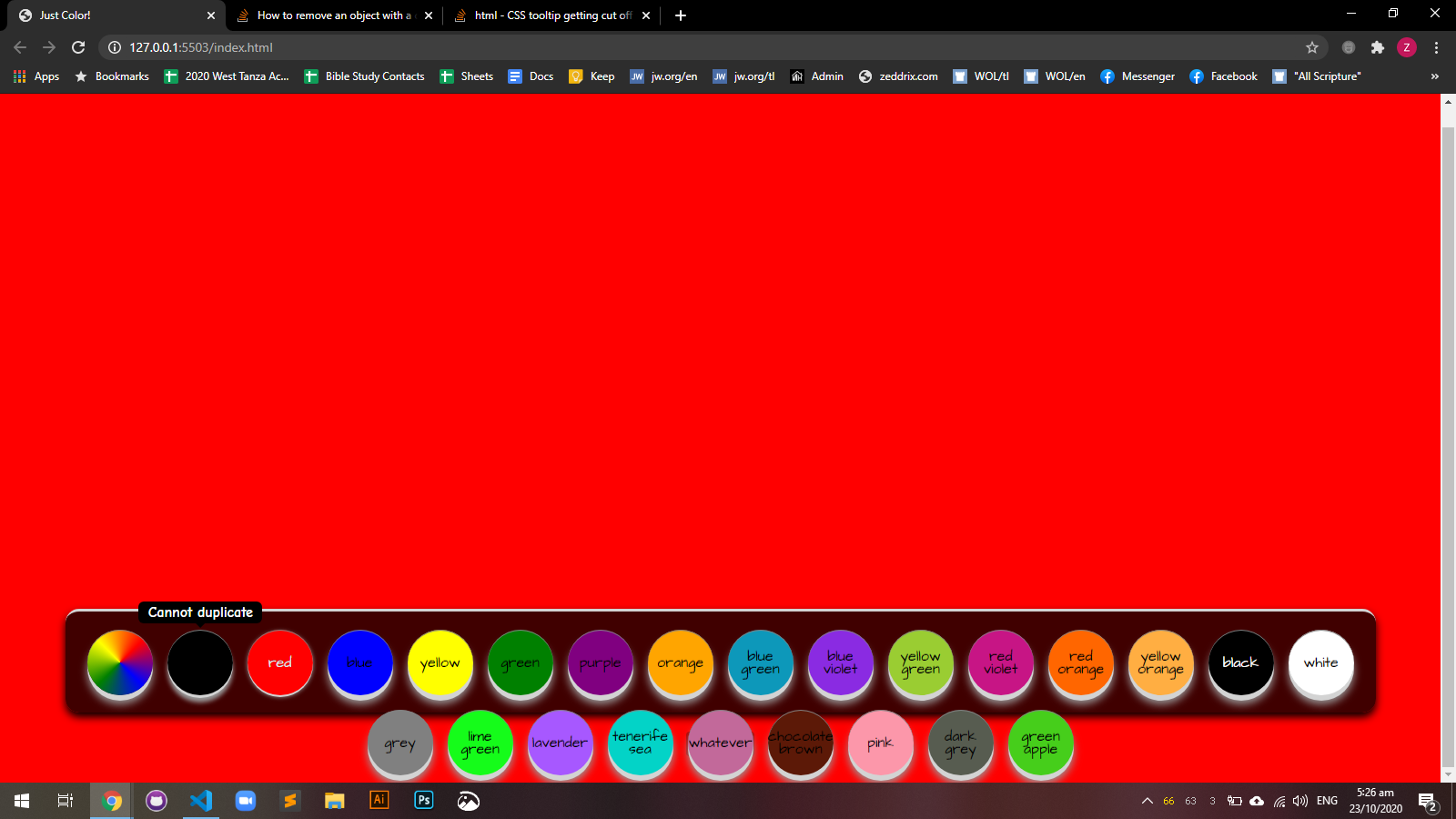
是的,工具提示起作用了,但我的按钮已经超出了div (..color palette)。--我希望在不移除工具提示底部箭头的情况下工作,不向下移动工具提示,不增加div使工具提示适合内部。我想要的只是使工具提示重叠。怎么办?
回答 1
Stack Overflow用户
发布于 2020-10-22 21:49:27
尝试将类中的值从110更改为95:
.tooltip .tooltiptext {
bottom: 95%;
}
更新:更改类中的最高值
.tooltip .tooltiptext::after {

      top: 100%;
}页面原文内容由Stack Overflow提供。腾讯云小微IT领域专用引擎提供翻译支持
原文链接:
https://stackoverflow.com/questions/64490911
复制相关文章
相似问题
腾讯云开发者

Copyright © 2013 - 2026 Tencent Cloud. All Rights Reserved. 腾讯云 版权所有
深圳市腾讯计算机系统有限公司 ICP备案/许可证号:粤B2-20090059  粤公网安备44030502008569号
腾讯云计算(北京)有限责任公司 京ICP证150476号 | 京ICP备11018762号