
在SVG文本旁边添加图标
在SVG文本旁边添加图标
提问于 2020-10-22 07:15:42
我想在svg文本旁边添加2个图标(图像附加,节点文本/名称将有差异长度),我知道我们可以使用foreignObject,但是当使用foreignObject时,我无法获得节点值
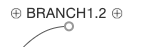
var addSvgCnt = nodeEnter.append("g")
     .attr("class",  "txt-swap-parent");

addSvgCnt.append("foreignObject")
   .attr("width", 1)
   .attr("height", 30)
   .append("xhtml:div")
   .attr("class", "svg-node")
    .html("<img src='https://cdn.onlinewebfonts.com/svg/img_356964.png' height='10' width='10'/>
           <span>BRANCH1.2</span>
           <img src='https://cdn.onlinewebfonts.com/svg/img_356964.png' height='10' width='10'/>");
这里我需要节点文本而不是BRANCH1.2,我尝试了psuedo元素,但它也不起作用。实现这个目标的最佳解决方案是什么?
回答 1
Stack Overflow用户
回答已采纳
发布于 2020-10-22 13:16:21
您的图标看起来非常像这个unicode字符,您甚至可以替换它,只需使用tspan
尝试单击节点以查看是否正确地注册了单击。
const someText = "Hi from branch 1";
const circledPlusUnicode = "\u2295";
const x = 50, y = 100;

const text = d3.select("svg")
  .append("text")
  .attr("x", x)
  .attr("y", y);

text.append("tspan")
  .attr("class", "circle")
  .text(circledPlusUnicode)
  .on("click", function() {
    console.log("click circle 1");
  });

text.append("tspan")
  .attr("dy", 2)
  .attr("dx", 2)
  .text(someText);

text.append("tspan")
  .attr("class", "circle")
  .attr("dy", -2)
  .attr("dx", 2)
  .text(circledPlusUnicode)
  .on("click", function() {
    console.log("click circle 2");
});.circle {
fill: darkgrey;
font-size: 14px;
}<script src="https://cdnjs.cloudflare.com/ajax/libs/d3/5.7.0/d3.min.js"></script>
<svg></svg>
否则,您将使用getBBox,它将返回调用元素的边界框,您可以使用该框将图像定位到文本旁边:
const someText = "Hi from branch 1";
const circledPlusImg = "https://cdn.onlinewebfonts.com/svg/img_356964.png";
const x = 50,
  y = 100;

const textGroup = d3.select("svg")
  .append("g")
  .attr("transform", "translate" + [x, y] + ")");

textGroup.append("image")
  .attr("class", "circle")
  .attr("href", circledPlusImg)
  .attr("height", 14)
  .attr("width", 14)
  .on("click", function() {
    console.log("click circle 1");
  });

const text = textGroup.append("text")
  .attr("dy", 12)
  .attr("dx", 16)
  .text(someText);

textGroup.append("image")
  .attr("class", "circle")
  .attr("href", circledPlusImg)
  .attr("height", 14)
  .attr("width", 14)
  .attr("x", function() {
    const bbox = text.node().getBBox();
    return bbox.x + bbox.width;
  })
  .on("click", function() {
    console.log("click circle 2");
});<script src="https://cdnjs.cloudflare.com/ajax/libs/d3/5.7.0/d3.min.js"></script>
<svg></svg>
页面原文内容由Stack Overflow提供。腾讯云小微IT领域专用引擎提供翻译支持
原文链接:
https://stackoverflow.com/questions/64477090
复制相关文章
相似问题
腾讯云开发者

Copyright © 2013 - 2026 Tencent Cloud. All Rights Reserved. 腾讯云 版权所有
深圳市腾讯计算机系统有限公司 ICP备案/许可证号:粤B2-20090059  粤公网安备44030502008569号
腾讯云计算(北京)有限责任公司 京ICP证150476号 | 京ICP备11018762号