
如何根据已签名的用户角色禁用HTML文档的某些元素?
我正在为一小群用户制作一个文件网站,我有一个登录页面,目前我的网站是使用Firebase托管和认证的。
我试图使它,当人A登录时,他们可以访问文件夹1,文件夹2和管理控制台,但不是文件夹3-8,但当人B登录时,他们可以访问文件夹3,等等。
我想不出有什么办法可以做到,我搜索过谷歌,但是没有joy!我没有预期的或实际的结果,因为我想不出任何方法来做到这一点,因此我没有错误信息。
例如,我尝试了一些使用div的方法,然后将js用于如果用户有此角色,然后显示这一点,否则
目前,这是我用来测试不同方法的方法,如果用户登录,它应该显示已登录的div,否则它应该显示已注销的div。
<!DOCTYPE html>
<html>
    <head>
        <title>D-Skinner - Welcome</title>

        <!-- Adds Firebase Things -->
        <script src="/__/firebase/7.13.2/firebase-app.js"></script>
        <script src="/__/firebase/7.14.5/firebase-analytics.js"></script>
        <script src="/__/firebase/7.13.2/firebase-auth.js"></script>
        <script src="/__/firebase/init.js"></script>

        <!-- Adds the Auth Script-->
        <script src="/auth.js"></script>
        <style>
body {
text-align: center;

}
.Logged_In {
    visibility: hidden;
}
.Logged_Out {
    visibility: hidden;
}
        </style>
    </head>
    <body>
        <script>
            firebase.auth().onAuthStateChanged(function(user) {
                if (user) {
                    // If user is logged in

                    var displayName = user.displayName;
    var email = user.email;
    var emailVerified = user.emailVerified;


document.getElementById("Logged_In").style.visibility = "show"
                } else {

document.getElementById("Logged_Out").style.visibility = "show"

                }
            });
        </script>


<div id="Logged_Out">
    <h1>Please Login to D-Skinner Portal</h1>
    <p>We understand that you want access to Portal, but we need your username and password, otherwise we can't let you in, sorry!</p>
    <p>An alert has been sent to the D-Skinner team to alert them of this incident (just in case this was an accident), we will continue to monitor this IP Address and MAC Address for 1 hour to make sure that this isn't an attack.</p>
</div>

<div id="Logged_In">
    <h1>D-Skinner - Portal</h1>
    <p>We appreciate your beta testing, your login has been successful, please check with your beta co-ordinator to complete your beta.</p>
</div>
        </body>
</html>
我将在这个问题的底部留下一个临时登录,供人们测试(此登录有效期至2020年10月24日)。
基本上,js fimd (如果用户登录),如果是的话,他们有哪些角色,如果它们有特定的角色,则显示特定的div元素。
当前登录文件:
<!DOCTYPE html>
<html>
    <head>
        <title>D-Skinner - Login</title>

        <!-- Adds Firebase Things -->
        <script src="/__/firebase/7.13.2/firebase-app.js"></script>
        <script src="/__/firebase/7.14.5/firebase-analytics.js"></script>
        <script src="/__/firebase/7.13.2/firebase-auth.js"></script>
        <script src="/__/firebase/init.js"></script>

        <!-- Adds the Auth Script-->
        <script src="/auth.js"></script>
        <style>
body {
  background-image: url('assets/login_page_background.jpg');
  color: white;
  text-align: center;
}


        </style>
    </head>
    <body>
        <h1>Sign in</h1>


        <h4>Email address (required)</h4>
        <input placeholder="Email" type="email" id="fb_email"><br>


        <h4>Password (required)</h4>
        <input placeholder="Password" type="password" id="fb_password">

        <br>

        <button onclick="alert('Please contact support in order to get a password reset email \n support@d-skinner.com')" >I've forgotten my password</button>

        <br>

        <button onclick="login()">Login</button>

        <br>

        <button onclick="alert('If you are a teacher, your glow email address is your username, and your subject (in all lower-case) is your default password, you can reset your password from the settings page. Otherwise contact support. \nsupport@d-skinner.com')">Need A Portal Login?</button>
        <p>Only Portal users are allowed to access this service. If you do not have a Portal username and password then you may be committing an offence by trying to gain access to this service.</p>
        <br>

        <button onclick="window.location.href='info';" disabled>Find out more about Portal</button>
        </body>
</html>
请忽略此页面中的任何错误,如“查找更多关于门户的信息”按钮,因为我知道它是不正确的。
Auth.js文档:
function login() {
    // Gets the value (Text Entered) into the input box.
    const email = document.getElementById("fb_email").value
    const password = document.getElementById("fb_password").value

    // Takes the values and attempts to log the user in.
    firebase.auth().signInWithEmailAndPassword(email, password).catch(function(error) {
        console.warn("error.messsage\nerror.code")
    }).then(function() {
        after_login()
    })
}


function after_login(){
    // What happens when a user is logged in.

    window.location.href = "/D-skinner.html"
}
D-spner.html文件:
<!DOCTYPE html>
<html>
    <head>
        <title>D-Skinner - Welcome</title>

        <!-- Adds Firebase Things -->
        <script src="/__/firebase/7.13.2/firebase-app.js"></script>
        <script src="/__/firebase/7.14.5/firebase-analytics.js"></script>
        <script src="/__/firebase/7.13.2/firebase-auth.js"></script>
        <script src="/__/firebase/init.js"></script>

        <!-- Adds the Auth Script-->
        <script src="/auth.js"></script>
        <style>
body {
text-align: center;

}
.Logged_In {
    visibility: hidden;
}
.Logged_Out {
    visibility: hidden;
}
        </style>
    </head>
    <body>
        <script>
            firebase.auth().onAuthStateChanged(function(user) {
                if (user) {
                    // If user is logged in

                    var displayName = user.displayName;
    var email = user.email;
    var emailVerified = user.emailVerified;


document.getElementById("Logged_In").style.visibility = "show"
                } else {

document.getElementById("Logged_Out").style.visibility = "show"

                }
            });
        </script>


<div id="Logged_Out">
    <h1>Please Login to D-Skinner Portal</h1>
    <p>We understand that you want access to Portal, but we need your username and password, otherwise we can't let you in, sorry!</p>
    <p>An alert has been sent to the D-Skinner team to alert them of this incident (just in case this was an accident), we will continue to monitor this IP Address and MAC Address for 1 hour to make sure that this isn't an attack.</p>
</div>

<div id="Logged_In">
    <h1>D-Skinner - Portal</h1>
    <p>We appreciate your beta testing, your login has been successful, please check with your beta co-ordinator to complete your beta.</p>
</div>
        </body>
</html>
登录 https://d-skinner.web.app/电子邮件/用户名: help@stackoverflow.com密码: Stackoverflow
谢谢你的帮忙!
回答 3
Stack Overflow用户
发布于 2020-10-19 07:30:03
我想,你知道每个人都可以访问你隐藏的信息。
如果没有什么秘密,那么最好使用客户端实现。但是,如果它是某种敏感数据,您将实现服务器端的所有安全和过滤。
所以我会把授权和用户验证放在服务器上。而前端只会呈现来自服务器的信息。
Stack Overflow用户
发布于 2020-10-17 15:45:33
正如我在评论中所说,你拥有你所需要的一切(大部分情况下),你只需要添加“角色”.
你可以通过很多方法来完成这个任务(通常,我会看一下我正在使用的选项,并决定一个特定项目的最佳方式--我通常会使用类而不是ID --个人偏好,并取决于所涉及的一切)。在您的例子中,我遵循了您的代码风格(这很好,尽管有更短的方法来做事情.随着时间的推移,你会学到的!)
因此,只重用D-spner.html的主体(代码的其余部分不影响这一点),您将得到如下内容:
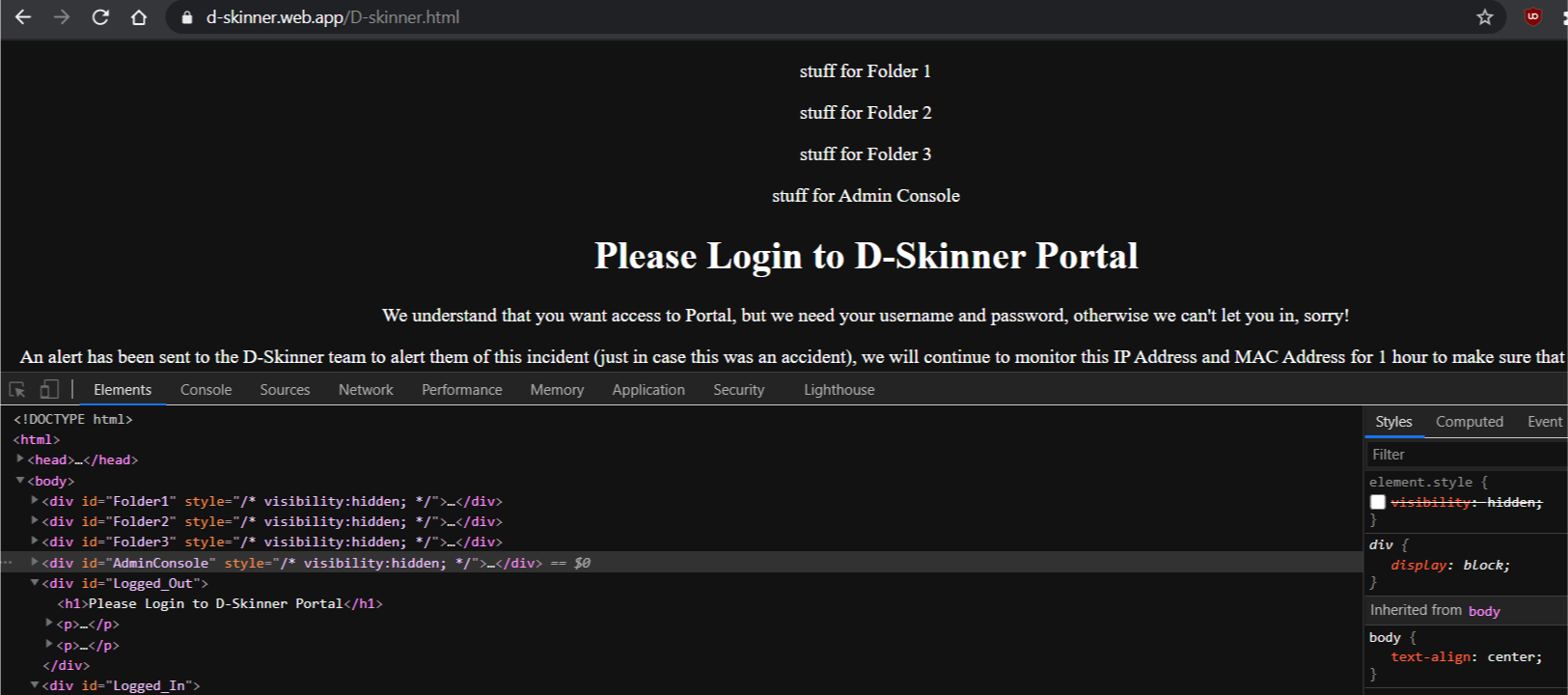
<body>
    <div id="Folder1" style="visibility:hidden;">
        <p>stuff for Folder 1</p>
    </div>
    <div id="Folder2" style="visibility:hidden;">
        <p>stuff for Folder 2</p>
    </div>
    <div id="Folder3" style="visibility:hidden;">
        <p>stuff for Folder 3</p>
    </div>
    <div id="AdminConsole" style="visibility:hidden;">
        <p>stuff for Admin Console</p>
    </div>
    <div id="Logged_Out">
        <h1>Please Login to D-Skinner Portal</h1>
        <p>We understand that you want access to Portal, but we need your username and password, otherwise we can't let you in, sorry!</p>
        <p>An alert has been sent to the D-Skinner team to alert them of this incident (just in case this was an accident), we will continue to monitor this IP Address and MAC Address for 1 hour to make sure that this isn't an attack.</p>
    </div>
    <div id="Logged_In">
        <h1>D-Skinner - Portal</h1>
        <p>We appreciate your beta testing, your login has been successful, please check with your beta co-ordinator to complete your beta.</p>
    </div>
    <script>
        firebase.auth().onAuthStateChanged(function(user) {
            if (user) {
                // you already know this, but here is a great way to test this
                console.log("user is now ", user);
                // now in your console (differs by browser - internet search to see how to open yours) you will see the user info in an object.
                // If user is logged in
                var displayName = user.displayName;
                var email = user.email;
                var emailVerified = user.emailVerified;
                // here you can verify everything if you like.....
                console.log("displayName is ", displayName);
                // I'll only include this one -you can do others as needed
                document.getElementById("Logged_In").style.visibility = "show"
                // HERE YOU TEST AND DO 'ROLE' THINGS (same as you did 'user'...)
                // you did not include any way you are determining which role so I have to guess from the data you did provide.....
                if(displayName === 'Person A'){
                   console.log("displayName ", displayName, " MATCHED here");
                   // you can do all the 'what they can see' here
                   // (there are easier and better ways, but this is simple and follows your style of coding)
                   document.getElementById("Folder1").style.visibility = "show";
                   document.getElementById("Folder2").style.visibility = "show";
                   document.getElementById("AdminConsole").style.visibility = "show";
                }
                if(displayName === 'Person B'){
                   console.log("displayName ", displayName, " MATCHED here");
                   // you can do all the 'what they can see' here
                   document.getElementById("Folder3").style.visibility = "show";
                   // etc
                }
            } else {
                   console.log(" NO USER - showing Logged_Out div");                   document.getElementById("Logged_Out").style.visibility = "show"
            }
        });
    </script>
</body>
同样,您也有了基本的概念--您只需要继续执行这些角色(因为您从未包括如何分配用户和角色,因此您需要修改上面的示例以适应您正在做的事情)。
Stack Overflow用户
发布于 2020-10-17 13:20:36
您可以在users表中创建一个名为role的新列,然后测试要显示或不显示内容的特定role。
https://stackoverflow.com/questions/64402017
复制相似问题
腾讯云开发者

Copyright © 2013 - 2026 Tencent Cloud. All Rights Reserved. 腾讯云 版权所有
深圳市腾讯计算机系统有限公司 ICP备案/许可证号:粤B2-20090059  粤公网安备44030502008569号
腾讯云计算(北京)有限责任公司 京ICP证150476号 | 京ICP备11018762号