
如何正确地对齐这些div?
如何正确地对齐这些div?
提问于 2020-10-16 12:11:42
我试着把我的div像在这个网站上描述的那样集中,但是有些地方不对劲,我不明白。也许你知道问题出在哪里,因为我找不到合适的解决方案,把div放在中间。我只添加了一个css输入描述,因为其他的都是相同的。
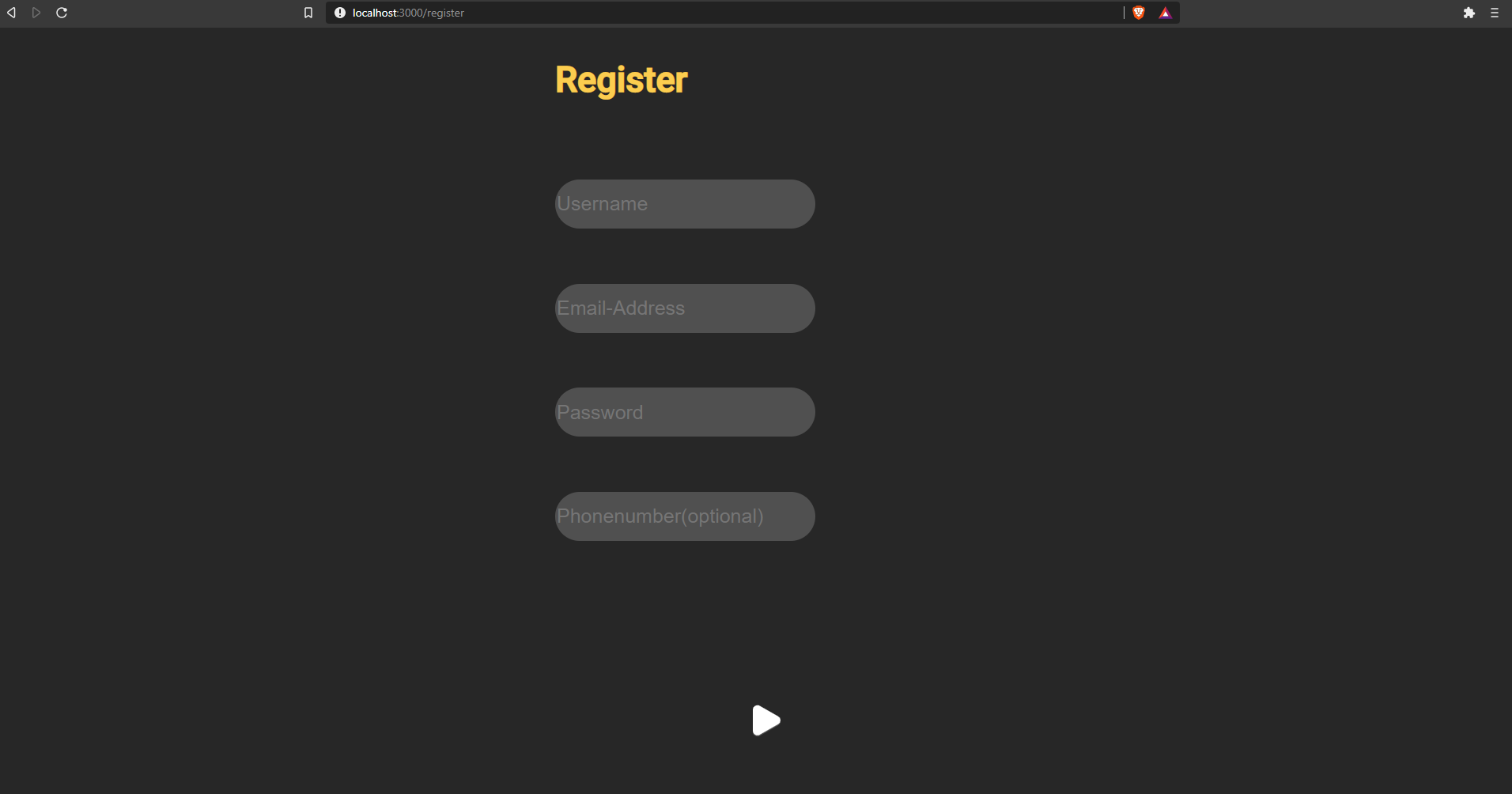
.registerBox {
    position: relative;
    height: 80%;
    justify-content: center;
    align-items: center;
  }
  .center {
    position: relative;
    height: auto;
    justify-content: center;
    align-items: center;
  }
  .centergui {
    justify-content: center;
    align-items: center;
  }
//text styles
.h1 {
  margin: auto;
  justify-self: center;
  text-align: center;
}

input[id="usernametext"]  {
  z-index: 2;
  border-radius: $textinputradius;
  background-color: $textinputbackground;
  font-size: $textinputfontsize;
  @include respond-to(medium-devices) {width: 125px;}
  @include respond-to(wide-screens) {float: none;}
}
  input[id="usernametext"],input[type="password"],input[id="emailtext"],input[id="phonenumbertext"], textarea, select {
      outline: #272727;
      border: none;
      color: #ececec;
}<div className={"h1"}> <h1>Register</h1> </div>
<div className={"flexCenter"}>
<div className={"registerBox"}>
<div className={"center"}><input type={"text"} id={"usernametext"} placeholder={"Username"}/></div>
<div className={"center"}><input type={"text"} id={"emailtext"} placeholder={"Email-Address"}/></div>
<div className={"center"}><input type={"password"} id={"passwordtext"} placeholder={"Password"}/></div>
<div className={"center"}><input type={"text"} id={"phonenumbertext"} placeholder={"Phonenumber(optional)"}/></div>
</div>
回答 1
Stack Overflow用户
回答已采纳
发布于 2020-10-16 12:34:41
我想提供两种选择- flex和table。封装两个父div (需要一个额外的父div,以便顶部标签同时对齐和居中),并向最上面的父div添加flex规则。你需要它吗?
挠曲:
.center_flex {
display: flex;
justify-content: center;
}
.registerBox {
position: relative;
height: 80%;
justify-content: center;
align-items: center;
}
.center {
position: relative;
height: auto;
justify-content: center;
align-items: center;
}
.centergui {
justify-content: center;
align-items: center;
}
//text styles
.h1 {
margin: auto;
justify-self: center;
text-align: center;
}
input[id="usernametext"] {
z-index: 2;
border-radius: $textinputradius;
background-color: $textinputbackground;
font-size: $textinputfontsize;
@include respond-to(medium-devices) {width: 125px;}
@include respond-to(wide-screens) {float: none;}
}
input[id="usernametext"],input[type="password"],input[id="emailtext"],input[id="phonenumbertext"], textarea, select {
outline: #272727;
border: none;
color: #ececec;
}<div class="center_flex">
<div class="center_flex_container">
<div className={"h1"}> <h1>Register</h1> </div>
        <div className={"flexCenter"}>
                <div className={"registerBox"}>

                    <div className={"center"}><input type={"text"} id={"usernametext"} placeholder={"Username"}/></div>


                    <div className={"center"}><input type={"text"} id={"emailtext"} placeholder={"Email-Address"}/></div>


                    <div className={"center"}><input type={"password"} id={"passwordtext"} placeholder={"Password"}/></div>


                    <div className={"center"}><input type={"text"} id={"phonenumbertext"} placeholder={"Phonenumber(optional)"}/></div>
                </div>
</div>
</div>
对于一个表,只需将其包装在一个父级div中,就可以设置margin规则:
.center_table {
    display: table;
    margin-left: auto;
    margin-right: auto;
}

.registerBox {
    position: relative;
    height: 80%;
    justify-content: center;
    align-items: center;
  }
  .center {
    position: relative;
    height: auto;
    justify-content: center;
    align-items: center;
  }
  .centergui {
    justify-content: center;
    align-items: center;
  }
//text styles
.h1 {
  margin: auto;
  justify-self: center;
  text-align: center;
}

input[id="usernametext"]  {
  z-index: 2;
  border-radius: $textinputradius;
  background-color: $textinputbackground;
  font-size: $textinputfontsize;
  @include respond-to(medium-devices) {width: 125px;}
  @include respond-to(wide-screens) {float: none;}
}
  input[id="usernametext"],input[type="password"],input[id="emailtext"],input[id="phonenumbertext"], textarea, select {
      outline: #272727;
      border: none;
      color: #ececec;
}<div class="center_table">
<div className={"h1"}> <h1>Register</h1> </div>
<div className={"flexCenter"}>
<div className={"registerBox"}>
<div className={"center"}><input type={"text"} id={"usernametext"} placeholder={"Username"}/></div>
<div className={"center"}><input type={"text"} id={"emailtext"} placeholder={"Email-Address"}/></div>
<div className={"center"}><input type={"password"} id={"passwordtext"} placeholder={"Password"}/></div>
<div className={"center"}><input type={"text"} id={"phonenumbertext"} placeholder={"Phonenumber(optional)"}/></div>
</div>
</div>
页面原文内容由Stack Overflow提供。腾讯云小微IT领域专用引擎提供翻译支持
原文链接:
https://stackoverflow.com/questions/64388971
复制相关文章
相似问题
腾讯云开发者

Copyright © 2013 - 2026 Tencent Cloud. All Rights Reserved. 腾讯云 版权所有
深圳市腾讯计算机系统有限公司 ICP备案/许可证号:粤B2-20090059  粤公网安备44030502008569号
腾讯云计算(北京)有限责任公司 京ICP证150476号 | 京ICP备11018762号