
无法为Python安装新的软件包(Python3.9.0,Windows 10)
为了升级和清理,我重新设置了我的电脑并安装了Windows 10。当然,我经常安装Python。但是,当我试图使用命令“”安装MatPlotLib时,它会显示红色显示的错误消息:
    C:\Users\majkl\AppData\Local\Programs\Python\Python39\Scripts>pip install matplotlib
Collecting matplotlib
  Using cached matplotlib-3.3.2.tar.gz (37.9 MB)
    ERROR: Command errored out with exit status 1:
     command: 'c:\users\majkl\appdata\local\programs\python\python39\python.exe' -c 'import sys, setuptools, tokenize; sys.argv[0] = '"'"'C:\\Users\\majkl\\AppData\\Local\\Temp\\pip-install-ex__f7yd\\matplotlib\\setup.py'"'"'; __file__='"'"'C:\\Users\\majkl\\AppData\\Local\\Temp\\pip-install-ex__f7yd\\matplotlib\\setup.py'"'"';f=getattr(tokenize, '"'"'open'"'"', open)(__file__);code=f.read().replace('"'"'\r\n'"'"', '"'"'\n'"'"');f.close();exec(compile(code, __file__, '"'"'exec'"'"'))' egg_info --egg-base 'C:\Users\majkl\AppData\Local\Temp\pip-pip-egg-info-my5odhue'
         cwd: C:\Users\majkl\AppData\Local\Temp\pip-install-ex__f7yd\matplotlib\
    Complete output (248 lines):
        ERROR: Command errored out with exit status 1:
         command: 'c:\users\majkl\appdata\local\programs\python\python39\python.exe' 'c:\users\majkl\appdata\local\programs\python\python39\lib\site-packages\pip\_vendor\pep517\_in_process.py' prepare_metadata_for_build_wheel 'C:\Users\majkl\AppData\Local\Temp\tmp1jo_3g_p'
             cwd: C:\Users\majkl\AppData\Local\Temp\pip-wheel-5qwibsn2\numpy
        Complete output (200 lines):
        Running from numpy source directory.
        setup.py:470: UserWarning: Unrecognized setuptools command, proceeding with generating Cython sources and expanding templates
          run_build = parse_setuppy_commands()
        Processing numpy/random\_bounded_integers.pxd.in
        Processing numpy/random\bit_generator.pyx
        Processing numpy/random\mtrand.pyx
        Processing numpy/random\_bounded_integers.pyx.in
        Processing numpy/random\_common.pyx
        Processing numpy/random\_generator.pyx
        Processing numpy/random\_mt19937.pyx
        Processing numpy/random\_pcg64.pyx
        Processing numpy/random\_philox.pyx
        Processing numpy/random\_sfc64.pyx
        Cythonizing sources
        blas_opt_info:
        blas_mkl_info:
        No module named 'numpy.distutils._msvccompiler' in numpy.distutils; trying from distutils
        customize MSVCCompiler
          libraries mkl_rt not found in ['c:\\users\\majkl\\appdata\\local\\programs\\python\\python39\\lib', 'C:\\', 'c:\\users\\majkl\\appdata\\local\\programs\\python\\python39\\libs']
          NOT AVAILABLE

        blis_info:
          libraries blis not found in ['c:\\users\\majkl\\appdata\\local\\programs\\python\\python39\\lib', 'C:\\', 'c:\\users\\majkl\\appdata\\local\\programs\\python\\python39\\libs']
          NOT AVAILABLE

        openblas_info:
          libraries openblas not found in ['c:\\users\\majkl\\appdata\\local\\programs\\python\\python39\\lib', 'C:\\', 'c:\\users\\majkl\\appdata\\local\\programs\\python\\python39\\libs']
        get_default_fcompiler: matching types: '['gnu', 'intelv', 'absoft', 'compaqv', 'intelev', 'gnu95', 'g95', 'intelvem', 'intelem', 'flang']'
        customize GnuFCompiler
        Could not locate executable g77
        Could not locate executable f77
        customize IntelVisualFCompiler
        Could not locate executable ifort
        Could not locate executable ifl
        customize AbsoftFCompiler
        Could not locate executable f90
        customize CompaqVisualFCompiler
        Could not locate executable DF
        customize IntelItaniumVisualFCompiler
        Could not locate executable efl
        customize Gnu95FCompiler
        Could not locate executable gfortran
        Could not locate executable f95
        customize G95FCompiler
        Could not locate executable g95
        customize IntelEM64VisualFCompiler
        customize IntelEM64TFCompiler
        Could not locate executable efort
        Could not locate executable efc
        customize PGroupFlangCompiler
        Could not locate executable flang
        don't know how to compile Fortran code on platform 'nt'
          NOT AVAILABLE

        atlas_3_10_blas_threads_info:
        Setting PTATLAS=ATLAS
          libraries tatlas not found in ['c:\\users\\majkl\\appdata\\local\\programs\\python\\python39\\lib', 'C:\\', 'c:\\users\\majkl\\appdata\\local\\programs\\python\\python39\\libs']
          NOT AVAILABLE

        atlas_3_10_blas_info:
          libraries satlas not found in ['c:\\users\\majkl\\appdata\\local\\programs\\python\\python39\\lib', 'C:\\', 'c:\\users\\majkl\\appdata\\local\\programs\\python\\python39\\libs']
          NOT AVAILABLE

        atlas_blas_threads_info:
        Setting PTATLAS=ATLAS
          libraries ptf77blas,ptcblas,atlas not found in ['c:\\users\\majkl\\appdata\\local\\programs\\python\\python39\\lib', 'C:\\', 'c:\\users\\majkl\\appdata\\local\\programs\\python\\python39\\libs']
          NOT AVAILABLE

        atlas_blas_info:
          libraries f77blas,cblas,atlas not found in ['c:\\users\\majkl\\appdata\\local\\programs\\python\\python39\\lib', 'C:\\', 'c:\\users\\majkl\\appdata\\local\\programs\\python\\python39\\libs']
          NOT AVAILABLE

        accelerate_info:
          NOT AVAILABLE

        C:\Users\majkl\AppData\Local\Temp\pip-wheel-5qwibsn2\numpy\numpy\distutils\system_info.py:1914: UserWarning:
            Optimized (vendor) Blas libraries are not found.
            Falls back to netlib Blas library which has worse performance.
            A better performance should be easily gained by switching
            Blas library.
          if self._calc_info(blas):
        blas_info:
          libraries blas not found in ['c:\\users\\majkl\\appdata\\local\\programs\\python\\python39\\lib', 'C:\\', 'c:\\users\\majkl\\appdata\\local\\programs\\python\\python39\\libs']
          NOT AVAILABLE

        C:\Users\majkl\AppData\Local\Temp\pip-wheel-5qwibsn2\numpy\numpy\distutils\system_info.py:1914: UserWarning:
            Blas (http://www.netlib.org/blas/) libraries not found.
            Directories to search for the libraries can be specified in the
            numpy/distutils/site.cfg file (section [blas]) or by setting
            the BLAS environment variable.
          if self._calc_info(blas):
        blas_src_info:
          NOT AVAILABLE

        C:\Users\majkl\AppData\Local\Temp\pip-wheel-5qwibsn2\numpy\numpy\distutils\system_info.py:1914: UserWarning:
            Blas (http://www.netlib.org/blas/) sources not found.
            Directories to search for the sources can be specified in the
            numpy/distutils/site.cfg file (section [blas_src]) or by setting
            the BLAS_SRC environment variable.
          if self._calc_info(blas):
          NOT AVAILABLE

        non-existing path in 'numpy\\distutils': 'site.cfg'
        lapack_opt_info:
        lapack_mkl_info:
          libraries mkl_rt not found in ['c:\\users\\majkl\\appdata\\local\\programs\\python\\python39\\lib', 'C:\\', 'c:\\users\\majkl\\appdata\\local\\programs\\python\\python39\\libs']
          NOT AVAILABLE

        openblas_lapack_info:
          libraries openblas not found in ['c:\\users\\majkl\\appdata\\local\\programs\\python\\python39\\lib', 'C:\\', 'c:\\users\\majkl\\appdata\\local\\programs\\python\\python39\\libs']
          NOT AVAILABLE

        openblas_clapack_info:
          libraries openblas,lapack not found in ['c:\\users\\majkl\\appdata\\local\\programs\\python\\python39\\lib', 'C:\\', 'c:\\users\\majkl\\appdata\\local\\programs\\python\\python39\\libs']
          NOT AVAILABLE

        flame_info:
          libraries flame not found in ['c:\\users\\majkl\\appdata\\local\\programs\\python\\python39\\lib', 'C:\\', 'c:\\users\\majkl\\appdata\\local\\programs\\python\\python39\\libs']
          NOT AVAILABLE

        atlas_3_10_threads_info:
        Setting PTATLAS=ATLAS
          libraries lapack_atlas not found in c:\users\majkl\appdata\local\programs\python\python39\lib
          libraries tatlas,tatlas not found in c:\users\majkl\appdata\local\programs\python\python39\lib
          libraries lapack_atlas not found in C:\
          libraries tatlas,tatlas not found in C:\
          libraries lapack_atlas not found in c:\users\majkl\appdata\local\programs\python\python39\libs
          libraries tatlas,tatlas not found in c:\users\majkl\appdata\local\programs\python\python39\libs
        <class 'numpy.distutils.system_info.atlas_3_10_threads_info'>
          NOT AVAILABLE

        atlas_3_10_info:
          libraries lapack_atlas not found in c:\users\majkl\appdata\local\programs\python\python39\lib
          libraries satlas,satlas not found in c:\users\majkl\appdata\local\programs\python\python39\lib
          libraries lapack_atlas not found in C:\
          libraries satlas,satlas not found in C:\
          libraries lapack_atlas not found in c:\users\majkl\appdata\local\programs\python\python39\libs
          libraries satlas,satlas not found in c:\users\majkl\appdata\local\programs\python\python39\libs
        <class 'numpy.distutils.system_info.atlas_3_10_info'>
          NOT AVAILABLE

        atlas_threads_info:
        Setting PTATLAS=ATLAS
          libraries lapack_atlas not found in c:\users\majkl\appdata\local\programs\python\python39\lib
          libraries ptf77blas,ptcblas,atlas not found in c:\users\majkl\appdata\local\programs\python\python39\lib
          libraries lapack_atlas not found in C:\
          libraries ptf77blas,ptcblas,atlas not found in C:\
          libraries lapack_atlas not found in c:\users\majkl\appdata\local\programs\python\python39\libs
          libraries ptf77blas,ptcblas,atlas not found in c:\users\majkl\appdata\local\programs\python\python39\libs
        <class 'numpy.distutils.system_info.atlas_threads_info'>
          NOT AVAILABLE

        atlas_info:
          libraries lapack_atlas not found in c:\users\majkl\appdata\local\programs\python\python39\lib
          libraries f77blas,cblas,atlas not found in c:\users\majkl\appdata\local\programs\python\python39\lib
          libraries lapack_atlas not found in C:\
          libraries f77blas,cblas,atlas not found in C:\
          libraries lapack_atlas not found in c:\users\majkl\appdata\local\programs\python\python39\libs
          libraries f77blas,cblas,atlas not found in c:\users\majkl\appdata\local\programs\python\python39\libs
        <class 'numpy.distutils.system_info.atlas_info'>
          NOT AVAILABLE

        lapack_info:
          libraries lapack not found in ['c:\\users\\majkl\\appdata\\local\\programs\\python\\python39\\lib', 'C:\\', 'c:\\users\\majkl\\appdata\\local\\programs\\python\\python39\\libs']
          NOT AVAILABLE

        C:\Users\majkl\AppData\Local\Temp\pip-wheel-5qwibsn2\numpy\numpy\distutils\system_info.py:1748: UserWarning:
            Lapack (http://www.netlib.org/lapack/) libraries not found.
            Directories to search for the libraries can be specified in the
            numpy/distutils/site.cfg file (section [lapack]) or by setting
            the LAPACK environment variable.
          return getattr(self, '_calc_info_{}'.format(name))()
        lapack_src_info:
          NOT AVAILABLE

        C:\Users\majkl\AppData\Local\Temp\pip-wheel-5qwibsn2\numpy\numpy\distutils\system_info.py:1748: UserWarning:
            Lapack (http://www.netlib.org/lapack/) sources not found.
            Directories to search for the sources can be specified in the
            numpy/distutils/site.cfg file (section [lapack_src]) or by setting
            the LAPACK_SRC environment variable.
          return getattr(self, '_calc_info_{}'.format(name))()
          NOT AVAILABLE

        numpy_linalg_lapack_lite:
          FOUND:
            language = c
            define_macros = [('HAVE_BLAS_ILP64', None), ('BLAS_SYMBOL_SUFFIX', '64_')]

        c:\users\majkl\appdata\local\programs\python\python39\lib\distutils\dist.py:274: UserWarning: Unknown distribution option: 'define_macros'
          warnings.warn(msg)
        running dist_info
        running build_src
        build_src
        building py_modules sources
        creating build
        creating build\src.win-amd64-3.9
        creating build\src.win-amd64-3.9\numpy
        creating build\src.win-amd64-3.9\numpy\distutils
        building library "npymath" sources
        error: Microsoft Visual C++ 14.0 is required. Get it with "Build Tools for Visual Studio": https://visualstudio.microsoft.com/downloads/
        ----------------------------------------
    ERROR: Command errored out with exit status 1: 'c:\users\majkl\appdata\local\programs\python\python39\python.exe' 'c:\users\majkl\appdata\local\programs\python\python39\lib\site-packages\pip\_vendor\pep517\_in_process.py' prepare_metadata_for_build_wheel 'C:\Users\majkl\AppData\Local\Temp\tmp1jo_3g_p' Check the logs for full command output.
    Traceback (most recent call last):
      File "c:\users\majkl\appdata\local\programs\python\python39\lib\site-packages\setuptools\installer.py", line 128, in fetch_build_egg
        subprocess.check_call(cmd)
      File "c:\users\majkl\appdata\local\programs\python\python39\lib\subprocess.py", line 373, in check_call
        raise CalledProcessError(retcode, cmd)
    subprocess.CalledProcessError: Command '['c:\\users\\majkl\\appdata\\local\\programs\\python\\python39\\python.exe', '-m', 'pip', '--disable-pip-version-check', 'wheel', '--no-deps', '-w', 'C:\\Users\\majkl\\AppData\\Local\\Temp\\tmp6fv0ox8i', '--quiet', 'numpy>=1.15']' returned non-zero exit status 1.

    The above exception was the direct cause of the following exception:

    Traceback (most recent call last):
      File "<string>", line 1, in <module>
      File "C:\Users\majkl\AppData\Local\Temp\pip-install-ex__f7yd\matplotlib\setup.py", line 242, in <module>
        setup(  # Finally, pass this all along to distutils to do the heavy lifting.
      File "c:\users\majkl\appdata\local\programs\python\python39\lib\site-packages\setuptools\__init__.py", line 164, in setup
        _install_setup_requires(attrs)
      File "c:\users\majkl\appdata\local\programs\python\python39\lib\site-packages\setuptools\__init__.py", line 159, in _install_setup_requires
        dist.fetch_build_eggs(dist.setup_requires)
      File "c:\users\majkl\appdata\local\programs\python\python39\lib\site-packages\setuptools\dist.py", line 699, in fetch_build_eggs
        resolved_dists = pkg_resources.working_set.resolve(
      File "c:\users\majkl\appdata\local\programs\python\python39\lib\site-packages\pkg_resources\__init__.py", line 779, in resolve
        dist = best[req.key] = env.best_match(
      File "c:\users\majkl\appdata\local\programs\python\python39\lib\site-packages\pkg_resources\__init__.py", line 1064, in best_match
        return self.obtain(req, installer)
      File "c:\users\majkl\appdata\local\programs\python\python39\lib\site-packages\pkg_resources\__init__.py", line 1076, in obtain
        return installer(requirement)
      File "c:\users\majkl\appdata\local\programs\python\python39\lib\site-packages\setuptools\dist.py", line 758, in fetch_build_egg
        return fetch_build_egg(self, req)
      File "c:\users\majkl\appdata\local\programs\python\python39\lib\site-packages\setuptools\installer.py", line 130, in fetch_build_egg
        raise DistutilsError(str(e)) from e
    distutils.errors.DistutilsError: Command '['c:\\users\\majkl\\appdata\\local\\programs\\python\\python39\\python.exe', '-m', 'pip', '--disable-pip-version-check', 'wheel', '--no-deps', '-w', 'C:\\Users\\majkl\\AppData\\Local\\Temp\\tmp6fv0ox8i', '--quiet', 'numpy>=1.15']' returned non-zero exit status 1.

    Edit setup.cfg to change the build options; suppress output with --quiet.

    BUILDING MATPLOTLIB
      matplotlib: yes [3.3.2]
          python: yes [3.9.0 (tags/v3.9.0:9cf6752, Oct  5 2020, 15:34:40) [MSC
                      v.1927 64 bit (AMD64)]]
        platform: yes [win32]
     sample_data: yes [installing]
           tests: no  [skipping due to configuration]
          macosx: no  [Mac OS-X only]

    ----------------------------------------
ERROR: Command errored out with exit status 1: python setup.py egg_info Check the logs for full command output.
对于我想安装的其他软件包,它也是这样做的。我不知道该怎么办。我已经尝试过重新安装pip,Python,我尝试过通过conda安装软件包,但是我似乎无法解决这个问题。任何帮助都将不胜感激。
回答 6
Stack Overflow用户
发布于 2020-10-13 05:50:37
Python3.9甚至有10天没有发布。据我所见,许多软件包还不支持Python3.9。我认为您最好的选择是卸载Python3.9并安装Python3.8.6。如果你想,你可以试试下面的方法来确保,但我想我不会工作。
pip intstall pipwin
pipwin install <package name>Stack Overflow用户
发布于 2020-12-01 12:34:42
最好先转到:https://www.python.org/downloads/
并找到最新的安全版本并使用它。如果你向下滚动一点,你会发现:
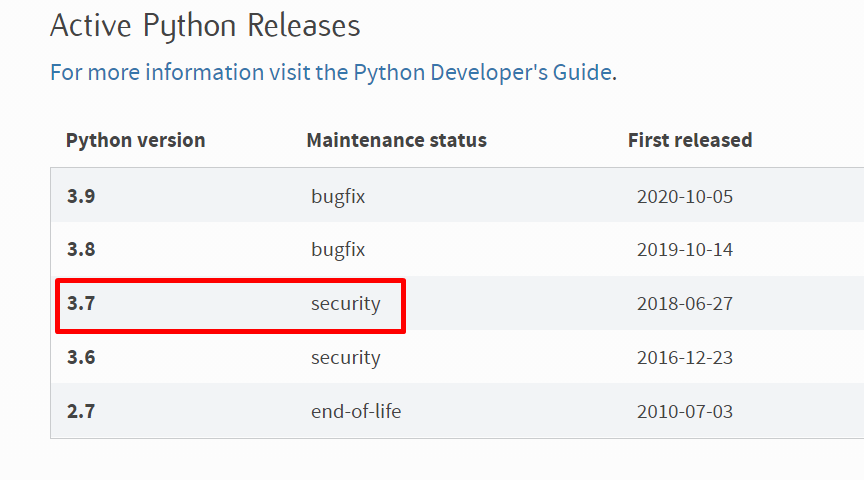
因此,在编写本文时,仍然是Python3.7。
而这更多地斥责了相同的页面,并下载了Python 3.7的最新版本:

编写时可以看到的是Python3.7.9
Stack Overflow用户
发布于 2020-10-29 08:15:38
我也有过同样的问题。我回到了3.8.6版,一切都很好。我们来得有点早。
https://stackoverflow.com/questions/64323080
复制相似问题
腾讯云开发者

Copyright © 2013 - 2026 Tencent Cloud. All Rights Reserved. 腾讯云 版权所有
深圳市腾讯计算机系统有限公司 ICP备案/许可证号:粤B2-20090059  粤公网安备44030502008569号
腾讯云计算(北京)有限责任公司 京ICP证150476号 | 京ICP备11018762号