
为什么这个System.IO.Pipelines代码比基于流的代码慢得多?
我编写了一个小的解析程序来比较旧的System.IO.Stream和.NET内核中较新的System.IO.Pipelines。我希望管道代码的速度和速度相等,或者更快。然而,它大约慢了40%。
该程序很简单:它在100 of文本文件中搜索关键字,并返回关键字的行号。以下是Stream版本:
public static async Task<int> GetLineNumberUsingStreamAsync(
    string file,
    string searchWord)
{
    using var fileStream = File.OpenRead(file);
    using var lines = new StreamReader(fileStream, bufferSize: 4096);

    int lineNumber = 1;
    // ReadLineAsync returns null on stream end, exiting the loop
    while (await lines.ReadLineAsync() is string line)
    {
        if (line.Contains(searchWord))
            return lineNumber;

        lineNumber++;
    }
    return -1;
}
我希望上面的流代码比下面的管道代码慢,因为流代码正在将字节编码成StreamReader中的一个字符串。管道代码通过对字节进行操作来避免这种情况:
public static async Task<int> GetLineNumberUsingPipeAsync(string file, string searchWord)
{
    var searchBytes = Encoding.UTF8.GetBytes(searchWord);
    using var fileStream = File.OpenRead(file);
    var pipe = PipeReader.Create(fileStream, new StreamPipeReaderOptions(bufferSize: 4096));

    var lineNumber = 1;
    while (true)
    {
        var readResult = await pipe.ReadAsync().ConfigureAwait(false);
        var buffer = readResult.Buffer;

        if(TryFindBytesInBuffer(ref buffer, searchBytes, ref lineNumber))
        {
            return lineNumber;
        }

        pipe.AdvanceTo(buffer.End);

        if (readResult.IsCompleted) break;
    }

    await pipe.CompleteAsync();

    return -1;
}
下面是关联的帮助方法:
/// <summary>
/// Look for `searchBytes` in `buffer`, incrementing the `lineNumber` every
/// time we find a new line.
/// </summary>
/// <returns>true if we found the searchBytes, false otherwise</returns>
static bool TryFindBytesInBuffer(
    ref ReadOnlySequence<byte> buffer,
    in ReadOnlySpan<byte> searchBytes,
    ref int lineNumber)
{
    var bufferReader = new SequenceReader<byte>(buffer);
    while (TryReadLine(ref bufferReader, out var line))
    {
        if (ContainsBytes(ref line, searchBytes))
            return true;

        lineNumber++;
    }
    return false;
}

static bool TryReadLine(
    ref SequenceReader<byte> bufferReader,
    out ReadOnlySequence<byte> line)
{
    var foundNewLine = bufferReader.TryReadTo(out line, (byte)'\n', advancePastDelimiter: true);
    if (!foundNewLine)
    {
        line = default;
        return false;
    }

    return true;
}

static bool ContainsBytes(
    ref ReadOnlySequence<byte> line,
    in ReadOnlySpan<byte> searchBytes)
{
    return new SequenceReader<byte>(line).TryReadTo(out var _, searchBytes);
}我之所以在上面使用SequenceReader<byte>,是因为我的理解是,它比ReadOnlySequence<byte>更智能/更快;当它可以在单个Span<byte>上运行时,它有一个快速的路径。
下面是基准测试结果(.NET Core3.1)。完整的代码和BenchmarkDotNet结果都是可用的在这次回购中。
- GetLineNumberWithStreamAsync - 435.6 ms同时分配366.19 MB
- GetLineNumberUsingPipeAsync - 619.8毫秒同时分配9.28MB
我在管道代码上做错什么了吗?
更新:Evk已经回答了这个问题。在应用了他的修正后,下面是新的基准数字:
- GetLineNumberWithStreamAsync - 452.2 ms同时分配366.19 MB
- GetLineNumberWithPipeAsync - 203.8毫秒,分配9.28MB
回答 2
Stack Overflow用户
发布于 2020-10-21 17:10:33
我认为原因在于SequenceReader.TryReadTo的实施。该方法的这是源代码。它使用非常简单的算法(读取第一个字节的匹配,然后检查匹配后的所有后续字节,如果没有-向前推进一个字节并重复),并注意在这个实现中有相当多的方法称为“慢速”(IsNextSlow、TryReadToSlow等),因此至少在某些特定情况下,在某些情况下,它会退回到一些慢路径。它还必须处理可能包含多个片段的事实序列,以及维护位置。
在您的示例中,您可以避免专门使用SequenceReader搜索匹配(但将其留给实际读取行时使用),例如,对于这些微小的更改(在本例中,TryReadTo的重载也更有效):
private static bool TryReadLine(ref SequenceReader<byte> bufferReader, out ReadOnlySpan<byte> line) {
    // note that both `match` and `line` are now `ReadOnlySpan` and not `ReadOnlySequence`
    var foundNewLine = bufferReader.TryReadTo(out ReadOnlySpan<byte> match, (byte) '\n', advancePastDelimiter: true);

    if (!foundNewLine) {
        line = default;
        return false;
    }

    line = match;
    return true;
}
然后:
private static bool ContainsBytes(ref ReadOnlySpan<byte> line, in ReadOnlySpan<byte> searchBytes) {
    // line is now `ReadOnlySpan` so we can use efficient `IndexOf` method
    return line.IndexOf(searchBytes) >= 0;
}
这将使管道代码比流代码运行得更快。
Stack Overflow用户
发布于 2020-10-21 14:33:15
也许这并不是你想要的解释,但我希望它能给你一些启示:
浏览一下这里的两种方法,就会发现第二种解决方案通过两个嵌套循环在计算上比另一种更复杂。
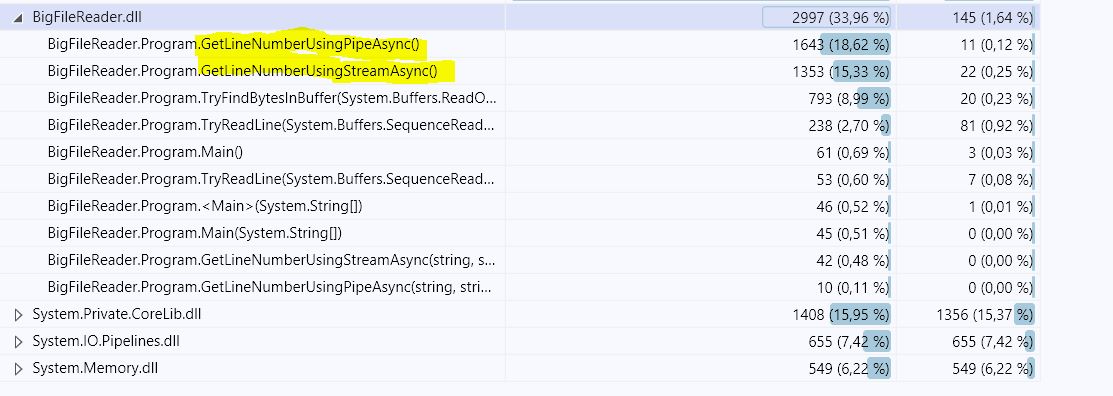
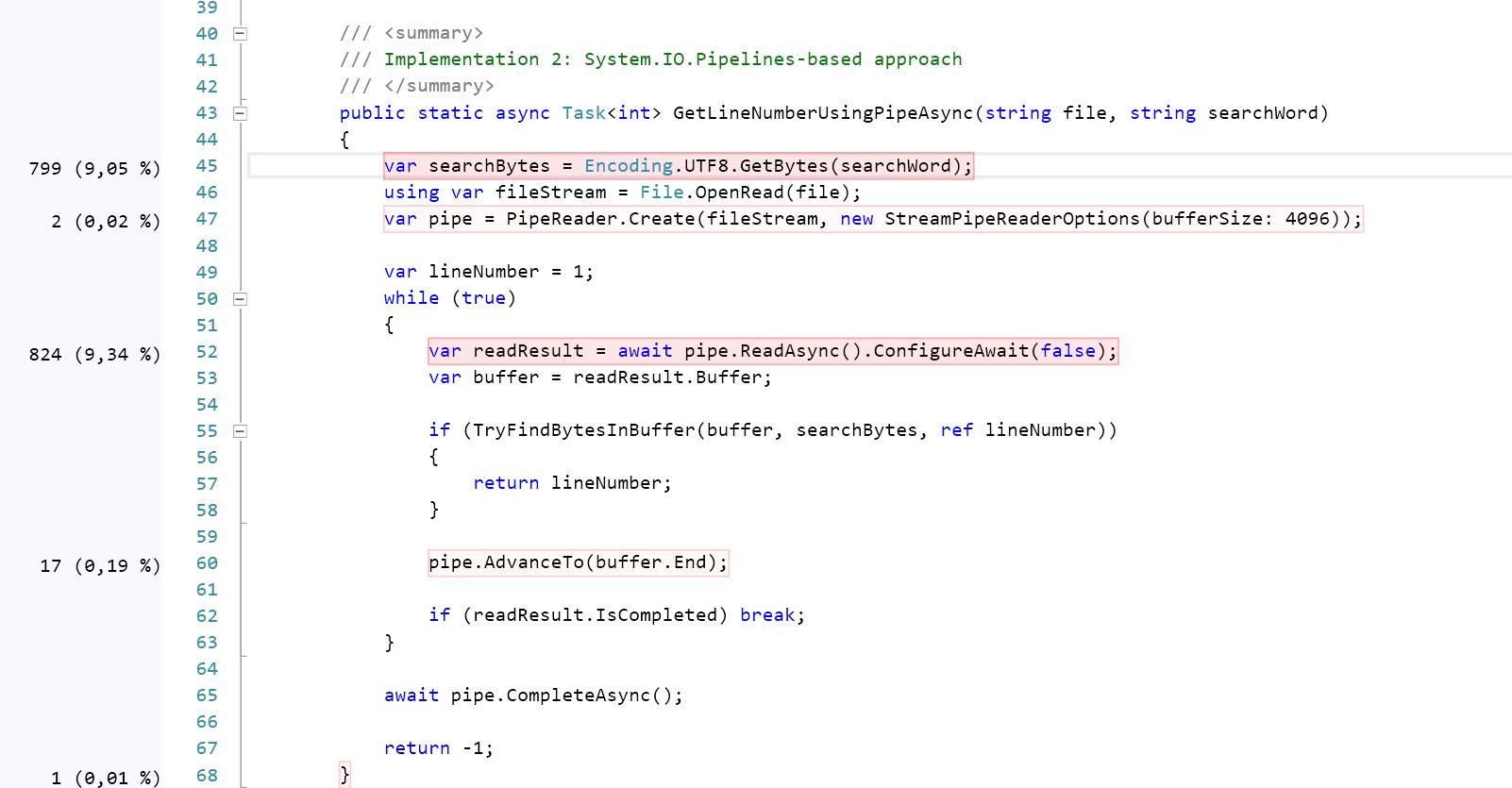
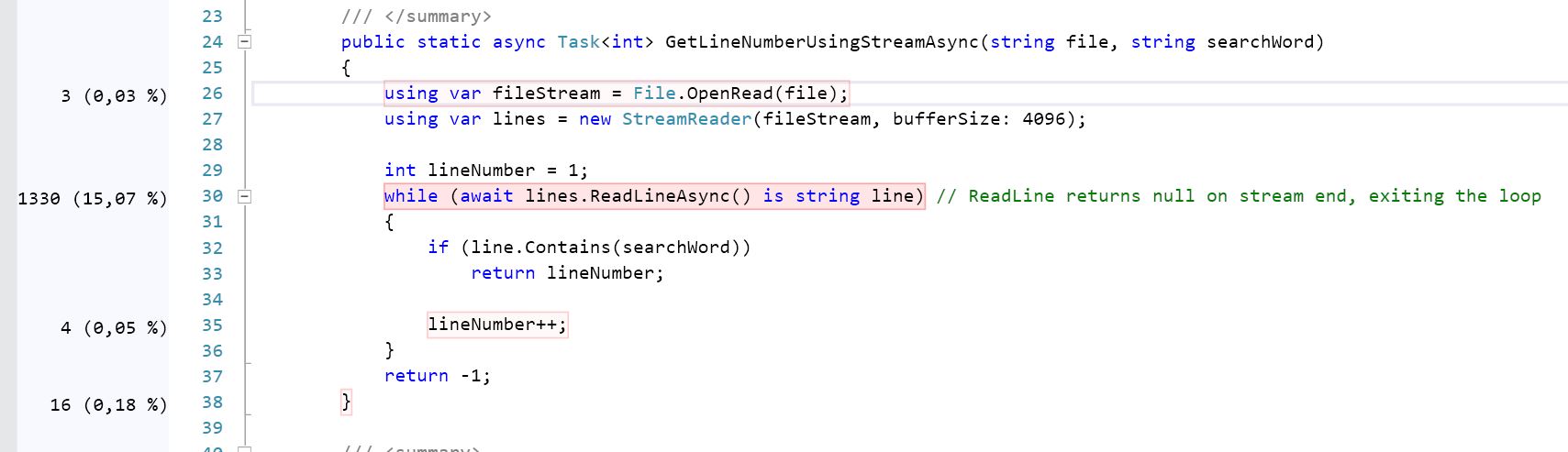
使用代码分析案例进行更深入的挖掘表明,第二个(GetLineNumberUsingPipeAsync)比使用流的CPU强度高21.5 %(请查看屏幕截图),它与我得到的基准测试结果相当接近:
- Solution#1: 683.7 ms,365.84 MB
- Solution#2: 777.5毫秒,9.08MB
https://stackoverflow.com/questions/64283938
复制相似问题
腾讯云开发者

Copyright © 2013 - 2026 Tencent Cloud. All Rights Reserved. 腾讯云 版权所有
深圳市腾讯计算机系统有限公司 ICP备案/许可证号:粤B2-20090059  粤公网安备44030502008569号
腾讯云计算(北京)有限责任公司 京ICP证150476号 | 京ICP备11018762号