
如何在引导中给按钮一个正确的对齐方式?
如何在引导中给按钮一个正确的对齐方式?
提问于 2020-10-04 08:03:05
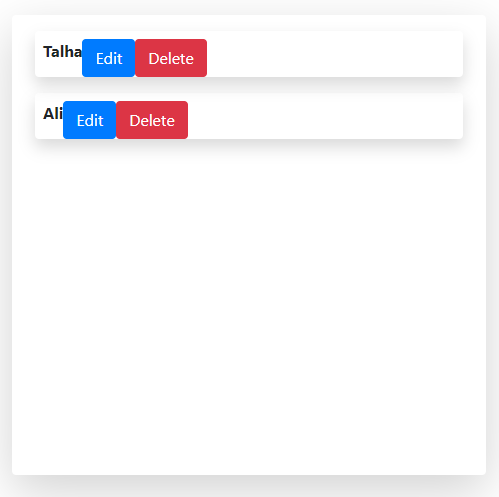
我试图在一行的右角对齐两个按钮,但是无论我使用什么方法,它每次都会显示相同的结果,下面是供您参考的代码:
import React from "react";
import bootstrap from "bootstrap";
import Container from "react-bootstrap/Container";
import Row from "react-bootstrap/Row";
import Col from "react-bootstrap/Col";

const AdminPanel = () => {
  const users = [{ name: "Talha" }, { name: "Ali" }];
  return (
    <Container className="pt-5">
      <Row className="d-flex" style={{ height: "70vh" }}>
        <Col className="shadow-lg bg-white rounded mx-5">
          {users.map((user) => (
            <Row
              className="shadow my-3 mx-2 py-2 px-2 rounded font-weight-bold"
              style={{ height: "7vh" }}
            >
              {user.name}
              <div className="btn-group">
                <a href="#">
                  <button className="btn btn-primary">Edit</button>
                </a>
                <a href="#">
                  <button className="btn btn-danger">Delete</button>
                </a>
              </div>
            </Row>
          ))}
        </Col>
        <Col className="shadow-lg bg-white rounded mx-5">
          <h1>
            list
          </h1>
        </Col>
      </Row>
    </Container>
  );
};

export default AdminPanel;
我得到的结果是:
如有任何帮助,将不胜感激!
回答 3
Stack Overflow用户
回答已采纳
发布于 2020-10-04 08:11:17
将类:ml-auto (= margin-left:auto !important)添加到:
<div className="btn-group ml-auto">由于这个div位于一个应用了属性div.row的display:flex;中,它应该自动地将它推到正确的位置。
Stack Overflow用户
发布于 2020-10-04 08:12:29
添加
className="float-right" 将按钮包装到div上
Stack Overflow用户
发布于 2020-10-04 08:15:11
可以在Col组件中添加行的每个子元素块,并将justify-content-between类添加到Row组件中,如下所示
<Col className="shadow-lg bg-white rounded mx-5">
    {users.map((user) => (
        <Row
            className="justify-content-between shadow my-3 mx-2 py-2 px-2 rounded font-weight-bold"
            style={{ height: "7vh" }}
        >
            <Col>
                {user.name}
            </Col>
            <Col>
                <div className="btn-group">
                    <a href="#">
                        <button className="btn btn-primary">Edit</button>
                    </a>
                    <a href="#">
                        <button className="btn btn-danger">Delete</button>
                    </a>
                </div>
            </Col>
        </Row>
    ))}
</Col>页面原文内容由Stack Overflow提供。腾讯云小微IT领域专用引擎提供翻译支持
原文链接:
https://stackoverflow.com/questions/64192383
复制相关文章
相似问题
腾讯云开发者

Copyright © 2013 - 2026 Tencent Cloud. All Rights Reserved. 腾讯云 版权所有
深圳市腾讯计算机系统有限公司 ICP备案/许可证号:粤B2-20090059  粤公网安备44030502008569号
腾讯云计算(北京)有限责任公司 京ICP证150476号 | 京ICP备11018762号