
离子封装构建失败-离子角工具包
即使经过几次从零开始清理系统的尝试,也会产生错误。
问题:检测源问题并修复它的最佳过程是什么?
构建命令
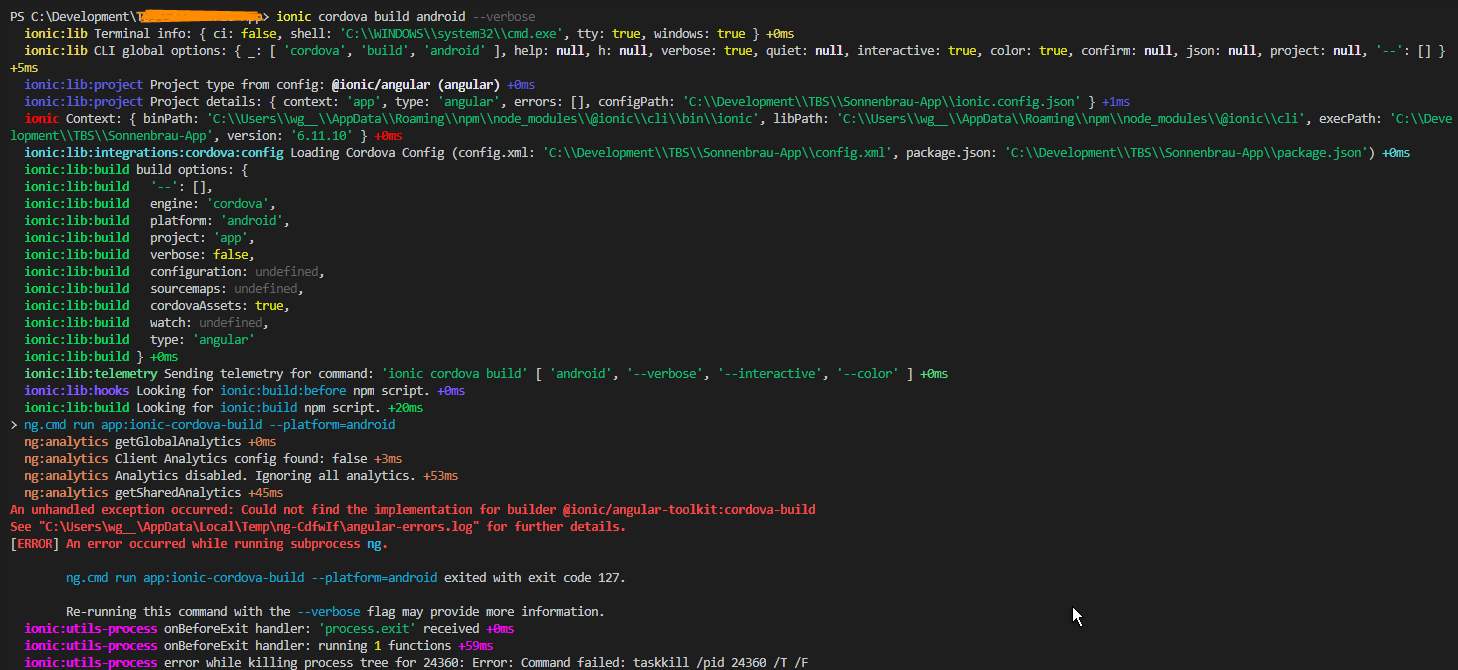
ionic cordova build android 错误
运行应用程序:离子型-cordova- builder =android发生了一个未处理的异常:找不到用于builder的实现,请参阅"C:\Users\username\AppData\Local\Temp\ng-DhZAYC\angular-errors.log“获取更多详细信息。运行子进程ng时发生错误。
ng.cmd运行应用程序:离子型-cordova-=android,退出代码127。使用--详细标志重新运行此命令可能会提供更多信息。
详细
系统信息
离子:
离子CLI : 6.11.10 (C:\Users\username\AppData\Roaming\npm\node_modules@ionic\cli)离子框架:@离子型/角4.11.13
@角-devkit/构建-角: 0.1001.4 @角-devkit/示意图: 10.1.4 @角/cli: 11.0.0-next.4
@离子型/角形-工具包: 1.5.1
科多瓦:
Cordova CLI : 10.0.0 Cordova平台: 6.0.0,android 9.0.0,browser,ios 5.1.1 Cordova Plugins :cordova-plugin-离子型-键盘2.2.0,cordova-plugin-离子型-webview 3.1.2,(和22个其他插件)
效用:
cordova-res : 0.15.1本地运行(更新: 1.2.1):0.2.9
系统:
Android工具: 26.1.1 (C:\Users\username\AppData\Local\Android\ SDK ) NodeJS : v12.10.0 (C:\Program ) npm : 6.13.7 OS : Windows 10
package.json
{   "name": "myapp",   "version": "0.0.30",   "author": "",   "homepage": "",   "scripts": {
    "ng": "ng",
    "start": "ng serve",
    "build": "ng build",
    "test": "ng test",
    "lint": "ng lint",
    "e2e": "ng e2e",
    "ionic:build-obsolet": "ionic-app-scripts build android --release --prod  --wwwDir www --buildDir build"   },   "private": true,   "dependencies": {
    "@angular-devkit/build-angular": "^0.1001.4",
    "@angular/common": "^11.0.0-next.4",
    "@angular/core": "^11.0.0-next.4",
    "@angular/fire": "^5.1.3",
    "@angular/forms": "^11.0.0-next.4",
    "@angular/http": "^7.2.2",
    "@angular/platform-browser": "^11.0.0-next.4",
    "@angular/platform-browser-dynamic": "^11.0.0-next.4",
    "@angular/router": "^11.0.0-next.4",
    "@ionic-native/android-permissions": "^5.11.0",
    "@ionic-native/app-version": "^5.9.0",
    "@ionic-native/calendar": "^5.9.0",
    "@ionic-native/camera": "^5.23.0",
    "@ionic-native/core": "^5.21.0",
    "@ionic-native/device": "^5.11.0",
    "@ionic-native/email-composer": "^5.15.1",
    "@ionic-native/fcm": "^5.15.1",
    "@ionic-native/firebase": "^5.5.1",
    "@ionic-native/firebase-x": "^5.24.0",
    "@ionic-native/http": "^5.24.0",
    "@ionic-native/image-picker": "^5.9.0",
    "@ionic-native/in-app-browser": "^5.13.0",
    "@ionic-native/is-debug": "^5.23.0",
    "@ionic-native/keyboard": "^5.9.0",
    "@ionic-native/native-storage": "^5.10.0",
    "@ionic-native/network": "^5.11.0",
    "@ionic-native/open-native-settings": "^5.8.0",
    "@ionic-native/qr-scanner": "^5.6.1",
    "@ionic-native/screenshot": "^5.9.0",
    "@ionic-native/social-sharing": "^5.9.0",
    "@ionic-native/splash-screen": "^5.0.0",
    "@ionic-native/status-bar": "^5.0.0",
    "@ionic/angular": "^4.5.0",
    "@ionic/storage": "^2.2.0",
    "@types/chart.js": "^2.8.5",
    "@types/cordova": "0.0.34",
    "ajv": "^6.10.0",
    "angularfire2": "^5.1.3",
    "animejs": "^3.0.1",
    "calendar-utils": "^0.3.1",
    "chart.js": "^2.8.0",
    "com.darktalker.cordova.screenshot": "^0.1.6",
    "cordova-android": "^9.0.0",
    "cordova-browser": "^6.0.0",
    "cordova-ios": "^5.1.1",
    "cordova-open-native-settings": "^1.5.2",
    "cordova-plugin-add-swift-support": "^2.0.2",
    "cordova-plugin-advanced-http": "^2.2.0",
    "cordova-plugin-android-permissions": "^1.0.2",
    "cordova-plugin-androidx": "^1.0.2",
    "cordova-plugin-androidx-adapter": "^1.1.0",
    "cordova-plugin-app-version": "^0.1.9",
    "cordova-plugin-calendar": "^5.1.4",
    "cordova-plugin-camera": "^4.1.0",
    "cordova-plugin-device": "^2.0.2",
    "cordova-plugin-email-composer": "^0.9.2",
    "cordova-plugin-file": "^6.0.2",
    "cordova-plugin-firebasex": "^7.0.0",
    "cordova-plugin-inappbrowser": "^3.1.0",
    "cordova-plugin-ionic-keyboard": "^2.1.3",
    "cordova-plugin-ionic-webview": "^3.1.2",
    "cordova-plugin-is-debug": "^1.0.0",
    "cordova-plugin-qrscanner": "^3.0.1",
    "cordova-plugin-safariviewcontroller": "^1.6.0",
    "cordova-plugin-splashscreen": "^5.0.2",
    "cordova-plugin-statusbar": "^2.4.2",
    "cordova-plugin-telerik-imagepicker": "^2.3.2",
    "cordova-plugin-whitelist": "^1.3.3",
    "cordova-plugin-x-socialsharing": "^5.4.7",
    "cordova-res": "^0.15.1",
    "cordova-sqlite-storage": "^3.2.1",
    "core-js": "^2.5.4",
    "errorhandler": "^1.5.1",
    "es6-promise-plugin": "^4.2.2",
    "firebase": "^7.22.0",
    "firebase-admin": "^9.2.0",
    "g": "^2.0.1",
    "guid-typescript": "^1.0.9",
    "ionic2-calendar": "^0.5.7",
    "lab": "18.0.2",
    "native-run": "^0.2.7",
    "rxjs": "^6.5.3",
    "signal-exit": "^3.0.2",
    "web": "0.0.2",
    "xcode": "^2.0.0",
    "zone.js": "~0.10.3"   },   "devDependencies": {
    "@angular-devkit/architect": "^0.1001.4",
    "@angular-devkit/core": "^10.1.4",
    "@angular-devkit/schematics": "^10.1.4",
    "@angular/cli": "11.0.0-next.4",
    "@angular/compiler": "~11.0.0-next.4",
    "@angular/compiler-cli": "~11.0.0-next.4",
    "@angular/language-service": "~11.0.0-next.4",
    "@ionic/angular-toolkit": "^1.4.1",
    "@ionic/lab": "^3.2.9",
    "@types/jasmine": "~2.8.8",
    "@types/jasminewd2": "~2.0.3",
    "@types/node": "~10.12.0",
    "codelyzer": "~4.5.0",
    "jasmine-core": "~2.99.1",
    "jasmine-spec-reporter": "~4.2.1",
    "karma": "~5.2.3",
    "karma-chrome-launcher": "~2.2.0",
    "karma-coverage-istanbul-reporter": "~2.0.1",
    "karma-jasmine": "~1.1.2",
    "karma-jasmine-html-reporter": "^0.2.2",
    "node-sass": "^4.12.0",
    "protractor": "~7.0.0",
    "ts-node": "~8.0.0",
    "tslint": "~6.1.3",
    "typescript": "^4.0.3"   },   "description": "An Ionic project",   "cordova": {
    "plugins": {
      "cordova-plugin-whitelist": {},
      "cordova-plugin-statusbar": {},
      "cordova-plugin-device": {},
      "cordova-plugin-splashscreen": {},
      "cordova-plugin-ionic-webview": {
        "ANDROID_SUPPORT_ANNOTATIONS_VERSION": "27.+"
      },
      "cordova-plugin-ionic-keyboard": {},
      "cordova-plugin-qrscanner": {},
      "cordova-open-native-settings": {},
      "cordova-sqlite-storage": {},
      "cordova-plugin-telerik-imagepicker": {
        "PHOTO_LIBRARY_USAGE_DESCRIPTION": " edit user profile "
      },
      "cordova-plugin-calendar": {
        "CALENDAR_USAGE_DESCRIPTION": " add party event to calendar ",
        "CONTACTS_USAGE_DESCRIPTION": " add contact to user "
      },
      "cordova-plugin-app-version": {},
      "com.darktalker.cordova.screenshot": {},
      "cordova-plugin-x-socialsharing": {
        "ANDROID_SUPPORT_V4_VERSION": "24.1.1+"
      },
      "cordova-plugin-safariviewcontroller": {},
      "cordova-plugin-inappbrowser": {},
      "cordova-plugin-advanced-http": {
        "OKHTTP_VERSION": "3.10.0"
      },
      "cordova-plugin-email-composer": {
        "ANDROID_SUPPORT_V4_VERSION": "27.+"
      },
      "cordova-plugin-android-permissions": {},
      "cordova-plugin-firebasex": {
        "ANDROID_FIREBASE_ANALYTICS_VERSION": "17.0.0",
        "FIREBASE_ANALYTICS_COLLECTION_ENABLED": "true",
        "FIREBASE_PERFORMANCE_COLLECTION_ENABLED": "true",
        "FIREBASE_CRASHLYTICS_COLLECTION_ENABLED": "true",
        "ANDROID_ICON_ACCENT": "#FF00FFFF",
        "ANDROID_PLAY_SERVICES_TAGMANAGER_VERSION": "17.0.0",
        "ANDROID_FIREBASE_MESSAGING_VERSION": "20.0.0",
        "ANDROID_FIREBASE_CONFIG_VERSION": "19.0.3",
        "ANDROID_FIREBASE_PERF_VERSION": "19.0.1",
        "ANDROID_FIREBASE_AUTH_VERSION": "19.1.0",
        "ANDROID_CRASHLYTICS_VERSION": "2.10.1",
        "ANDROID_CRASHLYTICS_NDK_VERSION": "2.1.1"
      },
      "cordova-plugin-camera": {
        "ANDROID_SUPPORT_V4_VERSION": "27.+"
      },
      "cordova-plugin-is-debug": {}
    },
    "platforms": [
      "browser",
      "android",
      "ios"
    ]   } }
我尝试了,但没有成功。手动删除node_modules (然后是npm i),重新启动系统并使用以下命令.
ionic repair
npm i @angular-devkit/architect@latest @angular-devkit/build-angular@latest @angular-devkit/core@latest @angular-devkit/schematics@latest

npm uninstall -g @angular/cli
npm cache verify
npm install -g @angular/cli@latest
npm install

npm i @ionic/angular-toolkit

npm audit fix
npm audit fix --force


npm update
ng update
ng update @angular/cli
ng update @angular/core
Ionic 在ionic serve上的附加错误信息
[ng] Schema validation failed with the following errors:
[ng]   Data path "" should NOT have additional properties(es5BrowserSupport).

[ERROR] ng has unexpectedly closed (exit code 1).

The Ionic CLI will exit. Please check any output above for error details.回答 3
Stack Overflow用户
发布于 2020-10-16 12:00:06
根据这一折页误差;
[ng] Schema validation failed with the following errors:
[ng] Data path "" should NOT have additional properties(es5BrowserSupport).您应该编辑angular.json文件并找到"es5BrowserSupport": true | false并删除它。
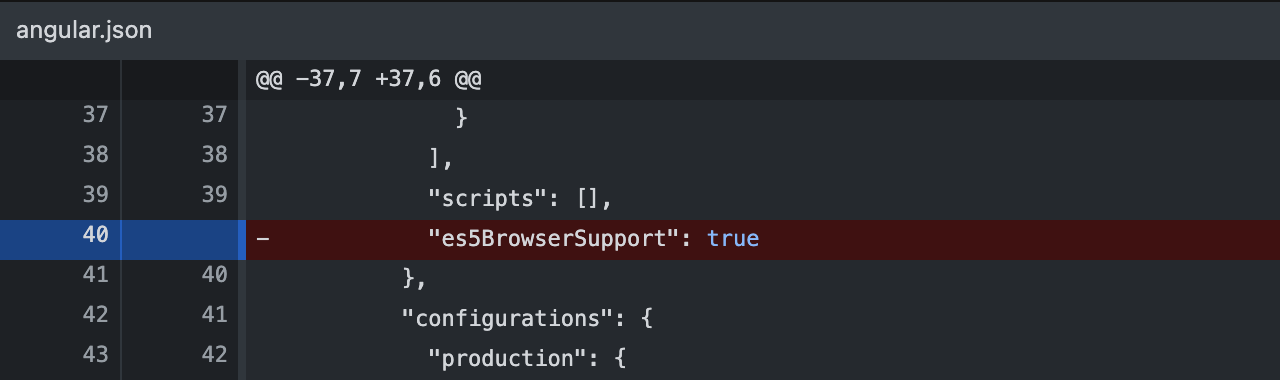
es5BrowserSupport选项是一个不受欢迎的选项,它控制针对ES5的构建是否将包含一个单独的有条件加载的针对旧浏览器的多边形填充。它是全差动装载支架的前身,并已被移除。
断裂改变
已删除不推荐的浏览器生成器选项es5BrowserSupport。ES5多填充的包含将从浏览器列表配置中列出的浏览器中确定。
Stack Overflow用户
发布于 2021-11-02 09:52:33
您可能需要升级您的@angular-devkit/build-angular或@angular-devkit/architect,或者两者都升级到^0.11 (在各自的npmjs.com中检查npm包中的版本),因为^0.11与@angular/cli的version 11一起使用。
Stack Overflow用户
发布于 2020-10-18 12:52:40
属性es5BrowserSupport已被废弃,并已被移除。ES5多填充的包含将从浏览器列表配置中列出的浏览器中确定。
https://stackoverflow.com/questions/64190188
复制相似问题
腾讯云开发者

Copyright © 2013 - 2026 Tencent Cloud. All Rights Reserved. 腾讯云 版权所有
深圳市腾讯计算机系统有限公司 ICP备案/许可证号:粤B2-20090059  粤公网安备44030502008569号
腾讯云计算(北京)有限责任公司 京ICP证150476号 | 京ICP备11018762号