
Google -只呈现一条路线的一条腿
Google -只呈现一条路线的一条腿
提问于 2020-10-03 21:22:29
我正在用Google开发一个JS API应用程序。
我必须计算A/D到B,B到C,C到A/D的距离(请检查下一张图像)。
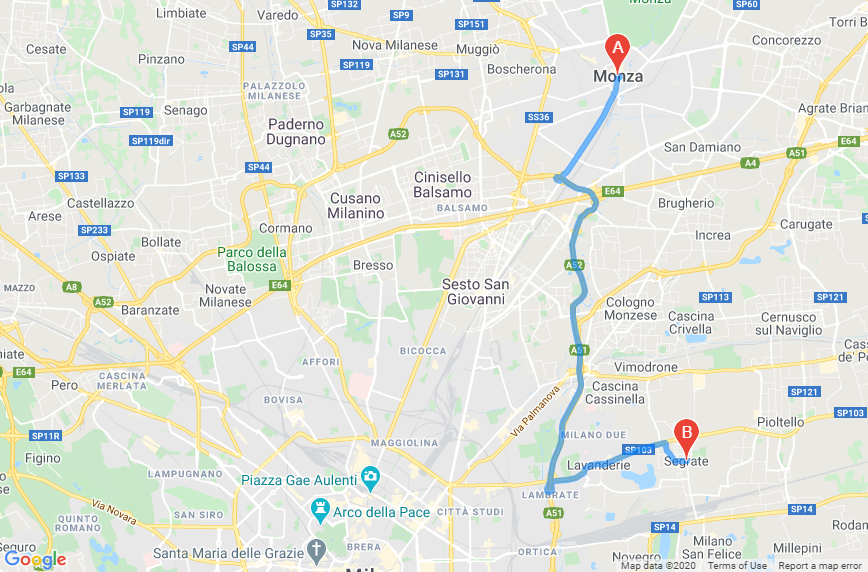
但是,在地图上,我只能渲染第二段(legs1,B到C)。(查看图像以获得更多信息)
我能做些什么来隐藏我路线的第一段和最后一段?当然,我可以做另一个请求,一个为地图,一个为计算,但我正在努力尽可能地提高效率。
我的JS:
 var mpos = "via Melzi deril 38 20154 Milano";
  var madd = $("#i_madd_v").val() + ', ' + $("#i_madd_n").val() + ', ' + $("#i_madd_c").val();
  var dadd = $("#i_dadd_v").val() + ', ' + $("#i_dadd_n").val() + ', ' + $("#i_dadd_c").val();

  console.log(madd);
  console.log(dadd);

  function initMap() {
    const directionsService = new google.maps.DirectionsService();
    const directionsRenderer = new google.maps.DirectionsRenderer();

    var centro = new google.maps.LatLng(45.462861, 9.186453);
    var mapOptions = {
      zoom:11,
      center: centro,
      disableDefaultUI: true
    }
    map = new google.maps.Map(document.getElementById('mappa'), mapOptions);
    directionsRenderer.setMap(map);
    calcRoute(directionsService, directionsRenderer);
  }

  function calcRoute(directionsService, directionsRenderer) {

    var request = {
      origin:mpos,
      destination:mpos,
      waypoints: [
        {
          location: madd,
          stopover: true
        },
        {
          location: dadd,
          stopover: true
        },
      ],
      travelMode: 'DRIVING'
    };
    directionsService.route(request, function(response, status) {
      if (status == 'OK') {
        console.log(response);
        console.log(status);

        directionsRenderer.setDirections(response);
      }
    });
  }
  initMap();
});回答 1
Stack Overflow用户
回答已采纳
发布于 2020-10-03 22:57:49
如果您的路线总是有三条腿,并且您总是希望删除第一条和最后一条,那么您可以在将其传递给“方向呈现器”之前修改来自“指南”服务的响应:
directionsService.route(request, function(response, status) {
  if (status == 'OK') {
    response.routes[0].legs.splice(0,1); // remove 1st leg
    response.routes[0].legs.splice(1,1); // remove last leg
    directionsRenderer.setDirections(response);
  } else alert("directions request failed:"+status);
});
代码片段:
var mpos = "via Melzi deril 38 20154 Milano";
var madd = "Monza, IT";
var dadd = "Segrate, IT";

function initMap() {
  const directionsService = new google.maps.DirectionsService();
  const directionsRenderer = new google.maps.DirectionsRenderer();

  var centro = new google.maps.LatLng(45.462861, 9.186453);
  var mapOptions = {
    zoom: 11,
    center: centro,
    disableDefaultUI: true
  }
  map = new google.maps.Map(document.getElementById('mappa'), mapOptions);
  directionsRenderer.setMap(map);
  calcRoute(directionsService, directionsRenderer);
}

function calcRoute(directionsService, directionsRenderer) {

  var request = {
    origin: mpos,
    destination: mpos,
    waypoints: [{
        location: madd,
        stopover: true
      },
      {
        location: dadd,
        stopover: true
      },
    ],
    travelMode: 'DRIVING'
  };
  directionsService.route(request, function(response, status) {
    if (status == 'OK') {
      response.routes[0].legs.splice(0, 1);
      response.routes[0].legs.splice(1, 1);
      directionsRenderer.setDirections(response);
    }
  });
}
initMap();/* Always set the map height explicitly to define the size of the div
* element that contains the map. */
#mappa {
height: 100%;
}
/* Optional: Makes the sample page fill the window. */
html,
body {
height: 100%;
margin: 0;
padding: 0;
}<!DOCTYPE html>
<html>
<head>
<title>Simple Map</title>
<script src="https://polyfill.io/v3/polyfill.min.js?features=default"></script>
<script src="https://maps.googleapis.com/maps/api/js?key=AIzaSyCkUOdZ5y7hMm0yrcCQoCvLwzdM6M8s5qk&libraries=&v=weekly"></script>
<!-- jsFiddle will insert css and js -->
</head>
<body>
<div id="mappa"></div>
</body>
</html>
页面原文内容由Stack Overflow提供。腾讯云小微IT领域专用引擎提供翻译支持
原文链接:
https://stackoverflow.com/questions/64189145
复制相关文章
相似问题
腾讯云开发者

Copyright © 2013 - 2026 Tencent Cloud. All Rights Reserved. 腾讯云 版权所有
深圳市腾讯计算机系统有限公司 ICP备案/许可证号:粤B2-20090059  粤公网安备44030502008569号
腾讯云计算(北京)有限责任公司 京ICP证150476号 | 京ICP备11018762号