
当图像通过CSS转换移动时,将背景设置为透明/白色
当图像通过CSS转换移动时,将背景设置为透明/白色
提问于 2020-09-28 03:35:37
我的视频库代码在下面,几乎所有的东西都正常工作,但是你可以在图像中看到在图像悬停之前有一个小的“空白”黑色,是要删除它还是替换这个颜色?
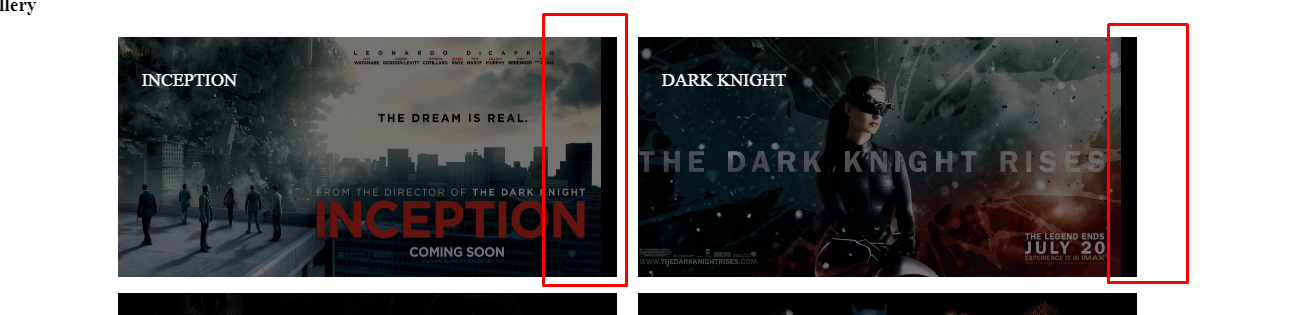
我想“保持”过渡和背景色。
下面是代码笔:https://codepen.io/wavyblues/pen/poyBbeL
<!DOCTYPE html>
<title>My Example</title>

<style>
  .video-gallery {
  position: relative;
  margin: 0 auto;
  max-width: 1300px;
  text-align: center;
}

.video-gallery .gallery-item {
  position: relative;
  float: left;
  overflow: hidden;
  margin: 10px 1%;
  /* min-width: 500px;
  max-width: 800px;
  max-height: 360px; */
  width: 48%;
  background: #000;
  cursor: pointer;
}

.video-gallery .gallery-item img {
  position: relative;
  display: block;
  opacity: .45;
  width: 100%;
  height: 300px;

  transition: opacity 0.35s, transform 0.35s;
  transform: translate3d(-20px, 0, 0);
  backface-visibility: hidden;
}

.video-gallery .gallery-item .gallery-item-caption {
  padding: 2em;
  color: #fff;
  text-transform: uppercase;
  font-size: 1.25em;
}

.video-gallery .gallery-item .gallery-item-caption,
.video-gallery .gallery-item .gallery-item-caption > a {
  position: absolute;
  top: 0;
  left: 0;
  width: 100%;
  height: 100%;
}

.video-gallery .gallery-item h2 {
  font-weight: 300;
  overflow: hidden;
  padding: 0.5em 0;
}


.video-gallery .gallery-item h2,
.video-gallery .gallery-item p {
  position: relative;
  margin: 0;
  z-index: 10;
}

.video-gallery .gallery-item p {
  letter-spacing: 1px;
  font-size: 68%;

  padding: 1em 0;
  opacity: 0;
  transition: opacity 0.35s, transform 0.35s;
  transform: translate3d(10%, 0, 0);
}

.video-gallery .gallery-item:hover img {
  opacity: .3;
  transform: translate3d(0, 0, 0);

}

.video-gallery .gallery-item .gallery-item-caption {
  text-align: left;
}

.video-gallery .gallery-item h2::after {
  content: "";
  position: absolute;
  bottom: 0;
  left: 0;
  width: 15%;
  height: 1px;
  background: #fff;

  transition: transform 0.3s;
  transform: translate3d(-100%, 0, 0);
}

.video-gallery .gallery-item:hover h2::after {
  transform: translate3d(0, 0, 0);
}

.video-gallery .gallery-item:hover p {
  opacity: 1;
  transform: translate3d(0, 0, 0);
}

@media screen and (max-width: 50em) {
  .video-gallery .gallery-item {
    display: inline-block;
    float: none;
    margin: 10px auto;
    width: 100%;
  }
}

</style>
<div class="content">
  <h1 class="section-header">Video Gallery</h1>
  <div class="section-header-underline"></div>
  <div class="video-gallery">
    <div class="gallery-item">
      <img src="https://cdn.collider.com/wp-content/uploads/2010/06/inception_movie_poster_banner_04.jpg">
      <div class="gallery-item-caption">
        <div>
          <h2>Inception</h2>
          <p></p>
        </div>
      </div>
    </div>

    <div class="gallery-item ">
      <img src="https://cdn.collider.com/wp-content/uploads/2012/05/dark-knight-rises-movie-poster-banner-catwoman.jpg" alt="Mt. Rainier">
      <div class="gallery-item-caption">
        <div>
          <h2>Dark Knight</h2>
          <p></p>
        </div>
      </div>
    </div>

    <div class="gallery-item">
      <img src="https://i.imgur.com/rD8Unfk.jpg" alt="Olympic National Park">
      <div class="gallery-item-caption">
        <div>
          <h2>Warcraft</h2>
          <p></p>
        </div>
      </div>
    </div>

    <div class="gallery-item">
      <img src="https://thumbor.forbes.com/thumbor/960x0/https%3A%2F%2Fblogs-images.forbes.com%2Fscottmendelson%2Ffiles%2F2017%2F07%2FJustice-League-SDCC-Banner.jpg" alt="Mount St. Helens">
      <div class="gallery-item-caption">
        <div>
          <h2>Justice League</h2>
          <p></p>
        </div>
      </div>
    </div>

  </div>
</div>
回答 2
Stack Overflow用户
回答已采纳
发布于 2020-09-28 04:08:25
您之所以难以这样做,是因为黑色背景是容器的一部分,但是您正在将转换应用到图像本身--它独立于黑色背景工作。
您可以通过简单地将图像放入具有黑色背景的容器中,然后将转换应用到它。
工作示例:
.video-gallery {
  position: relative;
  margin: 0 auto;
  max-width: 1300px;
  text-align: center;
}

.video-gallery .gallery-item {
  position: relative;
  float: left;
  overflow: hidden;
  margin: 10px 1%;
  /* min-width: 500px;
  max-width: 800px;
  max-height: 360px; */
  width: 48%;
  cursor: pointer;
}

.video-gallery .gallery-item-img {
  width: 100%;
  height: 300px;
  transition: opacity 0.35s, transform 0.35s;
  transform: translate3d(-20px, 0, 0);
  backface-visibility: hidden;
  background: #000;
}

.video-gallery .gallery-item img {
  position: relative;
  display: block;
  opacity: .45;
  width: 100%;
  height: 300px;
}

.video-gallery .gallery-item .gallery-item-caption {
  padding: 2em;
  color: #fff;
  text-transform: uppercase;
  font-size: 1.25em;
}

.video-gallery .gallery-item .gallery-item-caption,
.video-gallery .gallery-item .gallery-item-caption>a {
  position: absolute;
  top: 0;
  left: 0;
  width: 100%;
  height: 100%;
}

.video-gallery .gallery-item h2 {
  font-weight: 300;
  overflow: hidden;
  padding: 0.5em 0;
}

.video-gallery .gallery-item h2,
.video-gallery .gallery-item p {
  position: relative;
  margin: 0;
  z-index: 10;
}

.video-gallery .gallery-item p {
  letter-spacing: 1px;
  font-size: 68%;
  padding: 1em 0;
  opacity: 0;
  transition: opacity 0.35s, transform 0.35s;
  transform: translate3d(10%, 0, 0);
}


.video-gallery .gallery-item:hover .gallery-item-img {
  transform: translate3d(0, 0, 0);
}

.video-gallery .gallery-item:hover img {
  opacity: .3;
}

.video-gallery .gallery-item .gallery-item-caption {
  text-align: left;
}

.video-gallery .gallery-item h2::after {
  content: "";
  position: absolute;
  bottom: 0;
  left: 0;
  width: 15%;
  height: 1px;
  background: #fff;
  transition: transform 0.3s;
  transform: translate3d(-100%, 0, 0);
}

.video-gallery .gallery-item:hover h2::after {
  transform: translate3d(0, 0, 0);
}

.video-gallery .gallery-item:hover p {
  opacity: 1;
  transform: translate3d(0, 0, 0);
}

@media screen and (max-width: 50em) {
  .video-gallery .gallery-item {
    display: inline-block;
    float: none;
    margin: 10px auto;
    width: 100%;
  }
}<div class="content">
<h1 class="section-header">Video Gallery</h1>
<div class="section-header-underline"></div>
<div class="video-gallery">
<div class="gallery-item">
<div class="gallery-item-img">
<img src="https://cdn.collider.com/wp-content/uploads/2010/06/inception_movie_poster_banner_04.jpg">
</div>
<div class="gallery-item-caption">
<div>
<h2>Inception</h2>
<p></p>
</div>
</div>
</div>
<div class="gallery-item ">
<div class="gallery-item-img">
<img src="https://cdn.collider.com/wp-content/uploads/2012/05/dark-knight-rises-movie-poster-banner-catwoman.jpg" alt="Mt. Rainier">
</div>
<div class="gallery-item-caption">
<div>
<h2>Dark Knight</h2>
<p></p>
</div>
</div>
</div>
<div class="gallery-item">
<div class="gallery-item-img">
<img src="https://i.imgur.com/rD8Unfk.jpg" alt="Olympic National Park">
</div>
<div class="gallery-item-caption">
<div>
<h2>Warcraft</h2>
<p></p>
</div>
</div>
</div>
<div class="gallery-item">
<div class="gallery-item-img">
<img src="https://thumbor.forbes.com/thumbor/960x0/https%3A%2F%2Fblogs-images.forbes.com%2Fscottmendelson%2Ffiles%2F2017%2F07%2FJustice-League-SDCC-Banner.jpg" alt="Mount St. Helens">
</div>
<div class="gallery-item-caption">
<div>
<h2>Justice League</h2>
<p></p>
</div>
</div>
</div>
</div>
</div>
您需要做的主要更改是:
- 将图像添加到带有类
gallery-item-img的容器div中,例如:
<div class="gallery-item">
  <div class="gallery-item-img">
    <img src="https://www.example.com/image.jpg">
  </div>
  REST OF THE ITEM HERE....
</div>- 将黑色背景移动到这个类:
.video-gallery .gallery-item-img {
  background: #000;
  width: 100%;
  height: 300px;
  transition: opacity 0.35s, transform 0.35s;
  transform: translate3d(-20px, 0, 0);
  backface-visibility: hidden;
}

.video-gallery .gallery-item:hover .gallery-item-img {
  transform: translate3d(0, 0, 0);
}- 设置图像本身的高度、宽度和不透明度:
.video-gallery .gallery-item img {
  display: block;
  opacity: .45;
  width: 100%;
  height: 300px;
}
.video-gallery .gallery-item:hover img {
  opacity: .3;
}Stack Overflow用户
发布于 2020-09-28 04:03:13
删除-20px偏移量在您的transform中。transform: translate3d(-20px, 0, 0);到transform: translate3d(0, 0, 0);
  .video-gallery {
  position: relative;
  margin: 0 auto;
  max-width: 1300px;
  text-align: center;
}

.video-gallery .gallery-item {
  position: relative;
  float: left;
  overflow: hidden;
  margin: 10px 1%;
  /* min-width: 500px;
  max-width: 800px;
  max-height: 360px; */
  width: 48%;
  background: #000;
  cursor: pointer;
}

.video-gallery .gallery-item img {
  position: relative;
  display: block;
  opacity: .45;
  width: 100%;
  height: 300px;

  transition: opacity 0.35s, transform 0.35s;
  transform: translate3d(0, 0, 0);
  backface-visibility: hidden;
}

.video-gallery .gallery-item .gallery-item-caption {
  padding: 2em;
  color: #fff;
  text-transform: uppercase;
  font-size: 1.25em;
}

.video-gallery .gallery-item .gallery-item-caption,
.video-gallery .gallery-item .gallery-item-caption > a {
  position: absolute;
  top: 0;
  left: 0;
  width: 100%;
  height: 100%;
}

.video-gallery .gallery-item h2 {
  font-weight: 300;
  overflow: hidden;
  padding: 0.5em 0;
}


.video-gallery .gallery-item h2,
.video-gallery .gallery-item p {
  position: relative;
  margin: 0;
  z-index: 10;
}

.video-gallery .gallery-item p {
  letter-spacing: 1px;
  font-size: 68%;

  padding: 1em 0;
  opacity: 0;
  transition: opacity 0.35s, transform 0.35s;
  transform: translate3d(10%, 0, 0);
}

.video-gallery .gallery-item:hover img {
  opacity: .3;
  transform: translate3d(0, 0, 0);

}

.video-gallery .gallery-item .gallery-item-caption {
  text-align: left;
}

.video-gallery .gallery-item h2::after {
  content: "";
  position: absolute;
  bottom: 0;
  left: 0;
  width: 15%;
  height: 1px;
  background: #fff;

  transition: transform 0.3s;
  transform: translate3d(-100%, 0, 0);
}

.video-gallery .gallery-item:hover h2::after {
  transform: translate3d(0, 0, 0);
}

.video-gallery .gallery-item:hover p {
  opacity: 1;
  transform: translate3d(0, 0, 0);
}

@media screen and (max-width: 50em) {
  .video-gallery .gallery-item {
    display: inline-block;
    float: none;
    margin: 10px auto;
    width: 100%;
  }
}<!DOCTYPE html>
<title>My Example</title>
<div class="content">
<h1 class="section-header">Video Gallery</h1>
<div class="section-header-underline"></div>
<div class="video-gallery">
<div class="gallery-item">
<img src="https://cdn.collider.com/wp-content/uploads/2010/06/inception_movie_poster_banner_04.jpg">
<div class="gallery-item-caption">
<div>
<h2>Inception</h2>
<p></p>
</div>
</div>
</div>
<div class="gallery-item ">
<img src="https://cdn.collider.com/wp-content/uploads/2012/05/dark-knight-rises-movie-poster-banner-catwoman.jpg" alt="Mt. Rainier">
<div class="gallery-item-caption">
<div>
<h2>Dark Knight</h2>
<p></p>
</div>
</div>
</div>
<div class="gallery-item">
<img src="https://i.imgur.com/rD8Unfk.jpg" alt="Olympic National Park">
<div class="gallery-item-caption">
<div>
<h2>Warcraft</h2>
<p></p>
</div>
</div>
</div>
<div class="gallery-item">
<img src="https://thumbor.forbes.com/thumbor/960x0/https%3A%2F%2Fblogs-images.forbes.com%2Fscottmendelson%2Ffiles%2F2017%2F07%2FJustice-League-SDCC-Banner.jpg" alt="Mount St. Helens">
<div class="gallery-item-caption">
<div>
<h2>Justice League</h2>
<p></p>
</div>
</div>
</div>
</div>
</div>
页面原文内容由Stack Overflow提供。腾讯云小微IT领域专用引擎提供翻译支持
原文链接:
https://stackoverflow.com/questions/64095626
复制相关文章
相似问题
腾讯云开发者

Copyright © 2013 - 2026 Tencent Cloud. All Rights Reserved. 腾讯云 版权所有
深圳市腾讯计算机系统有限公司 ICP备案/许可证号:粤B2-20090059  粤公网安备44030502008569号
腾讯云计算(北京)有限责任公司 京ICP证150476号 | 京ICP备11018762号