
当我试图将产品添加到我的购物车时,我在我的控制台中得到了一条“未定义的”消息
当我试图将产品添加到我的购物车时,我在我的控制台中得到了一条“未定义的”消息
提问于 2020-09-18 09:13:48
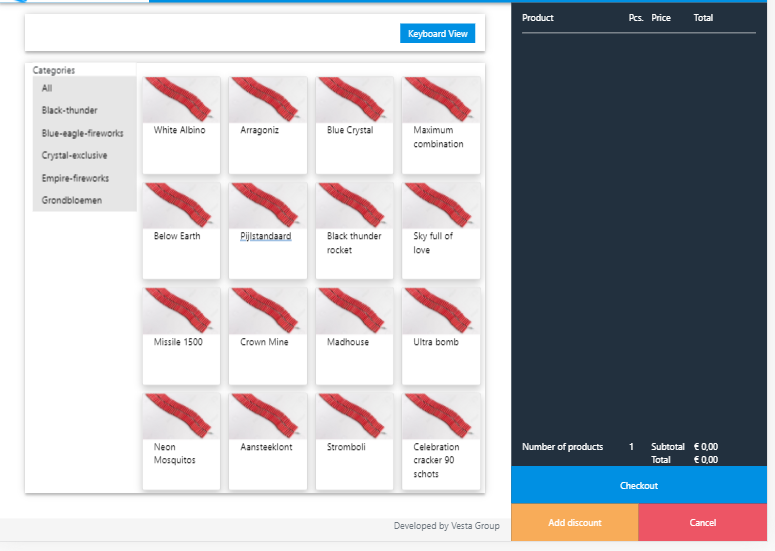
我试图使我的功能工作,最终必须添加项目到我的购物车。然而,我下面的教程使用的是他的html中的数据,这些数据是他通过元素本身的数据类型传递下来的。我正在从json文件中提取数据。我想知道如何使这个简单的功能工作,这样我就可以继续完成这个功能了。此刻,我又回到了我的控制台中的“未定义”。
Html代码:
<div class="row touchViewSection">
<!-- shopping sector -->
<!-- touchView -->
<!-- categories menu -->
<div class="col-3 categoriesSection">
<div class="categories">
<p style="background-color: white; margin-bottom: 0px" > Categories </p>
<a class="nav-link" id="all" href="#">All</a>
<a class="nav-link" id="black-thunder" href="#">Black-thunder</a>
<a class="nav-link" id="blue-eagle-fireworks" href="#">Blue-eagle-fireworks</a>
<a class="nav-link" id="crystal-exclusive" href="#">Crystal-exclusive</a>
<a class="nav-link" id="empire-fireworks" href="#">Empire-fireworks</a>
<a class="nav-link" id="grondbloemen" href="#">Grondbloemen</a>
</div>
</div>
<!-- categories menu -->
<!-- <p style="background-color: white; margin-bottom: 0px" > Products </p>-->
<div class="col-9 productItems" >
<br>
<div class="row" id="touchViewProducts">
</div>
</div>
</div>
<!--/touchView -->
<!--Keyboard View -->
<div class="row keyboardViewSection">
<div class="col-12 keyboardViewRow">
<table id="data-table" class="table table-bordered" style="width: 100%;">
<thead id="tableHead">
<tr>
<th> # </th>
<th> Product name </th>
<th> Free Stock </th>
<th> Price </th>
<th> Action </th>
</tr>
</thead>
</table>
</div>
</div>
<!--/Keyboard View -->
<div class="footer">
<div class="container">
<p class="text-muted"> Developed by Vesta Group</p>
</div>
</div>
</div>
<!--/shopping sector-->
<div class="col-4 cartSection">
<!--cart-->
<div class="row">
<div class="col-5">Product</div>
<div class="col-1">Pcs.</div>
<div class="col-2">Price</div>
<div class="col-3">Total</div>
</div>
<hr style="background-color: white;">
<div class="row cartCheck">
<div class="col-5">Number of products</div>
<div class="col-1">1</div>
<div class="col-2">Subtotal</div>
<div class="col-3 total">€ 0,00</div>
<div class="col-5"></div>
<div class="col-1"></div>
<div class="col-2">Total </div>
<div class="col-3">€ 0,00</div>
<div class="col-12 checkoutBtn"> Checkout </div>
<div class="col-6 addDiscountBtn"> Add discount </div>
<div class="col-6 cancelBtn"> Cancel </div>
</div>
<!--/cart-->
</div>
</div>
</div>
</div>JS代码:
   <script>
        $.getJSON("assets/products/sample_products.json", function(data) {
            var product_data = '';
            $.each(data.data, function (key, value) {
                // console.log(data);
                product_data += '<div class="col-3 productCard">';
                product_data += '<a href="#" class="productItem">';
                product_data += '<div class="card">';
                product_data += '<img src="assets/images/Firecracker.jpg" alt="Avatar" style="width:100%; height: 8vh;">';
                product_data += '<div class="container">';
                product_data += '<p>' + value.name + '</p>';
                product_data += '</div>';
                product_data += '</div>';
                product_data += '</a>';
                product_data += '</div>';
            });
            $('#touchViewProducts').append(product_data);


            //function to add item to shopping cart
            $(".productItem").click(function(e){
                e.preventDefault();

                var productInfo = $(this.dataset);
                console.log(productInfo[0].name);

            })
        })

    </script>
回答 1
Stack Overflow用户
回答已采纳
发布于 2020-09-18 09:58:26
仔细看看dataset vs .data - Difference? dataset做了什么,或者这方面的数据,然后看看您在.productItem中的内部HTML --里面没有一个数据属性,难怪dataset不能获取任何数据,而且没有定义。请告诉我什么是想要的结果,在console.log(productInfo[0].name);,什么是预期在里面,我们将提取它。
只需执行以下操作,就可以获取名称:
$(this).text()为了澄清,单击函数是从HTML中提取数据,而不是JSON数据本身。您将该JSON数据放入动态红色HTML中,然后单击即可得到它。
另外,如果只需要名称,请记住,如果您在.productItem中添加更多的文本,您将通过单击选择器进行更深入的挖掘,并调整它。在目前的例子中是有效的。示例:
//$.getJSON("assets/products/sample_products.json", function(data) {
  var product_data = '';
  var data=  { "data" : [{"id":"1333","article_number":"4016","barcode":"heeftgeenbarcode4","name":"White Albino"}] };

  $.each(data.data, function(key, value) {
    // console.log(data);
    product_data += '<div class="col-3 productCard">';
    product_data += '<a href="#" class="productItem">';
    product_data += '<div class="card">';
    product_data += '<img src="assets/images/Firecracker.jpg" alt="Avatar" style="width:100%; height: 8vh;">';
    product_data += '<div class="container">';
    product_data += '<p>' + value.name + '</p>';
    product_data += '</div>';
    product_data += '</div>';
    product_data += '</a>';
    product_data += '</div>';
  });
  $('#touchViewProducts').append(product_data);


  //function to add item to shopping cart
  $(".productItem").click(function(e) {
    e.preventDefault();

    console.log($(this).text());
    var productInfo = $(this.dataset);
    //console.log(productInfo[0].name);

  })
//})<script src="https://cdnjs.cloudflare.com/ajax/libs/jquery/3.3.1/jquery.min.js"></script>
<div class="row touchViewSection">
<!-- shopping sector -->
<!-- touchView -->
<!-- categories menu -->
<div class="col-3 categoriesSection">
<div class="categories">
<p style="background-color: white; margin-bottom: 0px"> Categories </p>
<a class="nav-link" id="all" href="#">All</a>
<a class="nav-link" id="black-thunder" href="#">Black-thunder</a>
<a class="nav-link" id="blue-eagle-fireworks" href="#">Blue-eagle-fireworks</a>
<a class="nav-link" id="crystal-exclusive" href="#">Crystal-exclusive</a>
<a class="nav-link" id="empire-fireworks" href="#">Empire-fireworks</a>
<a class="nav-link" id="grondbloemen" href="#">Grondbloemen</a>
</div>
</div>
<!-- categories menu -->
<!-- <p style="background-color: white; margin-bottom: 0px" > Products </p>-->
<div class="col-9 productItems">
<br>
<div class="row" id="touchViewProducts">
</div>
</div>
</div>
<!--/touchView -->
<!--Keyboard View -->
<div class="row keyboardViewSection">
<div class="col-12 keyboardViewRow">
<table id="data-table" class="table table-bordered" style="width: 100%;">
<thead id="tableHead">
<tr>
<th> # </th>
<th> Product name </th>
<th> Free Stock </th>
<th> Price </th>
<th> Action </th>
</tr>
</thead>
</table>
</div>
</div>
<!--/Keyboard View -->
<div class="footer">
<div class="container">
<p class="text-muted"> Developed by Vesta Group</p>
</div>
</div>
</div>
<!--/shopping sector-->
<div class="col-4 cartSection">
<!--cart-->
<div class="row">
<div class="col-5">Product</div>
<div class="col-1">Pcs.</div>
<div class="col-2">Price</div>
<div class="col-3">Total</div>
</div>
<hr style="background-color: white;">
<div class="row cartCheck">
<div class="col-5">Number of products</div>
<div class="col-1">1</div>
<div class="col-2">Subtotal</div>
<div class="col-3 total">€ 0,00</div>
<div class="col-5"></div>
<div class="col-1"></div>
<div class="col-2">Total </div>
<div class="col-3">€ 0,00</div>
<div class="col-12 checkoutBtn"> Checkout </div>
<div class="col-6 addDiscountBtn"> Add discount </div>
<div class="col-6 cancelBtn"> Cancel </div>
</div>
<!--/cart-->
</div>
</div>
</div>
</div>
页面原文内容由Stack Overflow提供。腾讯云小微IT领域专用引擎提供翻译支持
原文链接:
https://stackoverflow.com/questions/63952810
复制相关文章
相似问题
腾讯云开发者

Copyright © 2013 - 2026 Tencent Cloud. All Rights Reserved. 腾讯云 版权所有
深圳市腾讯计算机系统有限公司 ICP备案/许可证号:粤B2-20090059  粤公网安备44030502008569号
腾讯云计算(北京)有限责任公司 京ICP证150476号 | 京ICP备11018762号