
SwiftUI SegmentedControl
SwiftUI SegmentedControl
提问于 2020-09-18 08:30:34
我有一个有两个选项的分段控制。我想根据选择索引显示不同的观点。但出于某种原因我得到了警告:
“
”初始化器的PersonalAddressView结果未使用
和
“
”初始化器的CorporateAddressView结果未使用
struct AddressSegment : View {
    @State private var selectorIndex = 0
    @State private var options = ["Bireysel","Kurumsal"]
    init() {
        UISegmentedControl.appearance().selectedSegmentTintColor = #colorLiteral(red: 0.05490196078, green: 0.3254901961, blue: 0.368627451, alpha: 1)
        UISegmentedControl.appearance().setTitleTextAttributes([.foregroundColor: UIColor.white], for: .selected)
        UISegmentedControl.appearance().setTitleTextAttributes([.foregroundColor: UIColor.init(displayP3Red: 0.05490196078, green: 0.3254901961, blue: 0.368627451, alpha: 1)], for: .normal)
    }
    var body: some View {
        VStack {
            Picker("Addresses", selection: $selectorIndex) {
                ForEach(0..<options.count) { index in
                    Text(self.options[index]).tag(index)
                }
            }
            .onReceive([self.selectorIndex].publisher.first(), perform: { value in
                if value == 0 {
                    PersonalAddressView()
                } else {
                    CorporateAddressView()
                }
            })
            .pickerStyle(SegmentedPickerStyle())
            .frame(width: 216, height: 28, alignment: .center)
            .cornerRadius(5)
            .foregroundColor(.white)
        }
    }
}
我想要的是下面
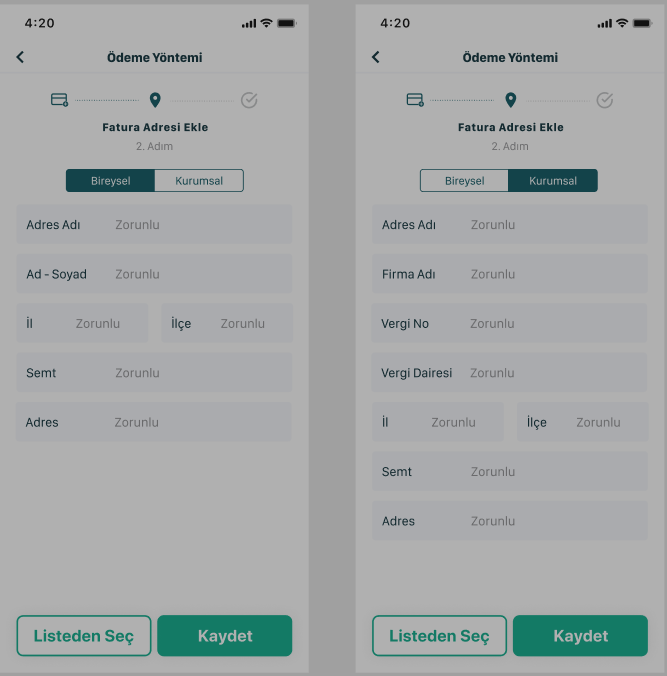
回答 1
Stack Overflow用户
回答已采纳
发布于 2020-09-18 08:43:32
您需要在ViewBuilder块中创建视图,而不是像onReceive这样的函数。
尝试以下几点:
struct AddressSegment : View {
    @State private var selectorIndex = 0
    @State private var options = ["Bireysel","Kurumsal"]
    init() {
        UISegmentedControl.appearance().selectedSegmentTintColor = #colorLiteral(red: 0.05490196078, green: 0.3254901961, blue: 0.368627451, alpha: 1)
        UISegmentedControl.appearance().setTitleTextAttributes([.foregroundColor: UIColor.white], for: .selected)
        UISegmentedControl.appearance().setTitleTextAttributes([.foregroundColor: UIColor.init(displayP3Red: 0.05490196078, green: 0.3254901961, blue: 0.368627451, alpha: 1)], for: .normal)
    }
    var body: some View {
        VStack {
            Picker("Addresses", selection: $selectorIndex) {
                ForEach(0..<options.count) { index in
                    Text(self.options[index]).tag(index)
                }
            }
            .pickerStyle(SegmentedPickerStyle())
            .frame(width: 216, height: 28, alignment: .center)
            .cornerRadius(5)
            .foregroundColor(.white)

            // move the code here, to the ViewBuilder block
            if selectorIndex == 0 {
                PersonalAddressView()
            } else {
                CorporateAddressView()
            }
        }
    }
}页面原文内容由Stack Overflow提供。腾讯云小微IT领域专用引擎提供翻译支持
原文链接:
https://stackoverflow.com/questions/63952069
复制相关文章
相似问题
腾讯云开发者

Copyright © 2013 - 2026 Tencent Cloud. All Rights Reserved. 腾讯云 版权所有
深圳市腾讯计算机系统有限公司 ICP备案/许可证号:粤B2-20090059  粤公网安备44030502008569号
腾讯云计算(北京)有限责任公司 京ICP证150476号 | 京ICP备11018762号