
通过堡垒机进行的SSH隧道和端口转发导致连接拒绝错误。
我有一个jupyter笔记本运行在服务器上,我可以通过堡垒机器进入服务器。我想访问本地机器上的笔记本。
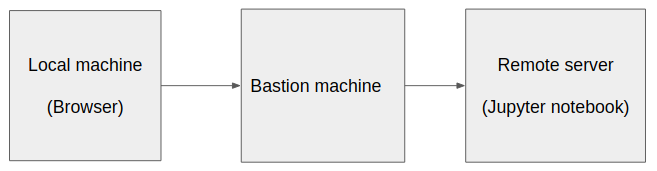
以下是我在服务器上运行jupyter之后所做的尝试:
ssh -f -N -L local_machine_port:server_machine_IP:server_machine_port_hosting_jupyter username@bastion_machine_ip每当我尝试访问http://localhost:local_machine_port或http://127.0.0.1:local_machine_port时,我都会得到
debug1: client_input_global_request: rtype hostkeys-00@openssh.com want_reply 0
debug1: Connection to port 7001 forwarding to <server ip> port <server port> requested.
debug1: channel 2: new [direct-tcpip]
debug1: Connection to port 7001 forwarding to <server ip> port <server port> requested.
debug1: channel 3: new [direct-tcpip]
channel 2: open failed: connect failed: Connection refused
debug1: channel 2: free: direct-tcpip: listening port 7001 for <server ip> port <server port>, connect from 127.0.0.1 port 43276 to 127.0.0.1 port 7001, nchannels 4
channel 3: open failed: connect failed: Connection refused
debug1: channel 3: free: direct-tcpip: listening port 7001 for <server ip> port <server port>, connect from 127.0.0.1 port 43278 to 127.0.0.1 port 7001, nchannels 3
debug1: Connection to port 7001 forwarding to 192.168.2.38 port 6006 requested.
debug1: channel 2: new [direct-tcpip]
channel 2: open failed: connect failed: Connection refused
debug1: channel 2: free: direct-tcpip: listening port 7001 for <server ip> port <server port>, connect from 127.0.0.1 port 43280 to 127.0.0.1 port 7001, nchannels 3
我该怎么办?
回答 1
Stack Overflow用户
发布于 2020-09-06 21:07:04
编辑
对不起,我只是刚刚意识到您正与ssh连接到堡垒机器,而不是连接到运行jupyter的远程服务器。
在这种情况下,您可能首先需要使用堡垒机器建立到远程服务器的ssh连接,参见this answer on how to do that。
原始答案
您是否将命令中的server_machine_IP替换为机器的外部IP地址?例如,类似
ssh -f -N -L 7001:10.45.12.34:7001 username@bastion_machine_ip如果是这样的话,这将将本地端口转发到远程服务器上的外部IP地址上的指定端口。但是,如果该主机上的jupyter没有监听该IP,而是只在本地主机上侦听,则连接将被拒绝。
如果jupyter只监听本地连接,您可以尝试@Mohammed's answer让jupyter监听外部IP。或尝试以下操作
ssh -f -N -L 7001:localhost:7001 username@bastion_machine_ip并在本地计算机上打开http://localhost:local_machine_port:这将从本地计算机上的端口转发到远程计算机上的localhost 上的端口,即对于远程主机上的jupyter来说,这看起来像来自本地计算机(即远程服务器)的连接。
https://stackoverflow.com/questions/63717748
复制相似问题
腾讯云开发者

Copyright © 2013 - 2026 Tencent Cloud. All Rights Reserved. 腾讯云 版权所有
深圳市腾讯计算机系统有限公司 ICP备案/许可证号:粤B2-20090059  粤公网安备44030502008569号
腾讯云计算(北京)有限责任公司 京ICP证150476号 | 京ICP备11018762号