
如何在VisualStudio2019中向.Net核心Web应用程序的默认模板添加左垂直侧栏
如何在VisualStudio2019中向.Net核心Web应用程序的默认模板添加左垂直侧栏
提问于 2020-08-28 11:23:16
我想在.Net Core3.1的默认引导模板中添加一个左垂直侧边栏。此侧栏必须仅对注册用户在登录后可见。默认ScreenShot核心Web应用程序的.Net

下面是_Layout.cshtml的代码:
<!DOCTYPE html>
<html lang="en">
<head>
<meta charset="utf-8" />
<meta name="viewport" content="width=device-width, initial-scale=1.0" />
<title>@ViewData["Title"] - Agalber.Hostel.Backoffice</title>
<link rel="stylesheet" href="~/lib/bootstrap/dist/css/bootstrap.min.css" />
<link rel="stylesheet" href="~/css/site.css" />
</head>
<body>
<header>
<nav class="navbar navbar-expand-sm navbar-toggleable-sm navbar-light bg-white border-bottom box-shadow mb-3">
<div class="container">
<a class="navbar-brand" asp-area="" asp-controller="Home" asp-action="Index"><img src="~/logoagalber.png" alt="AGALBER" width="102" height="46" /></a>
<button class="navbar-toggler" type="button" data-toggle="collapse" data-target=".navbar-collapse" aria-controls="navbarSupportedContent"
aria-expanded="false" aria-label="Toggle navigation">
<span class="navbar-toggler-icon"></span>
</button>
<div class="navbar-collapse collapse d-sm-inline-flex flex-sm-row-reverse">
<partial name="_LoginPartial" />
<ul class="navbar-nav flex-grow-1">
<li class="nav-item">
<a class="nav-link text-dark" asp-area="" asp-controller="Home" asp-action="Index">Home</a>
</li>
<li class="nav-item">
<a class="nav-link text-dark" asp-area="" asp-controller="Home" asp-action="Privacy">Privacy</a>
</li>
</ul>
</div>
</div>
</nav>
</header>
<div class="container">
<main role="main" class="pb-3">
@RenderBody()
</main>
</div>
<footer class="border-top footer text-muted">
<div class="container">
© 2020 - Agalber.Hostel.Backoffice - <a asp-area="" asp-controller="Home" asp-action="Privacy">Privacy</a>
</div>
</footer>
<script src="~/lib/jquery/dist/jquery.min.js"></script>
<script src="~/lib/bootstrap/dist/js/bootstrap.bundle.min.js"></script>
<script src="~/js/site.js" asp-append-version="true"></script>
@RenderSection("Scripts", required: false)
</body>
</html>
下面是site.css文件的内容。
/* Please see documentation at https://learn.microsoft.com/aspnet/core/client-side/bundling-and-minification
for details on configuring this project to bundle and minify static web assets. */

a.navbar-brand {
  white-space: normal;
  text-align: center;
  word-break: break-all;
}

/* Provide sufficient contrast against white background */
a {
  color: #0366d6;
}

.btn-primary {
  color: #fff;
  background-color: #1b6ec2;
  border-color: #1861ac;
}

.nav-pills .nav-link.active, .nav-pills .show > .nav-link {
  color: #fff;
  background-color: #1b6ec2;
  border-color: #1861ac;
}

/* Sticky footer styles
-------------------------------------------------- */
html {
  font-size: 14px;
}
@media (min-width: 768px) {
  html {
    font-size: 16px;
  }
}

.border-top {
  border-top: 1px solid #e5e5e5;
}
.border-bottom {
  border-bottom: 1px solid #e5e5e5;
}

.box-shadow {
  box-shadow: 0 .25rem .75rem rgba(0, 0, 0, .05);
}

button.accept-policy {
  font-size: 1rem;
  line-height: inherit;
}

/* Sticky footer styles
-------------------------------------------------- */
html {
  position: relative;
  min-height: 100%;
}

body {
  /* Margin bottom by footer height */
  margin-bottom: 60px;
}
.footer {
  position: absolute;
  bottom: 0;
  width: 100%;
  white-space: nowrap;
  line-height: 60px; /* Vertically center the text there */
}
有人能帮我解决这个问题吗?
回答 1
Stack Overflow用户
回答已采纳
发布于 2020-08-30 05:15:27
假设您使用Asp.net核心标识登录网站,如果是这样,您可以检查User或HttpContext.User.Identity.IsAuthenticated是否为真,然后根据显示侧边栏的结果。
代码如下(_Layout.cshtml):
<div class="container">
    @if (User.Identity.IsAuthenticated)
    {

    <div class="sidenav">
        <a href="#about">About</a>
        <a href="#services">Services</a>
        <a href="#clients">Clients</a>
        <a href="#contact">Contact</a>
    </div>
    }
    <div class="main">

        <main role="main" class="pb-3">
            @RenderBody()
        </main>
    </div>
</div>
CSS样式:
    body {
        font-family: "Lato", sans-serif;
    }

    .sidenav {
        width: 130px;
        position: fixed;
        z-index: 1;
        top: 60px;
        left: 10px;
        background: #eee;
        overflow-x: hidden;
        padding: 8px 0;
    }

        .sidenav a {
            padding: 6px 8px 6px 16px;
            text-decoration: none;
            font-size: 25px;
            color: #2196F3;
            display: block;
        }

            .sidenav a:hover {
                color: #064579;
            }

    .main {
        margin-left: 140px; /* Same width as the sidebar + left position in px */
        padding: 0px 10px;
    }
登录成功后,结果如下:
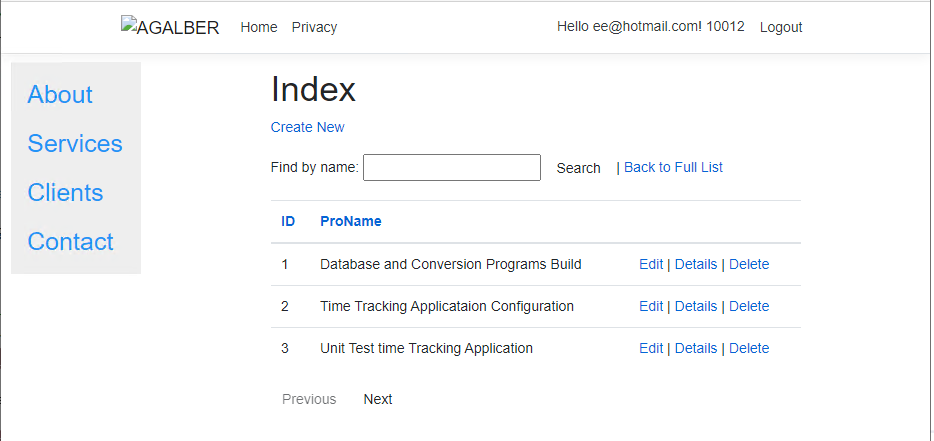
如果不使用Asp.net核心标识,可以使用ViewData或TempData存储用户信息,然后在布局页面中使用If语句检查ViewData或TempData是否为空,然后显示侧栏。
页面原文内容由Stack Overflow提供。腾讯云小微IT领域专用引擎提供翻译支持
原文链接:
https://stackoverflow.com/questions/63632842
复制相关文章
相似问题
腾讯云开发者

Copyright © 2013 - 2026 Tencent Cloud. All Rights Reserved. 腾讯云 版权所有
深圳市腾讯计算机系统有限公司 ICP备案/许可证号:粤B2-20090059  粤公网安备44030502008569号
腾讯云计算(北京)有限责任公司 京ICP证150476号 | 京ICP备11018762号