
在JSConfig.json文件中看到未知类型记录错误
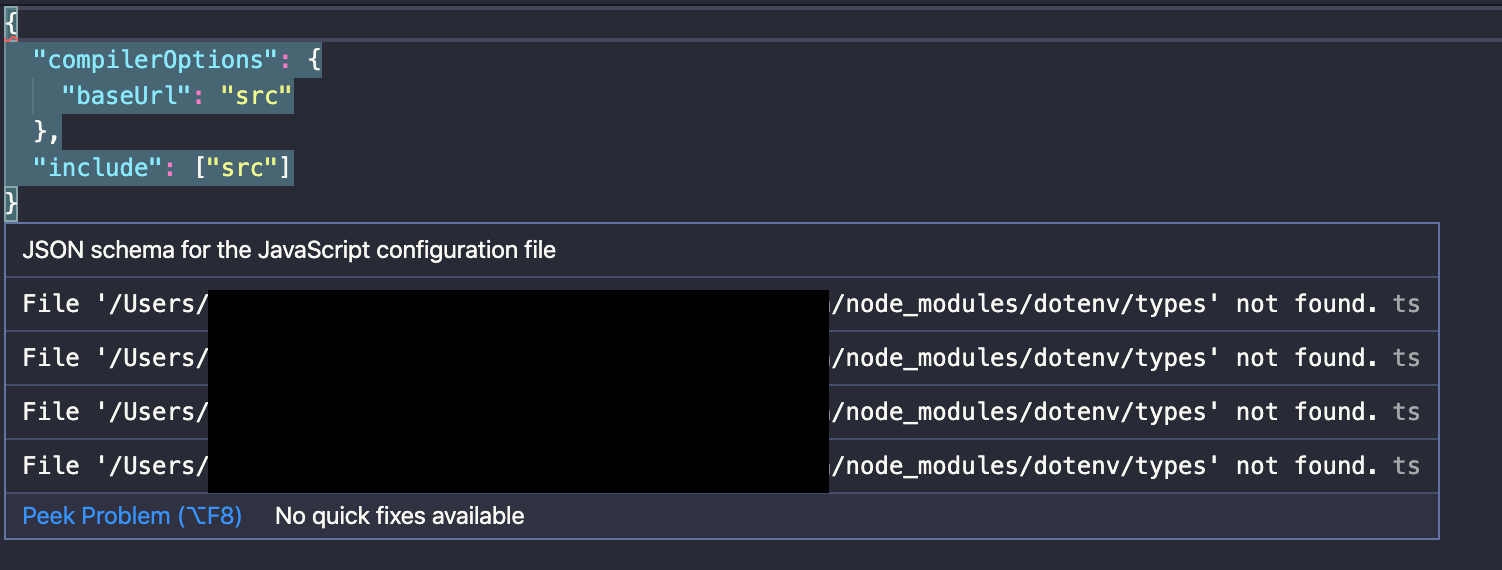
我在我的项目中添加了一个jsconfig.json,出于某种原因,我得到了一个类型记录错误,它声明dotenv/types未找到。我一辈子都搞不懂我为什么会犯这个错误。我甚至尝试在我的package.json中添加dotenv,但它并没有解决我的问题。
这是一个标准的项目,是用创建反应应用程序创建的,我添加了jsconfig.json以允许绝对导入。
// jsconfig.json
{
  "compilerOptions": {
    "baseUrl": "src"
  },
  "include": ["src"]
}
例外:
找不到'/Users/path/to/file/node_modules/dotenv/types‘文件
。
其他可能有用的文件:
package.json
{
  "name": "quantous-spa",
  "version": "0.1.0",
  "private": true,
  "dependencies": {
    "@testing-library/jest-dom": "^4.2.4",
    "@testing-library/react": "^9.3.2",
    "@testing-library/user-event": "^7.1.2",
    "axios": "^0.20.0",
    "babel-plugin-macros": "^2.8.0",
    "react": "^16.13.1",
    "react-dom": "^16.13.1",
    "react-feather": "^2.0.8",
    "react-loading-skeleton": "^2.1.1",
    "react-router-dom": "^5.2.0",
    "react-scripts": "3.4.3",
    "styled-components": "^5.1.1",
    "typeface-muli": "^1.1.3"
  },
  "scripts": {
    "start": "react-scripts start",
    "build": "react-scripts build",
    "test": "react-scripts test",
    "eject": "react-scripts eject"
  },
  "eslintConfig": {
    "extends": "react-app"
  },
  "browserslist": {
    "production": [
      ">0.2%",
      "not dead",
      "not op_mini all"
    ],
    "development": [
      "last 1 chrome version",
      "last 1 firefox version",
      "last 1 safari version"
    ]
  },
  "devDependencies": {
    "eslint-config-google": "^0.14.0",
    "eslint-config-prettier": "^6.11.0",
    "eslint-plugin-prettier": "^3.1.4",
    "eslint-plugin-react": "^7.20.6",
    "prettier": "^2.0.5"
  },
  "resolutions": {
    "styled-components": "^5"
  }
}
.eslintrc
{
  "env": {
    "browser": true,
    "es2020": true
  },
  "extends": [
    "plugin:react/recommended",
    "google",
    "plugin:prettier/recommended"
  ],
  "parserOptions": {
    "ecmaFeatures": {
      "jsx": true,
      "js": true
    },
    "ecmaVersion": 11,
    "sourceType": "module"
  },
  "plugins": ["react"],
  "rules": {
    "require-jsdoc": "off"
  },
  "settings": {
    "import/resolver": {
      "node": {
        "paths": ["node_modules", "src/"]
      }
    }
  }
}
回答 3
Stack Overflow用户
发布于 2021-04-18 15:45:41
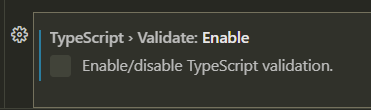
如果使用Visual代码,只需在设置中禁用“类型记录验证”即可。
错误应该消失。
Stack Overflow用户
发布于 2021-11-03 04:13:11
@dioslibre answer工作得很好,但我不想禁用类型记录验证。@Anees Hameed in their answer to a similar question解释的另一种选择是向settings.json添加以下代码段:
 "json.schemas": [
      {
        "$schema": "https://json.schemastore.org/jsconfig"
      }
]Stack Overflow用户
发布于 2020-08-27 22:45:50
错误是告诉您找不到dotenv类型。运行安装类型的npm install dotenv。
https://stackoverflow.com/questions/63525778
复制相似问题
腾讯云开发者

Copyright © 2013 - 2026 Tencent Cloud. All Rights Reserved. 腾讯云 版权所有
深圳市腾讯计算机系统有限公司 ICP备案/许可证号:粤B2-20090059  粤公网安备44030502008569号
腾讯云计算(北京)有限责任公司 京ICP证150476号 | 京ICP备11018762号