
引导4表单检查-更改的顺序:从左到右,从左到右,从上到下,从上到下,从左到下,从左到右。
我有一个简单的Bootstrap表单,显示了一个包含13个选项的复选框--这些选项包括以下内容:
Urban Plans Commercial Entity Cultural Approval Education Sector Hospitality Industrial Design Interiors Art Leisure/ Sporting Residential Care Retail Space Seniors Living Care Warehouse
目前的情况如下:
<link href="https://stackpath.bootstrapcdn.com/bootstrap/4.1.0/css/bootstrap.min.css" rel="stylesheet"/>
<script src="https://stackpath.bootstrapcdn.com/bootstrap/4.1.0/js/bootstrap.min.js"></script>
<script src="https://ajax.googleapis.com/ajax/libs/jquery/2.1.1/jquery.min.js"></script>


<div class="row">

    <div class="col-md-6">

</div><!-- /.col-md-6-->


    <div class="col-md-6">

<table class="table table-striped table-bordered">
                        <thead>
                            <th scope="col">Customer Sectors</th>
                        </thead>
    <tr>


    <td>


                 <label class="checkbox-inline-contacts">
                                <input type="checkbox" id="clientSectors" name="clientSectors[]" value="Urban Plans">Urban Plans                            </label>
                                                        <label class="checkbox-inline-contacts">
                                <input type="checkbox" id="clientSectors" name="clientSectors[]" value="Commercial Entity">Commercial Entity                            </label>
                                                        <label class="checkbox-inline-contacts">
                                <input type="checkbox" id="clientSectors" name="clientSectors[]" value="Cultural Approval">Cultural Approval                            </label>
                                                        <label class="checkbox-inline-contacts">
                                <input type="checkbox" id="clientSectors" name="clientSectors[]" value="Education Sector">Education Sector                          </label>
                                                        <label class="checkbox-inline-contacts">
                                <input type="checkbox" id="clientSectors" name="clientSectors[]" value="Hospitality">Hospitality                            </label>
                                                        <label class="checkbox-inline-contacts">
                                <input type="checkbox" id="clientSectors" name="clientSectors[]" value="Industrial Design">Industrial Design                            </label>
                                                        <label class="checkbox-inline-contacts">
                                <input type="checkbox" id="clientSectors" name="clientSectors[]" value="Interiors Art">Interiors Art                            </label>
                                                        <label class="checkbox-inline-contacts">
                                <input type="checkbox" id="clientSectors" name="clientSectors[]" value="Leisure/ Sporting" checked="checked">Leisure/ Sporting                          </label>
                                                        <label class="checkbox-inline-contacts">
                                <input type="checkbox" id="clientSectors" name="clientSectors[]" value="Residential Care">Residential Care                          </label>
                                                        <label class="checkbox-inline-contacts">
                                <input type="checkbox" id="clientSectors" name="clientSectors[]" value="Retail Space">Retail Space                          </label>
                                                        <label class="checkbox-inline-contacts">
                                <input type="checkbox" id="clientSectors" name="clientSectors[]" value="Seniors Living Care">Seniors Living Care                            </label>
                                                        <label class="checkbox-inline-contacts">
                                <input type="checkbox" id="clientSectors" name="clientSectors[]" value="Student Housing" checked="checked">Student Housing                          </label>
                                                        <label class="checkbox-inline-contacts">
                                <input type="checkbox" id="clientSectors" name="clientSectors[]" value="Warehouse">Warehouse                            </label>


    </td>
    </tr>
    </table>

    </div><!-- /.col-md-6-->

</div><!-- /.row-->
复选框的值是从数据库中检索出来的,因此它们是动态生成的。如您所见,选项从左到右显示,然后为每一行从上到下显示。
下面是一个屏幕截图,以防片段显示不正确:
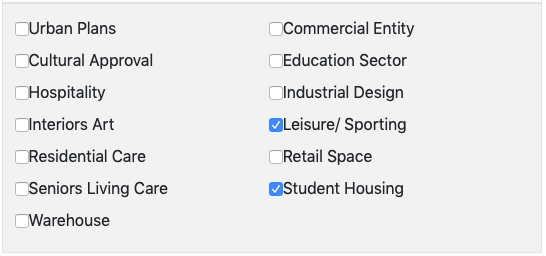
我们希望更改它,以便列表从上到下显示,然后从左到右,因此它将出现在网页上,如下所示:
城市规划休闲/体育
商业实体住宅护理
文化认可零售空间
教育部门老年人生活护理
招待费学生宿舍
工业设计仓库
室内艺术
回答 1
Stack Overflow用户
发布于 2020-08-14 04:46:38
您可以使用CSS列来完成此操作。您可以为复选框的容器创建一个类,并指定:
- 要显示多少列
- 列的最小大小。
例如,下面的类将在2列中显示最小200 by宽度的复选框(一旦屏幕变得太小,不能同时显示这些列,这些列将被堆叠)。
.mycolumns{
    -webkit-column-count: 2;
       -moz-column-count: 2;
            column-count: 2;
    -webkit-column-width: 200px;
       -moz-column-width: 200px;
            column-width: 200px;
}
当然,您可以将其更改为所需的列数和宽度。
工作片段:
.mycolumns{
  -webkit-columns: 2 200px;
     -moz-columns: 2 200px;
          columns: 2 200px;
}
/* put each checkbox on a separate line */
.mycolumns label { display:block}<link href="https://stackpath.bootstrapcdn.com/bootstrap/4.1.0/css/bootstrap.min.css" rel="stylesheet" />
<div class="row">
<div class="col-md-6">
<p>This is your first col-md-6</p>
</div><!-- /.col-md-6-->
<div class="col-md-6">
<h2>Customer Sectors</h2>
<div class="mycolumns">
<label class="checkbox-inline-contacts">
<input type="checkbox" id="clientSectors" name="clientSectors[]" value="Urban Plans">Urban Plans </label>
<label class="checkbox-inline-contacts">
<input type="checkbox" id="clientSectors" name="clientSectors[]" value="Commercial Entity">Commercial Entity </label>
<label class="checkbox-inline-contacts">
<input type="checkbox" id="clientSectors" name="clientSectors[]" value="Cultural Approval">Cultural Approval </label>
<label class="checkbox-inline-contacts">
<input type="checkbox" id="clientSectors" name="clientSectors[]" value="Education Sector">Education Sector </label>
<label class="checkbox-inline-contacts">
<input type="checkbox" id="clientSectors" name="clientSectors[]" value="Hospitality">Hospitality </label>
<label class="checkbox-inline-contacts">
<input type="checkbox" id="clientSectors" name="clientSectors[]" value="Industrial Design">Industrial Design </label>
<label class="checkbox-inline-contacts">
<input type="checkbox" id="clientSectors" name="clientSectors[]" value="Interiors Art">Interiors Art </label>
<label class="checkbox-inline-contacts">
<input type="checkbox" id="clientSectors" name="clientSectors[]" value="Leisure/ Sporting" checked="checked">Leisure/ Sporting </label>
<label class="checkbox-inline-contacts">
<input type="checkbox" id="clientSectors" name="clientSectors[]" value="Residential Care">Residential Care </label>
<label class="checkbox-inline-contacts">
<input type="checkbox" id="clientSectors" name="clientSectors[]" value="Retail Space">Retail Space </label>
<label class="checkbox-inline-contacts">
<input type="checkbox" id="clientSectors" name="clientSectors[]" value="Seniors Living Care">Seniors Living Care </label>
<label class="checkbox-inline-contacts">
<input type="checkbox" id="clientSectors" name="clientSectors[]" value="Student Housing" checked="checked">Student Housing </label>
<label class="checkbox-inline-contacts">
<input type="checkbox" id="clientSectors" name="clientSectors[]" value="Warehouse">Warehouse </label>
</div>
</div>
<!-- /.col-md-6-->
</div>
<!-- /.row-->
https://stackoverflow.com/questions/63406594
复制相似问题
腾讯云开发者

Copyright © 2013 - 2026 Tencent Cloud. All Rights Reserved. 腾讯云 版权所有
深圳市腾讯计算机系统有限公司 ICP备案/许可证号:粤B2-20090059  粤公网安备44030502008569号
腾讯云计算(北京)有限责任公司 京ICP证150476号 | 京ICP备11018762号