
TextInputLayout不会设置errorIconDrawable
当我将style="@style/Widget.Design.TextInputLayout"用于TextInputLayout时,设置app:errorIconDrawable什么也不做。只有当我不设置样式并让它继承应用程序主题(Theme.MaterialComponents.Light.NoActionBar)时,它才能工作。app:endIconDrawable也不起作用,我无法找到替代/解决这个问题的方法。请帮帮我!
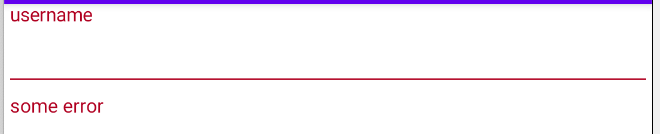
以下内容在继承应用程序主题时有效:Theme.MaterialComponents.Light.NoActionBar,但我不想使用这种样式,特别是下划线与文本不一致:
<com.google.android.material.textfield.TextInputLayout
    android:id="@+id/login_password_input_layout"
    android:layout_width="match_parent"
    android:layout_height="wrap_content"
    android:hint="username"
    app:layout_constraintStart_toStartOf="parent"
    app:layout_constraintTop_toTopOf="parent">

    <com.google.android.material.textfield.TextInputEditText
        android:id="@+id/login_password_input_text"
        android:layout_width="match_parent"
        android:layout_height="wrap_content" />

</com.google.android.material.textfield.TextInputLayout>

这使用了我需要的样式,但不会显示错误图标:
<com.google.android.material.textfield.TextInputLayout
    android:id="@+id/login_password_input_layout"
    android:layout_width="match_parent"
    android:layout_height="wrap_content"
    android:hint="username"
    style="@style/Widget.Design.TextInputLayout"
    app:layout_constraintStart_toStartOf="parent"
    app:layout_constraintTop_toTopOf="parent">

    <com.google.android.material.textfield.TextInputEditText
        android:id="@+id/login_password_input_text"
        android:layout_width="match_parent"
        android:layout_height="wrap_content" />

</com.google.android.material.textfield.TextInputLayout>
回答 2
Stack Overflow用户
发布于 2020-08-14 08:01:33
由于您使用的是遗留样式Widget.Design.TextInputLayout,所以它不支持*.OutlinedBox和*.FilledBox样式所具有的所有文本字段特性。
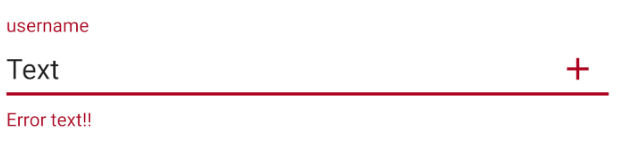
不能在xml中设置errorIconDrawable,必须在TextInputLayout.setError之后调用TextInputLayout.setErrorIconDrawable。
login_password_input_layout.setError("Error text!!");
login_password_input_layout.setErrorIconDrawable(R.drawable....);
Stack Overflow用户
发布于 2020-08-14 06:15:38
嗯,看看你是否直接在下面使用
style=“@style/Widget.Design.extInputLayout”
然后,您的错误可绘制变为空。
我建议您,创建一个样式,根据您的喜好修改这些值。
<style name="TextLabel" parent="Widget.Design.TextInputLayout">
    <item name="android:textColorHint">#f32</item>
    <item name="android:textSize">20sp</item>
    <item name="colorAccent">#4CAF50</item>
    <item name="errorIconDrawable">@drawable/ic_baseline_error_24</item>
    <item name="colorControlNormal">#673AB7</item>
    <item name="colorControlActivated">#E91E63</item>
    <item name="errorEnabled">true</item>
</style>
然后将其应用于via
   <com.google.android.material.textfield.TextInputLayout
        android:id="@+id/login_password_input_layout"
        android:theme="@style/TextLabel"
        android:layout_width="match_parent"
        android:layout_height="wrap_content"
        android:layout_centerInParent="true"
        android:hint="username"
        app:layout_constraintStart_toStartOf="parent"
        app:layout_constraintTop_toTopOf="parent">

        <com.google.android.material.textfield.TextInputEditText
            android:id="@+id/login_password_input_text"
            android:layout_width="match_parent"
            android:layout_height="wrap_content" />

    </com.google.android.material.textfield.TextInputLayout>
这应该能解决。
https://stackoverflow.com/questions/63406480
复制相似问题
腾讯云开发者

Copyright © 2013 - 2026 Tencent Cloud. All Rights Reserved. 腾讯云 版权所有
深圳市腾讯计算机系统有限公司 ICP备案/许可证号:粤B2-20090059  粤公网安备44030502008569号
腾讯云计算(北京)有限责任公司 京ICP证150476号 | 京ICP备11018762号