
gRPC-节点:当*Dockerizing* Service,请求不通过服务的服务器?[包括截图]
我创建了一个非常简单的书店,其中有一个图书、客户和一个主要服务。这一特殊问题涉及到主要的图书服务。
我目前正在发出一个名为“gRPC”的createBook请求,它在DB中创建了一本书,还创建了控制台日志。
在没有停靠器的情况下运行gRPC服务器(booksServer)时,进程运行平稳。
--但一旦我使用了docker,似乎gRPC请求就不会进入gRPC服务器.
我所说的“使用码头”是指使用码头来运行booksServer。(如下所示)
结果:无码头
As you can see, without docker, the request is fulfilled, and everything works as it should.
Our gRPC client makes a call to the gRPC server (in which metadata is created) and the metadata is also sent back to the client.
(Scroll down to see the gRPC server file with the method called "getBooks".)
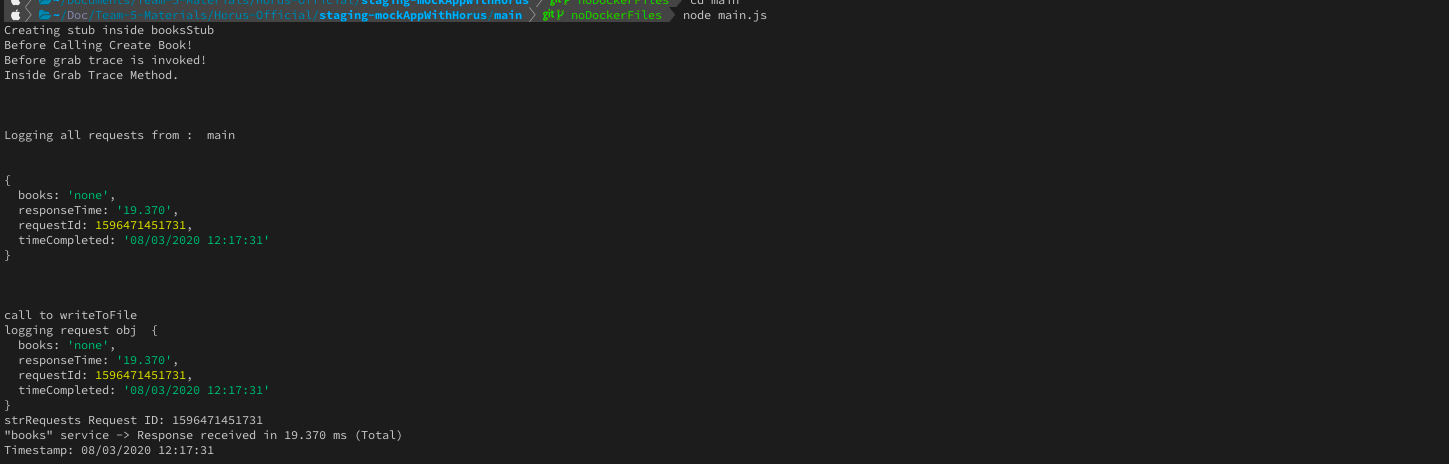
booksServer (无码头)
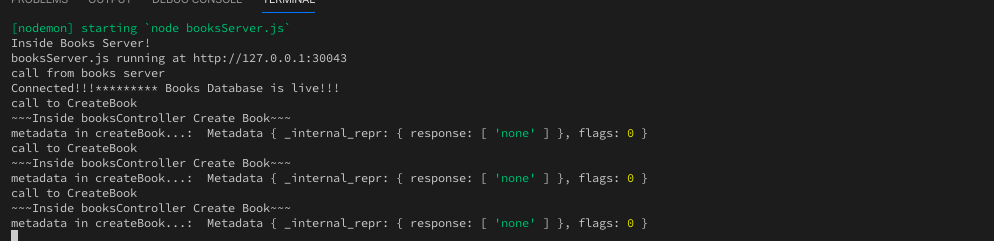
*** Notice the console logs in the booksServer!!! ***让我运行booksServer (与码头)
(下面是Dockerfile)
FROM node:12.14.0
WORKDIR /usr/src/app
COPY package*.json ./
COPY . /usr/src/app
RUN npm install
RUN npm install nodemon -g
EXPOSE 30043
CMD ["nodemon", "booksServer.js"


Here's my main service docker file too which initiates the request:

FROM node:12.14.0
WORKDIR /usr/src/app
COPY package*.json ./
COPY . /usr/src/app
# COPY wait-for-it.sh .
# RUN chmod +x /wait-for-it.sh
RUN npm install
EXPOSE 4555
CMD ["node", "main.js"]
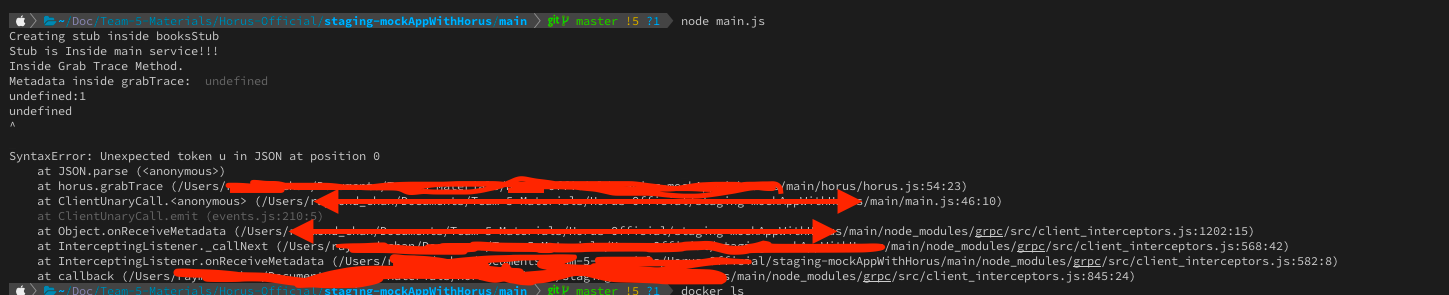
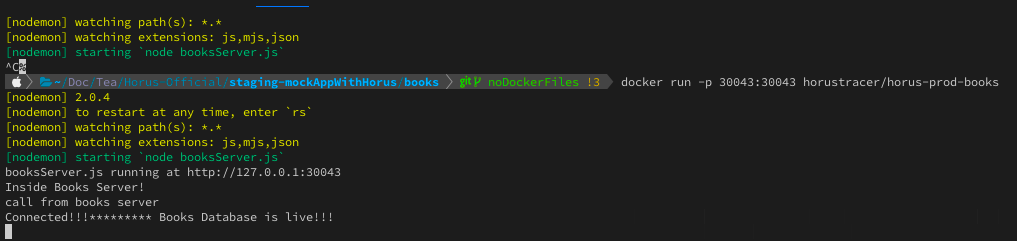
^^^ Notice how when dockerfile is used to run booksServer
it doesn't go/run inside the booksServer file
***It does NOT produce any console.logs when I fire off a gRPC requesst***
--这是booksServer.js文件的样子,
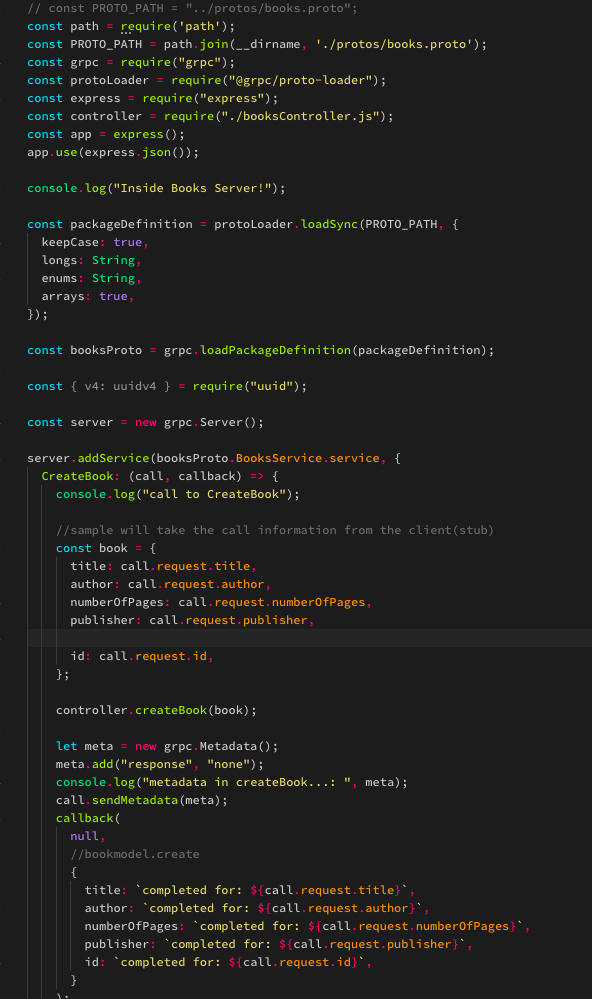
来了Books
//use this for bookInitiator
const path = require('path');
const PROTO_PATH = path.join(__dirname, "../protos/books.proto");

const grpc = require("grpc");
const protoLoader = require("@grpc/proto-loader");

const packageDefinition = protoLoader.loadSync(PROTO_PATH, {
  keepCase: true,
  longs: String,
  enums: String,
  arrays: true
});

const BooksService = grpc.loadPackageDefinition(packageDefinition).BooksService;

// potential issues to fix 1) making localhost port dynamic 2) docker containerization may cause conflict

const client = new BooksService (
  "172.17.0.2:30043",
  grpc.credentials.createInsecure()
);

console.log("Creating stub inside booksStub");
module.exports = client;
这里是gRPC服务器文件(带有绑定端口).
// const PROTO_PATH = "../protos/books.proto";
const path = require('path');
const PROTO_PATH = path.join(__dirname, './protos/books.proto');
const grpc = require("grpc");
const protoLoader = require("@grpc/proto-loader");
const express = require("express");
const controller = require("./booksController.js");
const app = express();
app.use(express.json());

const packageDefinition = protoLoader.loadSync(PROTO_PATH, {
  keepCase: true,
  longs: String,
  enums: String,
  arrays: true,
});

const booksProto = grpc.loadPackageDefinition(packageDefinition);

const { v4: uuidv4 } = require("uuid");

const server = new grpc.Server();

server.addService(booksProto.BooksService.service, {
  CreateBook: (call, callback) => {
    console.log("call to CreateBook");

    //sample will take the call information from the client(stub)
    const book = {
      title: call.request.title,
      author: call.request.author,
      numberOfPages: call.request.numberOfPages,
      publisher: call.request.publisher,

      id: call.request.id,
    };

    controller.createBook(book);

    let meta = new grpc.Metadata();
    meta.add("response", "none");
    console.log("metadata in createBook...: ", meta);
    call.sendMetadata(meta);

    callback(
      null,
      //bookmodel.create
      {
        title: `completed for: ${call.request.title}`,
        author: `completed for: ${call.request.author}`,
        numberOfPages: `completed for: ${call.request.numberOfPages}`,
        publisher: `completed for: ${call.request.publisher}`,
        id: `completed for: ${call.request.id}`,
      }
    );
  },
  GetBooks: (call, callback) => {
    console.log("call to GetBooks");
    // read from database
    let meta = new grpc.Metadata();
    meta.add('response', 'none');
    call.sendMetadata(meta);

    controller.getBooks(callback);
  }
});

server.bind("0.0.0.0:30043", grpc.ServerCredentials.createInsecure());
console.log("booksServer.js running at 0.0.0.0:30043");
console.log("Inside Books Server!");
console.log("call from books server");

server.start();
horus.js (定制的简单跟踪工具),获取跟踪,捕捉某个请求的过程,并将其作为元数据发送回gRPC客户端。
const fs = require("fs");
const grpc = require("grpc");
const path = require("path");

class horus {
  constructor(name) {
    this.serviceName = name; // represents the name of the microservices
    this.startTime = null;
    this.endTime = null;
    this.request = {};
    this.targetService = null; // represents the location to which the request was made
    this.allRequests = []; // array which stores all requests
    this.timeCompleted = null;
    this.call;
  }

  static getReqId() {
    // primitive value - number of millisecond since midnight January 1, 1970 UTC
    // add service name/ initials to the beginning of reqId?
    return new Date().valueOf();
  }

  // start should be invoked before the request is made
  // start begins the timer and initializes the request as pending
  start(targetService, call) {
    this.startTime = Number(process.hrtime.bigint());
    this.request[targetService] = "pending"; // {books: 'pending', responseTime: 'pending'}
    this.request.responseTime = "pending";
    this.targetService = targetService;
    this.call = call;
    this.request.requestId = horus.getReqId();
  }
  // end should be invoked when the request has returned
  end() {
    this.endTime = Number(process.hrtime.bigint());
    this.request.responseTime = (
      (this.endTime - this.startTime) /
      1000000
    ).toFixed(3); //converting into ms.
    this.sendResponse();
    this.request.timeCompleted = this.getCurrentTime();
  }
  // grabTrace accepts inserts trace into request
  // trace represents the "journey" of the request
  // trace expects metaData to be 'none when the server made no additional requests
  // trace expects metaData to be the request object generated by the server otherwise
  // in gRPC, the trace must be sent back as meta data. objects should be converted with JSON.parse
  grabTrace(metaData) {
    //console.log("incoming meta data ", metaData);
    console.log("Inside Grab Trace Method.");
    console.log("Metadata inside grabTrace: ", metaData);
    if (metaData === "none" || metaData === undefined) this.request[this.targetService] = "none";
    else {
      metaData = JSON.parse(metaData);
      this.request[this.targetService] = metaData;
    }
    this.allRequests.push(this.request);
    this.sendResponse();
  }
  // displayRequests logs to the console all stored requests
  // setTimeout builds in deliberate latency since metadata may be sent before or after a request is done processing
  displayRequests() {
    console.log("\n\n");
    console.log("Logging all requests from : ", this.serviceName);
    this.allRequests.forEach((request) => {
      console.log("\n");
      console.log(request);
    });
    console.log("\n\n");
  }
  // sends response via metadata if service is in the middle of a chain
  sendResponse() {
    if (
      this.request.responseTime === "pending" ||
      this.request[this.targetService] === "pending" ||
      this.call === undefined
    )
      return;
    console.log("Inside send response");
    let meta = new grpc.Metadata();
    meta.add("response", JSON.stringify(this.request));
    console.log('meta in send response: ', meta)
    this.call.sendMetadata(meta);
  }
  writeToFile() {
    console.log("call to writeToFile");
    console.log("logging request obj ", this.request);
    let strRequests = "";
    for (let req of this.allRequests) {
      // First write to file - contains Total
      // subsequent - chained requests
      strRequests += `Request ID: ${req.requestId}\n`;
      strRequests += `"${
        Object.keys(req)[0]
      }" service -> Response received in ${Object.values(req)[1]} ms (Total)\n`;
      strRequests += `Timestamp: ${req.timeCompleted}\n`;
      // while we don't hit an empty object on the 1st key, go inside
      // add numbering in order for nested requests inside original?!
      let innerObj = Object.values(req)[0];
      while (innerObj !== "none") {
        strRequests += `"${
          Object.keys(innerObj)[0]
        }" service -> Response received in ${Object.values(innerObj)[1]} ms\n`;
        strRequests += `Timestamp: ${innerObj.timeCompleted}\n`;
        innerObj = Object.values(innerObj)[0];
      }
      strRequests +=
        "~~~~~~~~~~~~~~~~~~~~~~~~~~~~~~~~~~~~~~~~~~~~~~~~~~~~~~~\n";
    }
    console.log('strRequests', strRequests)
    fs.writeFile(this.serviceName + 'data' + '.txt', strRequests, { flag: "a+" }, (err) => {
      if (err) {
        console.error(err);
      }
    }); //'a+' is append mode
  }

module.exports = horus;
main.js (初始化gRPC客户端请求)
const path = require('path');
// const grpc = require("grpc");
const customersStub = require("./stubs/customersStub.js");
const booksStub = require("./stubs/booksStub.js");
const horusTracer = require(path.join(__dirname, "./horus/horus.js"));

//In master branch
console.log("Stub is Inside main service!!!");

const book = {
  title: "ITttttt",
  author: "Stephen King",
  numberOfPages: 666,
  publisher: "Random House",
  id: 200,
};

const bookId = {
  id: 200
}

const customer = {
  id: 123,
  name: "Lily",
  age: 23,
  address: "Blablabla",
  favBookId: 100
};

const customerId = {
  id: 123
}

let ht = new horusTracer("main");


function CreateBook () {
  ht.start('books')
  booksStub.CreateBook(book, (error, response) => {
    if (error) console.log("there was an error ", error);
    ht.end();
    ht.displayRequests();
    ht.writeToFile();
  }).on('metadata', (metadata) => {
    console.log("Before grab trace is invoked!");
    ht.grabTrace(metadata.get('response')[0]);
  });
}

}


CreateBook(); //Works
我认为这是个问题.
Edit: murgatroid99 mentioned that it was a networking issue with docker!


~~~~~~~~~
I initially thought this was a networking issue, but I don't think it is
because all my docker files are running on the default bridge network.
So they all technically can communicate with one another...

Is it something wrong with nodemon interacting with Docker?
Does the server not output the console logs...?
Is the server actually running and working...?

Do I need a reverse proxy like nginx?

``回答 1
Stack Overflow用户
发布于 2020-08-03 21:14:45
问题是您的服务器绑定到"127.0.0.1:30043“。您说您正在使用默认桥接器网络运行对接者映像。在这种模式下,对接者映像具有与主机不同的(虚拟)网络,因此其回送地址与主机的回送地址不同。要解决这个问题,您可以将服务器绑定到0.0.0.0:30043或[::]:30043,以绑定到客户端可以从码头容器外部连接到的其他网络接口。
出于同样的原因,将客户端连接到localhost:30043将无法工作:它的"localhost“地址也引用了对接器容器中的回送接口。您应该将"localhost“替换为服务器容器的IP地址。
或者,如this question中所述,您可以在“主机”模式下对码头容器进行网络连接,以便它们与主机共享相同的网络。
https://stackoverflow.com/questions/63235024
复制相似问题
腾讯云开发者

Copyright © 2013 - 2026 Tencent Cloud. All Rights Reserved. 腾讯云 版权所有
深圳市腾讯计算机系统有限公司 ICP备案/许可证号:粤B2-20090059  粤公网安备44030502008569号
腾讯云计算(北京)有限责任公司 京ICP证150476号 | 京ICP备11018762号