
Azure Devops nuget神器饲料和码头
是否有一种好的方法可以为Devops创建身份验证机制以访问工件NuGet提要?我想为我的团队创建一个基本映像,允许他们从我们的Azure容器注册表中提取一个图像,它可以访问我们的devops提要。理想情况下,人们不必在每一个从其主机构建系统中获取PAT的项目中都有相同的股票dockerfile代码。这也将使我们能够更好地做到这一点。
我目前的解决方案
FROM mcr.microsoft.com/dotnet/core/sdk:3.1 AS build-env
WORKDIR /app

ARG IT_PAT
ENV VSS_NUGET_EXTERNAL_FEED_ENDPOINTS "{\"endpointCredentials\": [{\"endpoint\": \"https://pkgs.dev.azure.com/MNPIT/_packaging/MNP/nuget/v3/index.json\",\"username\": \"build\",\"password\": \"${IT_PAT}\"}]}"
RUN mkdir -p $HOME/.nuget/plugins
WORKDIR /deps

# Downloads and installs the NuGet credential plugin so we can login to the private NuGet feed
RUN curl https://github.com/microsoft/artifacts-credprovider/releases/download/v0.1.24/Microsoft.NetCore2.NuGet.CredentialProvider.tar.gz -L -o creds.tar.gz -s
RUN tar -xzf creds.tar.gz
RUN cp -r plugins/netcore/ ~/.nuget/plugins- 每个构建文件中的股票代码
- 每个用户使用PAT配置他们的环境变量
- 在每一个构建上传递PAT
- 不适用于自动生成系统。
回答 2
Stack Overflow用户
发布于 2020-07-30 05:29:55
我想为我的团队创建一个基本映像,允许他们从我们的Azure容器注册表中提取一个图像,它可以访问我们的devops提要。
为了实现这一点,您可以在映像中包含凭据,但出于安全考虑,最好添加一些额外的步骤或代码,以便从图像外部传递凭据。
根据您的当前解决方案,您可以使用系统预定义变量 $(System.AccessToken)在azure管道中获取安全令牌。然后在docker构建任务中,将访问令牌作为争论传递给ARG IT_PAT,
--build-arg IT_PAT=$(System.AccessToken)
除了使用NuGet凭据插件之外,还可以使用dotnet向nuget源代码添加凭据。然后在构建论证中传递$(System.AccessToken)。见下文:
ARG PAT
COPY . .
RUN dotnet nuget add source "your-source-url" --name "source-name" --username "useless" --password "$PAT" --store-password-in-clear-text
RUN dotnet restore另一个解决方法是将nuget.config包含在构建上下文中。但是您需要首先包含一个没有凭据的nuget.config文件,然后添加一个额外的nuget任务来将凭据添加到配置文件中。然后将nuget.config复制到您的停靠文件中。见下文:
添加一个nuget任务,在自定义命令下运行,以将凭据添加到nuget.config文件中。
sources Add -Name "MyPackages" -Source "https://my.pkgs.visualstudio.com/_packaging/MyPackages/nuget/v3/index.json" -username any -password $(System.AccessToken) -ConfigFile Source/Nuget.config -StorePasswordInClearText在停靠文件中复制nuget.config,还原完成后不要忘记删除nuget.config文件:
COPY *.csproj .
COPY ./nuget.config .
RUN dotnet restore
RUN rm nuget.config如果您正在使用基于Yaml的管道。您还可以查看集装箱作业。然后通过设置集装箱端点来使用您的私有容器。然后可以直接使用管道中的还原任务。参见下面的示例,nuget还原任务将在您的私有容器中运行,它可以通过为您的nuget提要指定属性vstsFeed直接访问您的azure提要:
在管道中指定容器时,代理将首先获取并启动容器。然后,作业的每一步都将在容器中运行。
container:
  image: myprivate/registry:ubuntu1604
  endpoint: private_dockerhub_connection

steps:
- task: NuGetCommand@2
  inputs:
    command: 'restore'
    feedsToUse: 'select'
    vstsFeed: 'my-azure-nuget-feed'
restoreSolution: '**/*.sln'有关更多信息,您可以查看这条线。
Stack Overflow用户
发布于 2021-01-19 09:38:38
YAML
- 运行
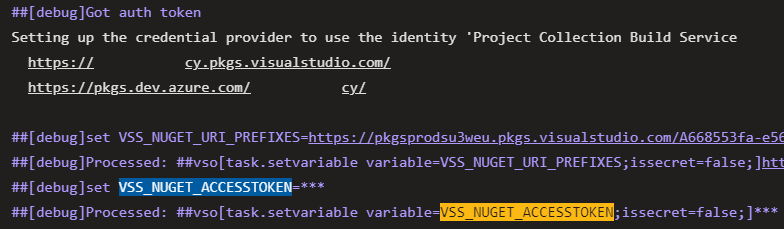
NuGetAuthenticate任务将VSS_NUGET_ACCESSTOKEN添加到环境变量(更多信息) - 将令牌作为参数传递给
Docker任务
- task: NuGetAuthenticate@0

- task: Docker@2
  displayName: 'build docker image'
  inputs:
    command: build
    containerRegistry: 'happycodeacr'
    repository: 'hc-app-sample-api-dev'
    buildContext: '$(Pipeline.Workspace)/app'
    Dockerfile: '$(Pipeline.Workspace)/app/src/HappyCode.Api/Dockerfile'
    arguments: '--build-arg FEED_ACCESSTOKEN=$(VSS_NUGET_ACCESSTOKEN)'
    tags: |
      latest
      $(Build.BuildId)
Dockerfile
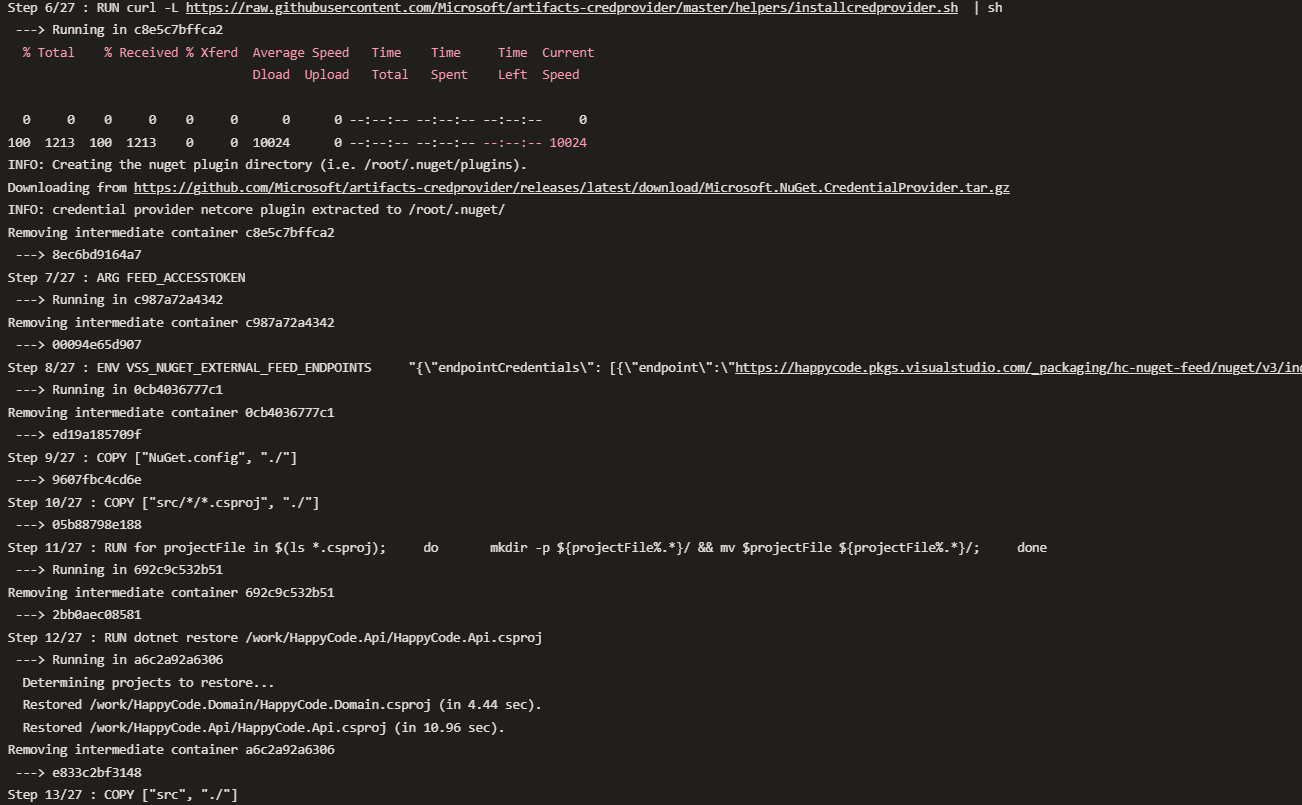
- 下载和安装工件提供程序(更多信息)
- 接收令牌
- 为nuget恢复过程设置带有提要url和令牌的
VSS_NUGET_EXTERNAL_FEED_ENDPOINTS环境变量 - 复制
NuGet.config文件 - 运行
dotnet restore
FROM mcr.microsoft.com/dotnet/core/sdk:3.1-buster AS build
WORKDIR /work

RUN curl -L https://raw.githubusercontent.com/Microsoft/artifacts-credprovider/master/helpers/installcredprovider.sh  | sh
ARG FEED_ACCESSTOKEN
ENV VSS_NUGET_EXTERNAL_FEED_ENDPOINTS \
    "{\"endpointCredentials\": [{\"endpoint\":\"https://happycode.pkgs.visualstudio.com/_packaging/hc-nuget-feed/nuget/v3/index.json\", \"password\":\"${FEED_ACCESSTOKEN}\"}]}"
COPY ["NuGet.config", "./"]

COPY ["src/*/*.csproj", "./"]
RUN for projectFile in $(ls *.csproj); \
    do \
      mkdir -p ${projectFile%.*}/ && mv $projectFile ${projectFile%.*}/; \
    done
RUN dotnet restore /work/HappyCode.Api/HappyCode.Api.csproj

# further instructions
https://stackoverflow.com/questions/63158785
复制相似问题
腾讯云开发者

Copyright © 2013 - 2026 Tencent Cloud. All Rights Reserved. 腾讯云 版权所有
深圳市腾讯计算机系统有限公司 ICP备案/许可证号:粤B2-20090059  粤公网安备44030502008569号
腾讯云计算(北京)有限责任公司 京ICP证150476号 | 京ICP备11018762号