
带有角和弹簧误差的密钥披风:获取http://localhost:8180/auth/realms/Storage/protocol/openid-connect/3p-cookies/step1.html 404 (未找到)
我正在尝试将Keycloak与Spring和角集成在一起。
保安工作正常。当我试图通过浏览器localhost:8080/products/1 (产品是数据库中的实体)手动访问安全端点时,我被重定向到Keycloak登录客户端,登录后我可以访问端点。
我一直在收藏这个教程。
当我试图访问localhost:4200 (角应用程序主页)时会出现问题,在浏览器控制台中我会收到以下错误:

keycloak.js:1305 GET http://localhost:8180/auth/realms/Storage/protocol/openid-connect/3p-cookies/step1.html 404 (Not Found)弹簧配置文件:application-local.yml
keycloak:
  auth-server-url: 'http://localhost:8180/auth'
  realm: 'Storage'
  resource: 'storage-app-client'
  public-client: true
  principal-attribute: test123
其余的配置文件摘自上述教程。
密钥掩蔽域:
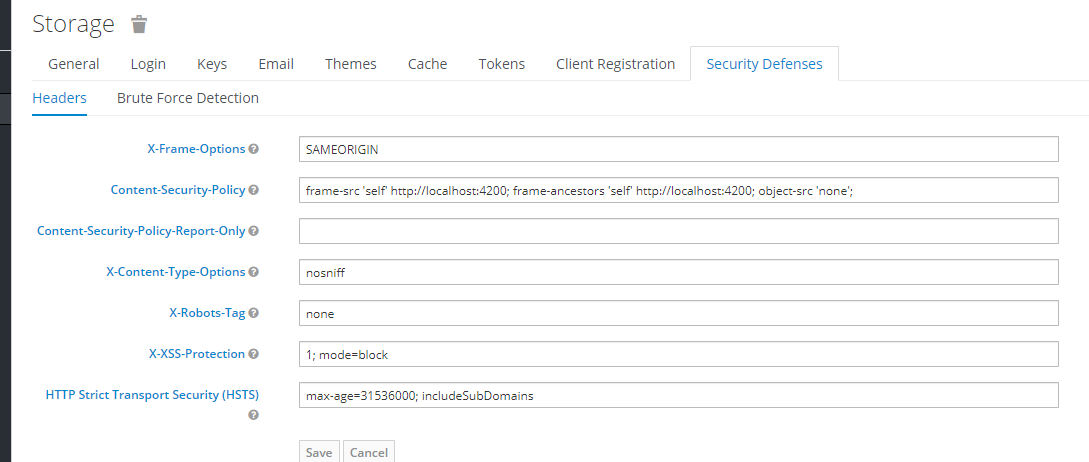
角的密钥披风初始化:
@Injectable({
  providedIn: 'root'
})
export class KeycloakService
{
  private keycloakAuth: KeycloakInstance;

  constructor()
  {
  }

  init(): Promise<any>
  {
    return new Promise((resolve, reject) =>
    {
      const config = {
        'url': 'http://localhost:8180/auth',
        'realm': 'Storage',
        'clientId': 'storage-app-client'
      };
      // @ts-ignore
      this.keycloakAuth = new Keycloak(config);
      this.keycloakAuth.init({onLoad: 'login-required'})
        .success(() =>
        {
          resolve();
        })
        .error(() =>
        {
          reject();
        });
    });
  }

  getToken(): string
  {
    return this.keycloakAuth.token;
  }

  logout()
  {
    const options = {
      'redirectUri': 'http://localhost:4200',
      'realm': 'Storage',
      'clientId': 'storage-app-client'
    };
    this.keycloakAuth.logout(options);
  }
}
app.module.ts
import {BrowserModule} from '@angular/platform-browser';
import {APP_INITIALIZER, NgModule} from '@angular/core';

import {AppComponent} from './app.component';
import {BrowserAnimationsModule} from '@angular/platform-browser/animations';
import {HTTP_INTERCEPTORS, HttpClient, HttpClientModule} from "@angular/common/http";
import {MatSliderModule} from '@angular/material/slider';
import {MatToolbarModule} from '@angular/material/toolbar';
import {MatIconModule} from '@angular/material/icon';
import {RouterModule} from '@angular/router';
import {NavbarComponent} from './components/navbar/navbar.component';
import {MainContentComponent} from './components/main-content/main-content.component';
import {ProductComponent} from './components/products/product/product.component';
import {HomeComponent} from './components/home/home.component';
import {ProductGroupComponent} from './components/productGroups/productGroup/product-group.component';
import {FooterComponent} from './components/footer/footer.component';
import {MatTableModule} from "@angular/material/table";
import {MatButtonModule} from "@angular/material/button";
import {MatPaginatorModule} from "@angular/material/paginator";
import {ProductUpdateComponent} from './components/products/product-update/product-update.component';
import {MatFormFieldModule} from "@angular/material/form-field";
import {FormsModule, ReactiveFormsModule} from "@angular/forms";
import {MatInputModule} from "@angular/material/input";
import {ProductCreateComponent} from './components/products/product-create/product-create.component';
import {MatSortModule} from "@angular/material/sort";
import {ProductGroupUpdateComponent} from './components/productGroups/product-group-update/product-group-update.component';
import {ProductGroupCreateComponent} from './components/productGroups/product-group-create/product-group-create.component';
import {MatExpansionModule} from "@angular/material/expansion";
import {MatSelectModule} from "@angular/material/select";
import {LogoutComponent} from "./components/logout/logout.component";
import {KeycloakService} from "./services/keycloak-service.service";
import {TokenInterceptor} from "./interceptors/token-interceptor";

export function kcFactory(keycloakService: KeycloakService) {
  return () => keycloakService.init();
}

@NgModule({
  declarations: [
    AppComponent,
    NavbarComponent,
    MainContentComponent,
    ProductComponent,
    HomeComponent,
    ProductGroupComponent,
    FooterComponent,
    ProductUpdateComponent,
    ProductCreateComponent,
    ProductGroupUpdateComponent,
    ProductGroupCreateComponent,
    LogoutComponent
  ],
  imports: [
    BrowserModule,
    BrowserAnimationsModule,
    HttpClientModule,
    MatSliderModule,
    MatToolbarModule,
    MatIconModule,
    RouterModule.forRoot([
      {path: '', component: HomeComponent},
      {path: 'products/update/:id', component: ProductUpdateComponent},
      {path: 'products/add', component: ProductCreateComponent},
      {path: 'groups', component: ProductGroupComponent},
      {path: 'groups/add', component: ProductGroupCreateComponent},
      {path: 'groups/update/:id', component: ProductGroupUpdateComponent},
      {path: 'logout', component: LogoutComponent},
    ]),
    MatTableModule,
    MatButtonModule,
    MatPaginatorModule,
    MatFormFieldModule,
    ReactiveFormsModule,
    MatInputModule,
    MatSortModule,
    MatExpansionModule,
    MatSelectModule,
    FormsModule
  ],
  providers: [KeycloakService,
    {
      provide: APP_INITIALIZER,
      useFactory: kcFactory,
      deps: [KeycloakService],
      multi: true
    },
    {
      provide: HTTP_INTERCEPTORS,
      useClass: TokenInterceptor,
      multi: true
    }],
  bootstrap: [AppComponent]
})
export class AppModule {
}
密钥披风客户端
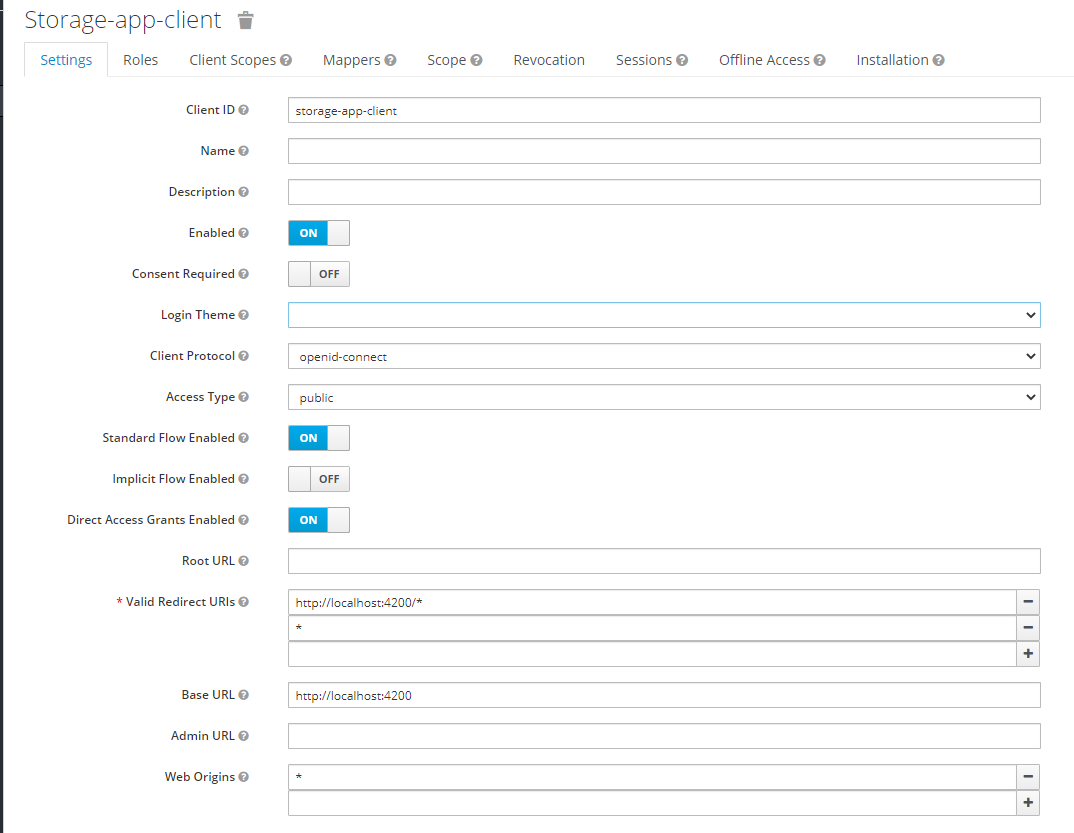
回答 10
Stack Overflow用户
发布于 2020-07-28 14:08:19
我感觉到你的痛苦。我今天正在学习本教程,并陷入相同的GET 404错误中:
https://dev.to/anjnkmr/keycloak-integration-in-angular-application-5a43
错误来自keycloak包。经过几个小时的努力寻找原因,我检查了keycloak的发行版本,发现新版本11是6天前发布的(而且我正在使用)。
我切换到了版本10.0.2,用于keycloak-js包。
总之,这里有以下几个版本:
钥匙斗篷: 10.0.1
钥匙斗篷-js: 10.0.2
钥匙斗篷-角度: 8.0.1 (如果你使用它)
角度: 10** (在一个绝望的移动中,我已经将角度从9提升到10,我不知道它是否产生了影响)
因此,对我来说,是新版本的keycloak包导致了所有的麻烦。
我建议你试着把keycloak-js的等级降到10.0.2。
Stack Overflow用户
发布于 2020-07-29 04:48:28
尝试通过路径/auth/js/keycloak.js从您的keycloak服务器使用keycloak.js的一个版本。
库可以在/auth/js/keycloak.js上直接从Keycloak服务器检索,还可以作为ZIP存档分发。最佳实践是直接从Keycloak加载JavaScript适配器,因为在升级服务器时它将自动更新。如果将适配器复制到web应用程序,请确保只在升级服务器后才升级适配器。
您可以参考这获得更多的详细信息。
Stack Overflow用户
发布于 2021-02-11 03:07:21
我也面临着同样的问题。我使用了服务器上的keycloak.js,我的应用程序是react。
索引html
<script src="https://sso-blabla.com/auth/js/keycloak.js"></script>然后在下面的react应用程序中使用这个
const Keycloak = window.Keycloak;我不确定这是最好的办法。但我用这个是因为它只是个战俘。
https://stackoverflow.com/questions/63111877
复制相似问题
腾讯云开发者

Copyright © 2013 - 2026 Tencent Cloud. All Rights Reserved. 腾讯云 版权所有
深圳市腾讯计算机系统有限公司 ICP备案/许可证号:粤B2-20090059  粤公网安备44030502008569号
腾讯云计算(北京)有限责任公司 京ICP证150476号 | 京ICP备11018762号