
实现透镜放大放大Windows任务栏
我希望能够在窗口任务栏的顶部执行镜头壮丽。到目前为止,我没有成功地实现这个功能,因为任务栏总是会在我的窗口顶部打开。Windows内置放大镜能够做到这一点,所以我希望它确实是可能的。
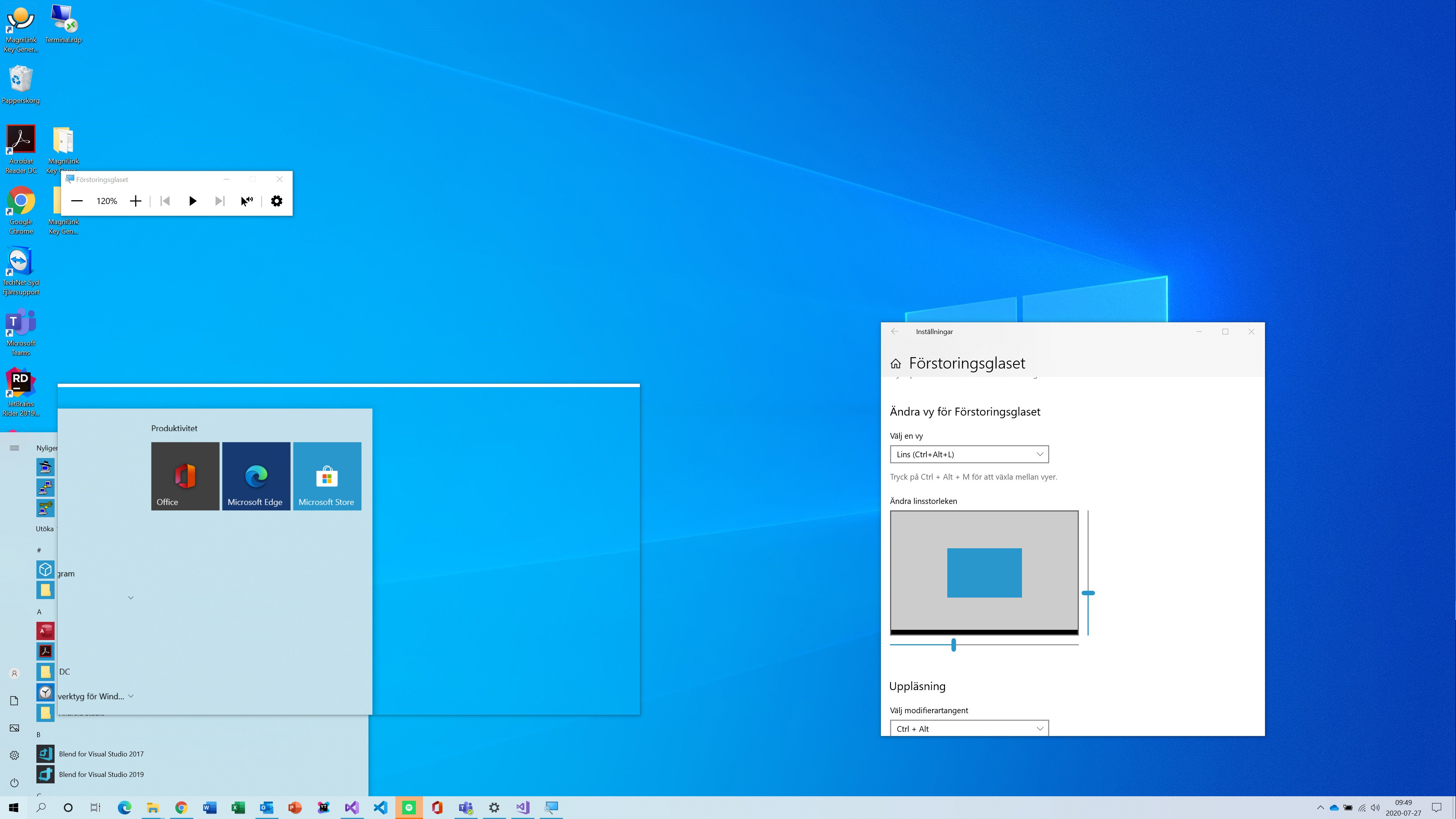
我附上了两个屏幕截图,显示Windows内置放大镜,以及它如何放大任务栏,以及我的应用程序如何在任务栏下面呈现。
内置窗口放大镜:
我的申请:
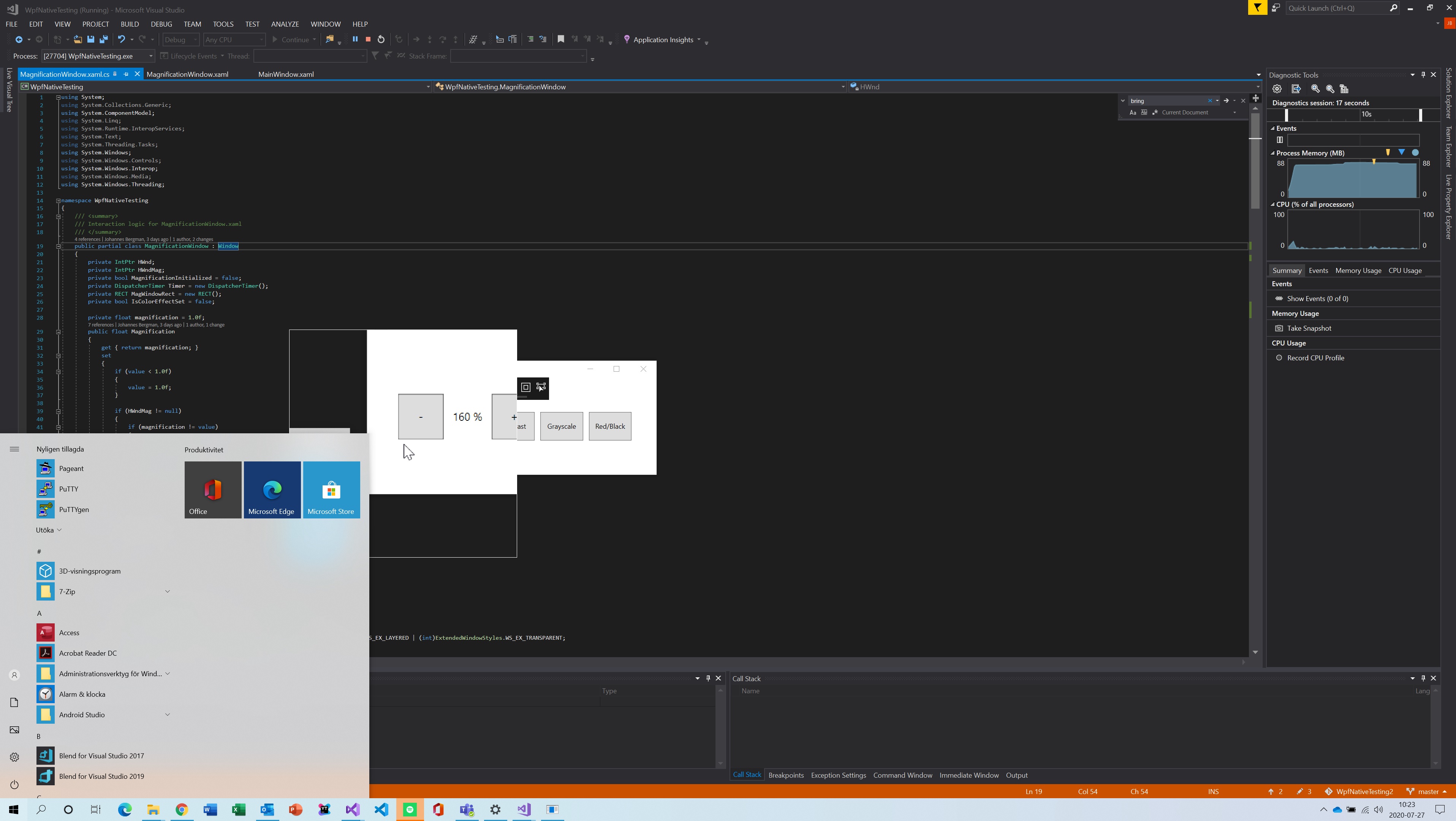
是否有任何方法使我的应用程序呈现在任务栏之上,从而放大任务栏?
<Window x:Class="WpfNativeTesting.MagnificationWindow"
        xmlns="http://schemas.microsoft.com/winfx/2006/xaml/presentation"
        xmlns:x="http://schemas.microsoft.com/winfx/2006/xaml"
        xmlns:d="http://schemas.microsoft.com/expression/blend/2008"
        xmlns:mc="http://schemas.openxmlformats.org/markup-compatibility/2006"
        xmlns:local="clr-namespace:WpfNativeTesting"
        mc:Ignorable="d"
        Title="MagnificationWindow"

        Height="400"
        Width="400"

        WindowStyle="None"
        ResizeMode="NoResize"
        AllowsTransparency="true"
        ShowInTaskbar="False"
        Topmost="True">
    <Grid x:Name="ContainerGrid">
        <Grid x:Name="MagnificationGrid" />
    </Grid>
</Window>public partial class MagnificationWindow : Window
{
private IntPtr HWnd;
private IntPtr HWndMag;
private bool MagnificationInitialized = false;
private DispatcherTimer Timer = new DispatcherTimer();
private RECT MagWindowRect = new RECT();
private bool IsColorEffectSet = false;
private float magnification = 1.0f;
public float Magnification
{
get { return magnification; }
set
{
if (value < 1.0f)
{
value = 1.0f;
}
if (HWndMag != null)
{
if (magnification != value)
{
magnification = value;
Transformation matrix = new Transformation(magnification);
NativeMethods.MagSetWindowTransform(HWndMag, ref matrix);
}
}
}
}
public MagnificationWindow()
{
InitializeComponent();
Loaded += MagnificationWindow_Loaded;
Show();
}
private void MagnificationWindow_Loaded(object sender, RoutedEventArgs e)
{
HWnd = new WindowInteropHelper(this).Handle;
var exStyle = NativeMethods.GetWindowLong(HWnd, NativeMethods.GWL_EXSTYLE);
exStyle |= (int)ExtendedWindowStyles.WS_EX_TOPMOST | (int)ExtendedWindowStyles.WS_EX_LAYERED | (int)ExtendedWindowStyles.WS_EX_TRANSPARENT;
NativeMethods.SetWindowLong(HWnd, NativeMethods.GWL_EXSTYLE, exStyle);
var style = NativeMethods.GetWindowLong(HWnd, NativeMethods.GWL_STYLE);
style |= (int)WindowStyles.WS_CAPTION | (int)WindowStyles.WS_SYSMENU;
NativeMethods.SetWindowLong(HWnd, NativeMethods.GWL_STYLE, exStyle);
MagnificationInitialized = NativeMethods.MagInitialize();
if (MagnificationInitialized)
{
SetupMagnifier();
Timer.Interval = TimeSpan.FromMilliseconds(NativeMethods.USER_TIMER_MINIMUM);
Timer.Tick += Timer_Tick;
Timer.Start();
}
}
protected override void OnClosing(CancelEventArgs e)
{
base.OnClosing(e);
RemoveMagnifier();
}
private void Timer_Tick(object sender, EventArgs e)
{
UpdateMaginifier();
}
private void SetupMagnifier()
{
var hInst = NativeMethods.GetModuleHandle(null);
NativeMethods.GetClientRect(HWnd, ref MagWindowRect);
HWndMag = NativeMethods.CreateWindow((int)ExtendedWindowStyles.WS_EX_STATICEDGE, NativeMethods.WC_MAGNIFIER,
"MagnificationWindow", (int)WindowStyles.WS_CHILD | (int)MagnifierStyle.MS_SHOWMAGNIFIEDCURSOR | (int)WindowStyles.WS_VISIBLE,
MagWindowRect.left, MagWindowRect.top, MagWindowRect.right, MagWindowRect.bottom, HWnd, IntPtr.Zero, hInst, IntPtr.Zero);
NativeMethods.MagShowSystemCursor(false);
if (HWndMag == IntPtr.Zero)
{
return;
}
var matrix = new Transformation(Magnification);
NativeMethods.MagSetWindowTransform(HWndMag, ref matrix);
}
private void UpdateMaginifier()
{
if (!MagnificationInitialized || HWndMag == IntPtr.Zero)
{
return;
}
POINT mousePoint = new POINT();
RECT sourceRect = new RECT();
NativeMethods.GetCursorPos(ref mousePoint);
int width = (int)((MagWindowRect.right - MagWindowRect.left) / Magnification);
int height = (int)((MagWindowRect.bottom - MagWindowRect.top) / Magnification);
sourceRect.left = mousePoint.x - width / 2;
sourceRect.top = mousePoint.y - height / 2;
NativeMethods.MagSetWindowSource(HWndMag, sourceRect);
POINT mouse = new POINT();
NativeMethods.GetCursorPos(ref mouse);
NativeMethods.SetWindowPos(HWnd, NativeMethods.HWND_TOPMOST, mouse.x - (int)(magnification * width / 2), mouse.y - (int)(magnification * height / 2), width, height,
(int)SetWindowPosFlags.SWP_NOACTIVATE |
(int)SetWindowPosFlags.SWP_NOSIZE);
NativeMethods.InvalidateRect(HWndMag, IntPtr.Zero, true);
}
public void RemoveMagnifier()
{
if (MagnificationInitialized)
{
NativeMethods.MagUninitialize();
MagnificationInitialized = false;
}
}
// ...
}回答 1
Stack Overflow用户
发布于 2020-07-31 14:04:04
我在微软的Q/A论坛上发布了这个问题,并找到了一个解决方案,使其发挥作用。
我们需要通过在清单中设置uiAcess=true,对可执行文件进行签名,并将其放置在安全的位置(例如程序文件),使其成为一个可访问性应用程序,如下所述:
- 将清单中的uiAccess=true设置为在Visual中设置此选项,方法是将Linker \ manifest文件\ UAC保护设置为Yes
在可执行文件(参见https://learn.microsoft.com/en-us/previous-versions/bb756995(v=msdn.10) )上签名的
- 将其置于安全位置(请参阅
- )
在对应用程序进行签名之前,我将其放置在一个安全位置,并使用以下命令创建证书并对应用程序进行签名。
makecert /n "CN=Company,O=Company,C=SE“/r /pe /h 0 /eku”1.3.6.1.5.7.3.3,1.6.1.4.311.10.3.13“/e 01/01/2021 /sv Company.cer Pvk2Pfx /pvk Company.pvk /pi /n 20”密码“”密码“
最后
签名工具签署/f "Company.pfx“/p密码"application".exe
就这样!
https://stackoverflow.com/questions/63111438
复制相似问题
腾讯云开发者

Copyright © 2013 - 2026 Tencent Cloud. All Rights Reserved. 腾讯云 版权所有
深圳市腾讯计算机系统有限公司 ICP备案/许可证号:粤B2-20090059  粤公网安备44030502008569号
腾讯云计算(北京)有限责任公司 京ICP证150476号 | 京ICP备11018762号