
GeometryReader在SwiftUI中的行为
GeometryReader在SwiftUI中的行为
提问于 2020-07-24 00:25:20
我知道GeometryReader占用了所有可用的空间
但是他们为什么把自己的内容(子视图)锚定在topLeading角落呢?
这是我的密码
struct ContentView: View {
    var body: some View {
        VStack {
            GeometryReader { proxy in
                Text("First Stack")
                .foregroundColor(.black)
                .font(.largeTitle)
            }
            .background(Color.red.opacity(0.4))
            Text("Second Stack").background(Color.blue)
        }
        .background(Color.yellow.opacity(0.5))
    }
}
像这样的结果
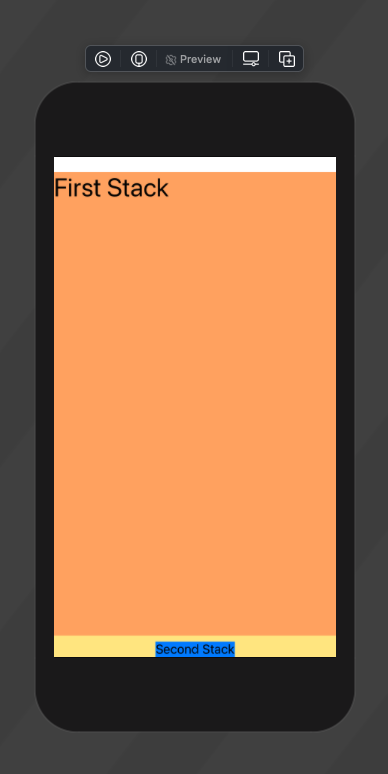
Text有自己的大小,但为什么锚定或对齐topLeading?
是GeometryReader的默认行为吗?
我试着让它在GeometryReader这样的中心
struct ContentView: View {
    var body: some View {
        VStack {
            GeometryReader { proxy in
                Text("First Stack")
                .position(x: proxy.frame(in: .local).midX, y: proxy.frame(in: .local).midY)
                .foregroundColor(.black)
                .font(.largeTitle)
            }
            .background(Color.red.opacity(0.4))
            Text("Second Stack").background(Color.blue)
        }
        .background(Color.yellow.opacity(0.5))
    }
}
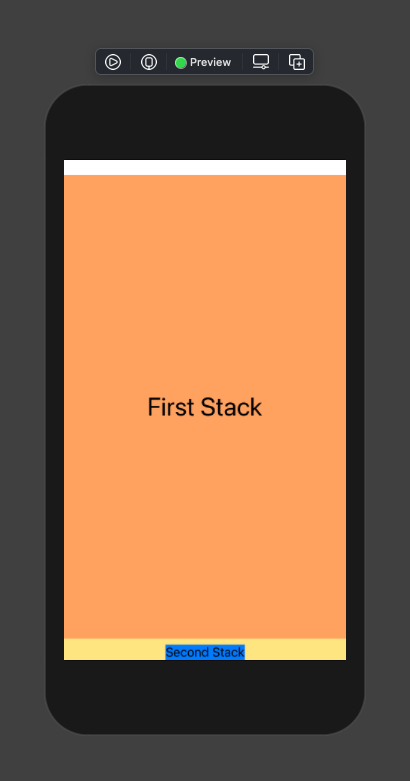
中心Text在GeometryReader中的解决方案对吗?
回答 1
Stack Overflow用户
回答已采纳
发布于 2020-07-24 01:01:25
看到这个我很惊讶。实际上,在Xcode 11.4中,GeometryReader的默认对齐方式是.center,但是在Xcode 12 beta 3中,默认对齐方式看起来是top-leading。
我还没有看到任何相关的信息。不过,我可以建议将Text封装到VStack或HStack中,并从proxy中提供框架。在我看来,这将提供更好的布局组织。
struct ContentView: View {
var body: some View {
    VStack {
        GeometryReader { proxy in
            VStack {
                Text("First Stack")
                    .foregroundColor(.black)
                    .font(.largeTitle)
            }
            .frame(width: proxy.size.width, height: proxy.size.height, alignment: .center)
        }
        .background(Color.red.opacity(0.4))
        Text("Second Stack").background(Color.blue)
    }
    .background(Color.yellow.opacity(0.5))
} }页面原文内容由Stack Overflow提供。腾讯云小微IT领域专用引擎提供翻译支持
原文链接:
https://stackoverflow.com/questions/63065037
复制相关文章
相似问题
腾讯云开发者

Copyright © 2013 - 2026 Tencent Cloud. All Rights Reserved. 腾讯云 版权所有
深圳市腾讯计算机系统有限公司 ICP备案/许可证号:粤B2-20090059  粤公网安备44030502008569号
腾讯云计算(北京)有限责任公司 京ICP证150476号 | 京ICP备11018762号