
升级到ReactiveNative0.63.0后Pod安装错误
升级到ReactiveNative0.63.0后Pod安装错误
提问于 2020-07-16 09:16:58
我使用的是React 0.62.2,现在我升级到0.63.0版本,在运行npx pod-install安装Pod软件包之后,我得到了以下错误:
CocoaPods找不到与pod“ReactCommon/callinvoker”兼容的版本:
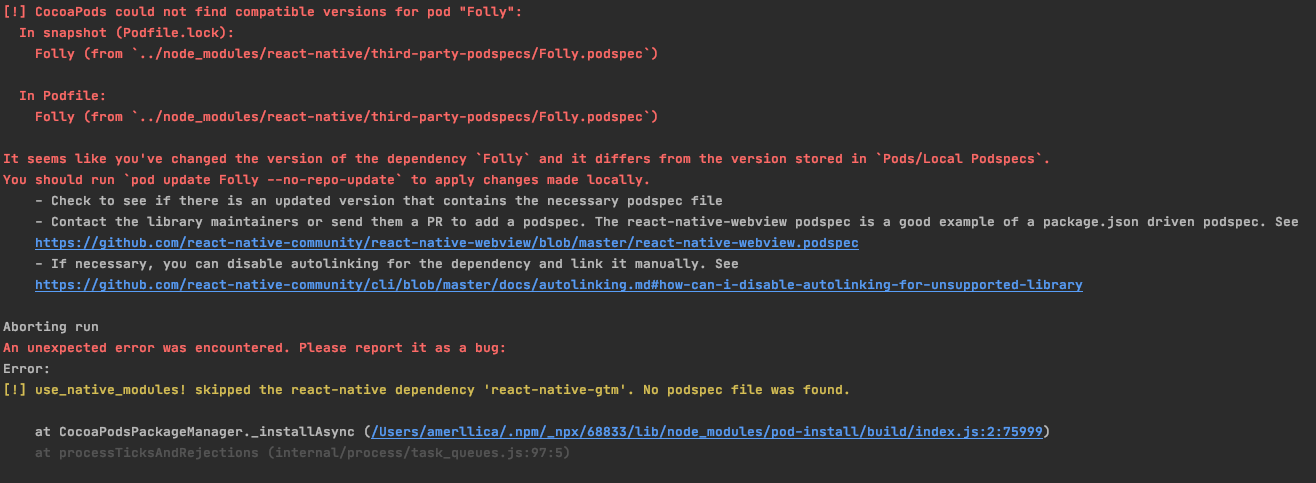
回答 2
Stack Overflow用户
回答已采纳
发布于 2020-07-16 09:16:58
实际上,我只是删除Podfile.lock并删除整个Podfile,并在最新版本上从新安装的React Native项目中添加新内容,这意味着它的内容应该是:
require_relative '../node_modules/@react-native-community/cli-platform-ios/native_modules'
require_relative '../node_modules/react-native/scripts/react_native_pods'

platform :ios, '10.0'

target '[YourProjectName]' do
  config = use_native_modules!
  use_react_native!(:path => config["reactNativePath"])

  target '[YourProjectName]Tests' do
    inherit! :complete
    # Pods for testing
  end

  # Enables Flipper.
  #
  # Note that if you have use_frameworks! enabled, Flipper will not work and
  # you should disable these next few lines.
  use_flipper!
  post_install do |installer|
    flipper_post_install(installer)
  end
end

target '[YourProjectName]-tvOS' do
  # Pods for [YourProjectName]-tvOS

  target '[YourProjectName]-tvOSTests' do
    inherit! :search_paths
    # Pods for testing
  end
end注意事项:很明显,您应该用[YourProjectName]__替换您的项目名称。
提示:如果您使用手动链接,请全部取消链接,我对手动链接react-native-vector-icons有关键问题。
之后,在项目的根上运行npx pod-install命令,一切都将回到正轨。
Stack Overflow用户
发布于 2020-07-16 09:20:58
在ios文件夹中,您应该删除Podfile.lock并在终端上运行此代码
rm -rf ./*.xcworkspace && rm -rf ./pods && pod install页面原文内容由Stack Overflow提供。腾讯云小微IT领域专用引擎提供翻译支持
原文链接:
https://stackoverflow.com/questions/62931404
复制相关文章
相似问题
腾讯云开发者

Copyright © 2013 - 2026 Tencent Cloud. All Rights Reserved. 腾讯云 版权所有
深圳市腾讯计算机系统有限公司 ICP备案/许可证号:粤B2-20090059  粤公网安备44030502008569号
腾讯云计算(北京)有限责任公司 京ICP证150476号 | 京ICP备11018762号