
Azure反向DNS不可能用于动态IP?
我正在运行一个爱好邮件服务器下的Azure免费层。
一项要求是使IP的反向DNS匹配主机名,否则激进的反垃圾邮件服务器将拒绝来自我的邮件服务器(如gmail)的消息。
在https://learn.microsoft.com/en-us/azure/dns/dns-reverse-dns-for-azure-services中,它指出(我的重点)
The DNS name for the PublicIpAddress, contosoapp1.northus.cloudapp.azure.com
The DNS name for a different PublicIpAddress in the same subscription, such as contosoapp2.westus.cloudapp.azure.com
A vanity DNS name, such as app1.contoso.com, so long as this name is first configured as a CNAME to contosoapp1.northus.cloudapp.azure.com, or to a different PublicIpAddress in the same subscription.
A vanity DNS name, such as app1.contoso.com, **so long as this name is first configured as an A record** to the IP address 23.96.52.53, or to the IP address of a different PublicIpAddress in the same subscription.
我通过nslookup验证了A记录是否正确地将FQDN解析为所讨论的IP。
但是,当按照指示执行时-我会收到以下错误消息:
ErrorMessage:
ReverseFqdn [[mydomain]]. that PublicIPAddress [[IP resource name]] is trying to use does not belong to subscription [[removed]].
One of the following conditions need to be met to establish ownership:
1) ReverseFqdn matches fqdn of any public ip resource under the subscription;
2) ReverseFqdn resolves to the fqdn (through CName records chain) of any public ip resource under the subcription;
3) It resolves to the ip address (through CName and A records chain) of a static public ip resource under the subscription.
注意,错误消息与文档略有不同--即只有在涉及静态IP的情况下才可能使用"A“记录方法。我也尝试过将IP设置为“静态”,它确实开始工作了。然而,静态IP是可收费的,因此这将违背爱好邮件服务器的目的,因此不能作为进行中的选择。
是MS文档错了,还是我错过了设置反向DNS?的一步?
补充信息
复制错误消息的步骤
1.核实记录是否正确
nslookup域
输出-显示我的VM的IP。
所以"A“记录正确解析。
2.尝试在反向DNS时设置
(这基本上就是上面文档链接中的步骤)
$pip = Get-AzPublicIpAddress -ResourceGroupName "Mail_in_a_Box"
$pip.DnsSettings = New-Object -TypeName "Microsoft.Azure.Commands.Network.Models.PSPublicIpAddressDnsSettings"
$pip.DnsSettings.DomainNameLabel = "mydomainlabel"
$pip.DnsSettings.ReverseFqdn = "mydomainname"
Set-AzPublicIpAddress -PublicIpAddress $pip- 将IP类型更改为静态
将下面的行添加到上面的块将允许设置反向DNS (但不是我想要的!)
$pip.PublicIpAllocationMethod = "Static"回答 1
Stack Overflow用户
发布于 2020-06-26 07:07:25
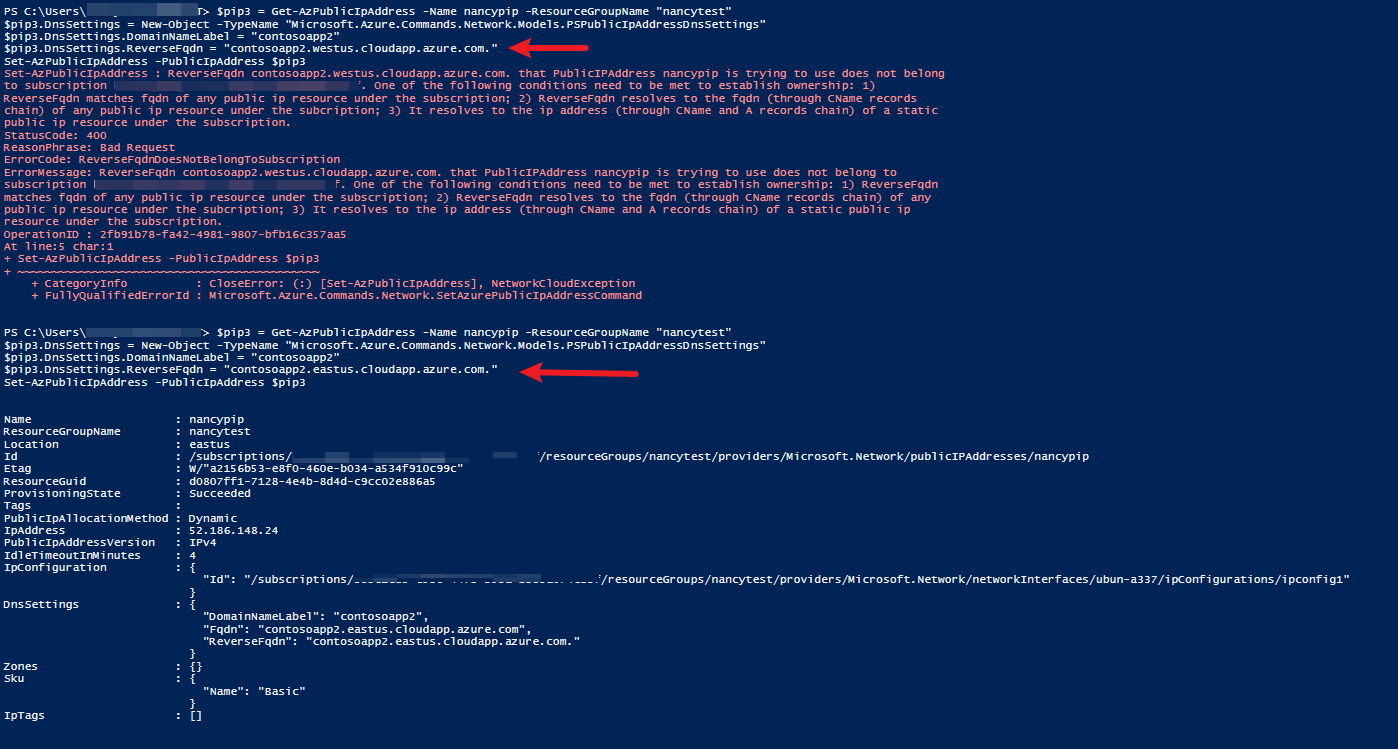
在我的验证之后,不需要将IP分配方法更改为静态。正确的命令如下:
$pip = Get-AzPublicIpAddress -Name "PublicIp" -ResourceGroupName "MyResourceGroup"
$pip.DnsSettings = New-Object -TypeName "Microsoft.Azure.Commands.Network.Models.PSPublicIpAddressDnsSettings"
$pip.DnsSettings.DomainNameLabel = "contosoapp1"
$pip.DnsSettings.ReverseFqdn = "contosoapp1.westus.cloudapp.azure.com."
Set-AzPublicIpAddress -PublicIpAddress $pip请注意,您只能在FQDN中选择DomainNameLabel。当公共IP地址分配给Azure门户中的网络接口时,它属于某个区域。FQDN应该与somednslabel.region.cloudapp.azure.com.这样的公共IP资源区域相匹配
如果我只是任意地键入ReverseFqdn,它将复制错误消息。请检查您是否输入了正确的ReverseFqdn。
更新
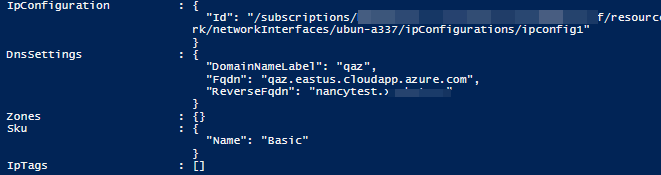
验证之后,您可以使用CNAME记录作为错误消息中的条件2。如果使用A记录,则需要静态公共IP资源。
2) ReverseFqdn resolves to the fqdn (through CName records chain) of any public IP resource under the subscription; 步骤:
- 创建默认的天青,提供像
qaz.eastus.cloudapp.azure.com.一样的公共IP地址作为上面的命令.
- 创建CNAME记录,将您的自定义主机名指向DNS区域中的此FQDN。在我的示例中,我使用Azure DNS区域。

- 在
ReverseFqdn中添加自定义主机名。
$pip = Get-AzPublicIpAddress -Name "ubun-pip" -ResourceGroupName "nancytest"
$pip.DnsSettings.ReverseFqdn = "nancytest.domain.com"
Set-AzPublicIpAddress -PublicIpAddress $pip
https://stackoverflow.com/questions/62569909
复制相似问题
腾讯云开发者

Copyright © 2013 - 2026 Tencent Cloud. All Rights Reserved. 腾讯云 版权所有
深圳市腾讯计算机系统有限公司 ICP备案/许可证号:粤B2-20090059  粤公网安备44030502008569号
腾讯云计算(北京)有限责任公司 京ICP证150476号 | 京ICP备11018762号