
Google中的动画展示
Google中的动画展示
提问于 2020-06-20 16:15:13
我试图在Google中展示动画。具体来说,我想用cv2动画一个numpy数组,比如以基于帧的方式绘制线条,并在单元格中显示输出。离我最近的是这个,你可以在Colab里试试这个代码:
from google.colab.patches import cv2_imshow
import IPython

from PIL import Image
import numpy as np
import cv2 as cv
import time

# Create a black image
img = np.zeros((512,512,3), np.uint8)
# Draw a diagonal blue line with thickness of 5 px
cv.line(img,(0,0),(511,511),(255,0,0),5)

cv2_imshow(img)

for i in range(100):
    cv.line(img,(i,0),(511,511),(255,0,0),5)
    cv2_imshow(img)
    IPython.display.clear_output(wait=True)
    time.sleep(1/60.0)
当然,在某些时候,如果没有time.sleep,这应该会发生,但是通过反复的回调,我们不会阻止任何其他代码的执行。然而,正如你所看到的,输出闪烁,而且一点也不平滑。
以下是我尝试过的几件事:
- ipycanvas.这是伟大的地方木星笔记本,是基于HTML5帆布。将图像数据从javascript返回到python有点烦人,但这是可能的。然而,这并不适用于Google。https://ipycanvas.readthedocs.io/
- Matplotlib动画。(不是我的):https://colab.research.google.com/drive/1lnl5UPFWVPrryaZZgEzd0theI6S94c3X#scrollTo=QLRBwgFqdr83,没关系。但是,在显示之前,它会呈现整个动画,这不是我想要的。特别是,我希望能够在动画中添加一些交互性,这是排除了这种限制的(例如单击图像或按钮,以animation).
- Some方式显式地在javascript中创建HTML5画布,例如:IPython: Adding Javascript scripts to IPython notebook,但是,我希望我的所有代码都是python,特别是我的数据是numpy数组或PIL图像。
。
有什么建议吗?
回答 1
Stack Overflow用户
发布于 2020-09-22 19:46:15
下面是一个使用ipywidgets.Image的示例。这种方法不像使用clear_output那样闪烁,但更新似乎相当缓慢。这可能与我们从Colab远程运行的事实有关--它必须通过网络发送图像更新。看起来我每秒有2到3次更新,似乎是“批处理”或丢弃中间的更新,而不是等待每一次更新。
在普通木星上当地运行非常顺利。
希望有人能在这方面有所改进--这也是我们想要做的:)
import ipywidgets as ipw
from IPython import display
import numpy as np
import PIL
from io import BytesIO
import time

# image size
h,w = 200,300

# Make an Image Widget and display it
wIm = ipw.Image()
display.display(wIm)

# Make an RGBA array for the image
g3 = np.zeros((h,w,4), dtype=np.uint8)
g3[:,:,3] = 255  # opacity
g3[:,:,0:3] = 0  # color black

p = np.array([h//2,w//2], dtype=int)

for i in range(1000):
  # Draw a coloured spiral
  r = i/10
  theta=i/20
  p2 = p + r * np.array([ np.cos(theta), np.sin(theta) ])
  (y,x) = p2.astype(int)
  rgb = np.array([100+r, 100*(1+np.sin(theta)), 100*(1+np.cos(theta))], dtype=np.uint8)
  g3[y:y+8, x:x+2, 0:3] = rgb

  # convert numpy to PIL to png-format bytes
  pilIm = PIL.Image.fromarray(g3, mode="RGBA")
  with BytesIO() as fOut:
      pilIm.save(fOut, format="png")
      byPng = fOut.getvalue()

  # set the png bytes as the image value;
  # this updates the image in the browser.
  wIm.value=byPng

  time.sleep(1/60)
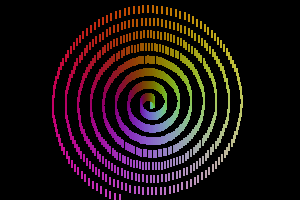
页面原文内容由Stack Overflow提供。腾讯云小微IT领域专用引擎提供翻译支持
原文链接:
https://stackoverflow.com/questions/62488398
复制相关文章
相似问题
腾讯云开发者

Copyright © 2013 - 2026 Tencent Cloud. All Rights Reserved. 腾讯云 版权所有
深圳市腾讯计算机系统有限公司 ICP备案/许可证号:粤B2-20090059  粤公网安备44030502008569号
腾讯云计算(北京)有限责任公司 京ICP证150476号 | 京ICP备11018762号