
避免重复两次安装程序的相同安装程序
避免重复两次安装程序的相同安装程序
提问于 2020-06-17 11:44:05
我从LabVIEW为我的应用程序制作了安装程序。使用这个LabVIEW安装程序,在LabVIEW安装程序的帮助下,我创建了另一个包含LabVIEW安装程序的所有文件的exe文件。为此,我需要一个文件安装程序附加数字签名。所以,我使用了Inno安装编译器,得到了一个单独的exe文件。

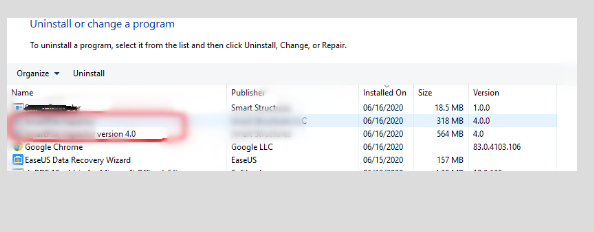
但是我在这里遇到的问题是,当我安装这个exe文件(由Inno编译器生成)时,我可以在程序列表窗口中看到两个安装程序文件。一个来自LabVIEW安装程序,另一个来自Inno安装程序。
如何避免在安装程序中安装?
Inno设置代码:
#define MyAppName "My Product Name"
#define MyAppVersion "4.0"
#define MyAppPublisher "Company Name"
#define MyAppURL "https:/<Mydomain.com>/"
#define MyAppExeName "setup.exe"

[Setup]
SignTool=DigiSign $f

AppId={{02A34D16-B816-44B4-AFD6-C620DE6C3D85}

AppName={#MyAppName}

AppVersion={#MyAppVersion}

AppPublisher={#MyAppPublisher}

AppPublisherURL={#MyAppURL}

AppSupportURL={#MyAppURL}

AppUpdatesURL={#MyAppURL}

DefaultDirName={autopf}\{#MyAppName}

DisableProgramGroupPage=yes

OutputDir=<output directory>\SetupFiles

OutputBaseFilename=My app name_4.0.2006162255

Compression=lzma

SolidCompression=yes

WizardStyle=modern

RestartIfNeededByRun=no

[Languages]
Name: "english"; MessagesFile: "compiler:Default.isl"

[Files]
Source: "<source file path where LabVIEW installer available>\*"; DestDir: "{userappdata}\<Path for extraction>"; Flags: ignoreversion recursesubdirs createallsubdirs

[Icons]
Name: "{autoprograms}\{#MyAppName}"; Filename: "{app}\{#MyAppExeName}"

[Run]
Filename: "{userappdata}\..path .. where.. I .. want to install it...\{#MyAppExeName}"; Description: "{cm:LaunchProgram,{#StringChange(MyAppName, '&', '&&')}}";
回答 1
Stack Overflow用户
回答已采纳
发布于 2020-06-17 13:54:37
Uninstallable=no我应该在Inno设置中使用这个命令。这解决了我的问题。有关更多信息,请访问此链接
页面原文内容由Stack Overflow提供。腾讯云小微IT领域专用引擎提供翻译支持
原文链接:
https://stackoverflow.com/questions/62428200
复制相关文章
相似问题
腾讯云开发者

Copyright © 2013 - 2026 Tencent Cloud. All Rights Reserved. 腾讯云 版权所有
深圳市腾讯计算机系统有限公司 ICP备案/许可证号:粤B2-20090059  粤公网安备44030502008569号
腾讯云计算(北京)有限责任公司 京ICP证150476号 | 京ICP备11018762号