
从不同的JSON文件中读取i18n [Reacti-i18nNext]
从不同的JSON文件中读取i18n [Reacti-i18nNext]
提问于 2020-06-05 23:57:20
我是新来的反应-我的下一个图书馆。我试图将我的翻译分离成文件,这样每个页面都有一个单独的JSON文件,而不是一个JSON文件。
我对如何从本指南执行以下步骤感到困惑
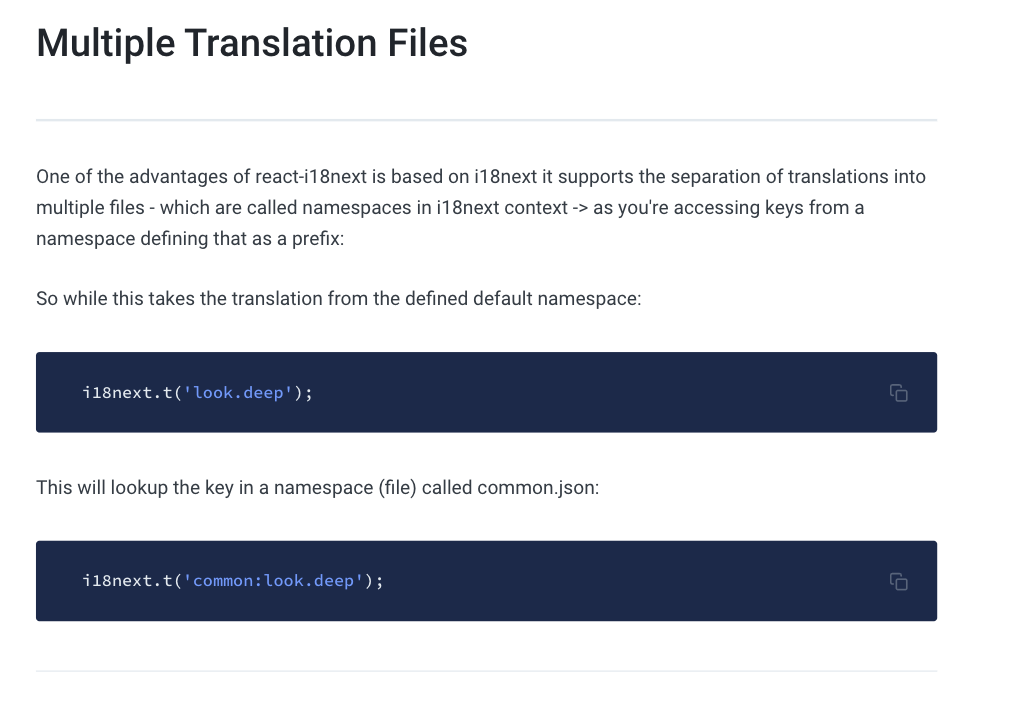
我如何尝试从其他文件实现i18n:
我使用以下代码调用默认的translate.json文件:
<h1>{t('title')}</h1>但是我想调用一个不同的文件,所以我必须按照指南使用:
<h1>{t('test:title')}</h1>如果我使用文件translation.json -一切正常,但如果我使用的文件的另一个名称-它失败的错误:
i18next::translator: missingKey en test title title我的应用程序中的文件:
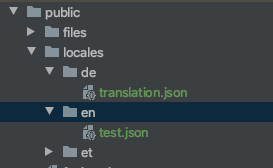
其他代码
我遵循了图书馆官方页面上的“一步步”指南。
这是我的i18n.js文件:
import i18n from 'i18next';
import { initReactI18next } from 'react-i18next';

import Backend from 'i18next-http-backend';
import LanguageDetector from 'i18next-browser-languagedetector';
// not like to use this?
// have a look at the Quick start guide
// for passing in lng and translations on init


const languages = ['en', 'de', 'et'];

i18n
    /*
     load translation using http -> see /public/locales (i.e. https://github.com/i18next/react-i18next/tree/master/example/react/public/locales)
     learn more: https://github.com/i18next/i18next-http-backend
    */
    .use(Backend)
    /*
     detect user language
     learn more: https://github.com/i18next/i18next-browser-languageDetector
    */
    .use(LanguageDetector)
    /*
     pass the i18n instance to react-i18next.
    */
    .use(initReactI18next)
    /*
     init i18next
     for all options read: https://www.i18next.com/overview/configuration-options
    */
    .init({
        lng:"ee",
        fallbackLng: 'et', // use et if detected lng is not available
        saveMissing: true, // send not translated keys to endpoint
        debug: true,
        whitelist: languages,

        // backend: {
        //     // for all available options read the backend's repository readme file
        //     loadPath: '/locales/{{lng}}/{{ns}}.json'
        // },

        react: {
            useSuspense: false
        }
    })


export default i18n;
为了提供更好的概述,我将代码添加到代码框中:

回答 1
Stack Overflow用户
回答已采纳
发布于 2020-06-06 16:39:14
为了在同一个页面中使用多个名称空间,您需要在调用useTranslation时指定它。
export default function App() {
  const [t] = useTranslation(["translation", "customFile"]);
  // ---------------------------------------------^

  return (
    <div className="App">
      <button onClick={() => changeLanguageOnClick("en")}>English</button>
      <button onClick={() => changeLanguageOnClick("de")}>German</button>
      <h1>{t("title")}</h1>
      <h2>{t("customFile:title")}</h2>
    </div>
  );
}这就是它的样子:https://codesandbox.io/s/intelligent-shockley-q588u?file=/src/App.js:243-304
页面原文内容由Stack Overflow提供。腾讯云小微IT领域专用引擎提供翻译支持
原文链接:
https://stackoverflow.com/questions/62225698
复制相关文章
相似问题
腾讯云开发者

Copyright © 2013 - 2026 Tencent Cloud. All Rights Reserved. 腾讯云 版权所有
深圳市腾讯计算机系统有限公司 ICP备案/许可证号:粤B2-20090059  粤公网安备44030502008569号
腾讯云计算(北京)有限责任公司 京ICP证150476号 | 京ICP备11018762号