
SpringBoot在为ngingx添加.ebextensions后失败-[在执行命令[app-部署]时发生了错误]
我有一个SpringBoot应用程序,可以很好地部署到AWSBean秸秆,默认的nginx代理可以工作,允许我通过端口80进行连接。
按照这里的说明:https://docs.aws.amazon.com/elasticbeanstalk/latest/dg/https-singleinstance.html,并与我的另一个使用此配置的项目进行验证,Bean秸秆未能错误地部署该应用程序:
2020/05/29 01:27:56.418780 [ERROR] An error occurred during execution of command [app-deploy] - [CheckProcfileForJavaApplication]. Stop running the command. Error: there is no Procfile and no .jar file at root level of your source bundle
我的war文件的内容如下:
app.war
    -.ebextensions
        -nginx/conf.d/https.conf
        -https-instance-single.config
        -https-instance.config
    -web-inf/
我的配置文件作为有效的yaml文件传递。(这些文件与AWS文档中的文件以及在我的其他项目中工作的文件相同。)
我使用一个实例,端口443设置为打开。
以下是在各种日志文件中报告的错误:
----------------------------------------
/var/log/eb-engine.log
----------------------------------------
2020/05/29 01:37:53.054366 [ERROR] /usr/bin/id: healthd: no such user
...
2020/05/29 01:37:53.254965 [ERROR] Created symlink from /etc/systemd/system/multi-user.target.wants/healthd.service to /etc/systemd/system/healthd.service.
...
2020/05/29 01:37:53.732794 [ERROR] Created symlink from /etc/systemd/system/multi-user.target.wants/cfn-hup.service to /etc/systemd/system/cfn-hup.service.


----------------------------------------
/var/log/cfn-hup.log
----------------------------------------
ReadTimeout: HTTPSConnectionPool(host='sqs.us-east-1.amazonaws.com', port=443): Read timed out. (read timeout=23)回答 5
Stack Overflow用户
发布于 2020-07-23 07:25:43
Java和Linux版本的问题
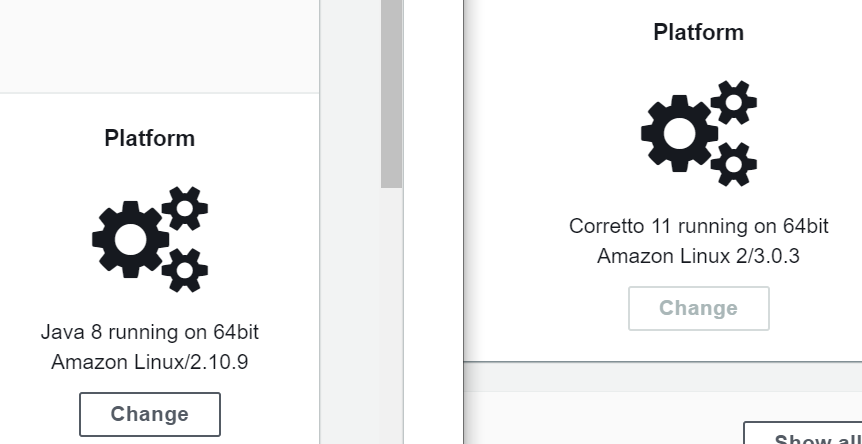
如果您使用的是Java 8和Linux2.10.9,代码将工作并覆盖ngingx配置,但是如果您选择Corretto 11和Linux2.2.3,则得到以下错误。
错误:在源包的根级没有Procfile和.jar文件
使用Java 8创建新环境并再次部署应用程序将解决问题。
Stack Overflow用户
发布于 2021-09-02 09:23:22
以count @Dean对Java11的回答为例,我成功地部署了Spring应用程序jar和.ebextensions文件夹。我刚刚将maven antrun插件添加到maven构建配置中,为了输出,我正在接收.zip文件,该文件包含相同级别的.ebextensions文件夹和spring .jar文件。只需将最后一个zip文件部署到AWS控制台。
下面是maven antrun插件的配置
....
<plugin>
            <groupId>org.apache.maven.plugins</groupId>
            <artifactId>maven-antrun-plugin</artifactId>
            <version>1.8</version>
            <executions>
                <execution>
                    <id>prepare</id>
                    <phase>package</phase>
                    <configuration>
                        <tasks>
                            <copy todir="${project.build.directory}/${project.build.finalName}/" overwrite="false">
                                <fileset dir="./" includes=".ebextensions/**"/>
                                <fileset dir="${project.build.directory}" includes="*.jar"/>
                            </copy>
                            <zip destfile="${project.build.directory}/${project.build.finalName}.zip" basedir="${project.build.directory}/${project.build.finalName}"/>
                        </tasks>
                    </configuration>
                    <goals>
                        <goal>run</goal>
                    </goals>
                </execution>
            </executions>
        </plugin>
....Stack Overflow用户
发布于 2021-03-25 12:26:52
替代方法是将源jar打包到包含.ebextensions文件夹的zip中,而不是像vaquar的答案那样更改为java 8。
换言之:
source.zip
    -.ebextensions
        -nginx/conf.d/https.conf
        -https-instance-single.config
        -https-instance.config
    -web-inf/
-app.war如果您查看最新的文档https://docs.aws.amazon.com/elasticbeanstalk/latest/dg/platforms-linux-extend.html,您将看到nginx现在放在.platform文件夹中,因此您的结构如下:
source.zip
    -.ebextensions
        -https-instance-single.config
        -https-instance.config
    -.platform
        -nginx/conf.d/https.conf
    -web-inf/
-app.warhttps://stackoverflow.com/questions/62077616
复制相似问题
腾讯云开发者

Copyright © 2013 - 2026 Tencent Cloud. All Rights Reserved. 腾讯云 版权所有
深圳市腾讯计算机系统有限公司 ICP备案/许可证号:粤B2-20090059  粤公网安备44030502008569号
腾讯云计算(北京)有限责任公司 京ICP证150476号 | 京ICP备11018762号