
TabbedPage图标很小
使用带有五个选项卡的TabbedPage,虽然问题与两个相同,但我看到呈现的图标非常小,如图所示,使用一些占位符图形。
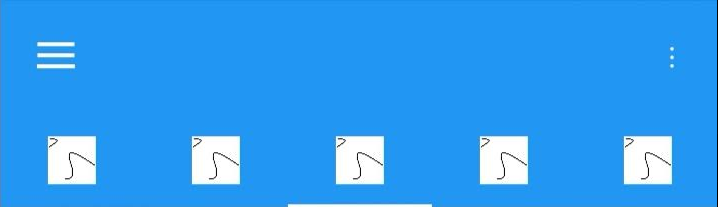
我尝试过所有像素分辨率从32x32到512x512的图像,它们都呈现相同的大小。您可能希望有一个选项来设置这个选项,但是在寻找解决方案时,它似乎总是归结为定制的呈现。虽然我没有见过有人抱怨小图标,但通常情况下更复杂的问题,所以我仍然希望有一个通用的表单解决方案。
在屏幕截图(android )中,我使用母版详细信息页提供工具栏和左菜单,但是当我自己拥有一个干净的TabbedPage时,问题是一样的。
TabbedPage的定义是微不足道的,因此我怀疑这里是否存在任何问题。
<?xml version="1.0" encoding="utf-8" ?>
<TabbedPage xmlns="http://xamarin.com/schemas/2014/forms"
            xmlns:x="http://schemas.microsoft.com/winfx/2009/xaml"
            xmlns:d="http://xamarin.com/schemas/2014/forms/design"
            xmlns:mc="http://schemas.openxmlformats.org/markup-compatibility/2006"
            mc:Ignorable="d"
            xmlns:views="clr-namespace:CloudDash.Views"
            x:Class="CloudDash.Views.TabPage">

    <TabbedPage.Children>
        <views:ThermalingPage IconImageSource="fly.png"/>
        <views:DataPage IconImageSource="fly.png"/>
        <views:FlightPage IconImageSource="fly.png"/>
        <views:RoutePage IconImageSource="fly.png"/>
        <views:AwarenessPage IconImageSource="fly.png"/>
    </TabbedPage.Children>

</TabbedPage>回答 2
Stack Overflow用户
发布于 2020-05-29 02:55:43
如果你想使图标更大,你必须做一个自定义渲染器来实现它。这是正在运行的截图。
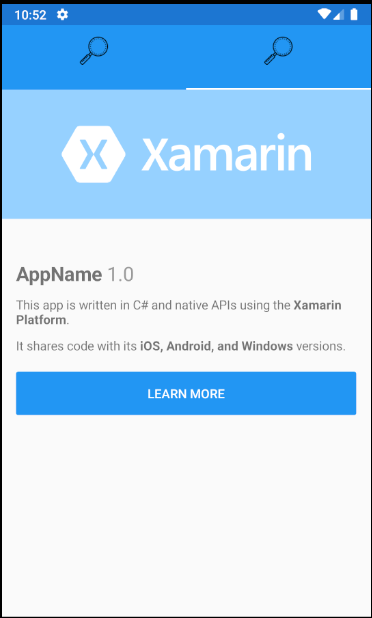
在Android文件夹里。创建自定义呈现程序MyTabbedPageRenderer.cs。
using System;
using System.Collections.Generic;
using System.ComponentModel;
using System.Linq;
using System.Text;

using Android.App;
using Android.Content;
using Android.Content.Res;
using Android.OS;
using Android.Runtime;
using Android.Support.Design.Widget;
using Android.Support.V4.View;
using Android.Views;
using Android.Widget;
using App22.Droid;
using Xamarin.Forms;
using Xamarin.Forms.Platform.Android;
using Xamarin.Forms.Platform.Android.AppCompat;

[assembly: ExportRenderer(typeof(TabbedPage), typeof(MyTabbedPageRenderer))]
namespace App22.Droid
{
     public class MyTabbedPageRenderer:TabbedPageRenderer
    {
        public MyTabbedPageRenderer(Context context) : base(context)
       {

       }

        protected override void SetTabIcon(TabLayout.Tab tab, FileImageSource icon)
        {
            base.SetTabIcon(tab, icon);
            tab.SetCustomView(Resource.Layout.Custom_tab_layou);

            var imageview = tab.CustomView.FindViewById<ImageView>(Resource.Id.icon);

            imageview.SetBackgroundDrawable(tab.Icon);

        }
    }
}在布局文件夹中创建一个Custom_tab_layou.xml。
<?xml version="1.0" encoding="utf-8"?>
<LinearLayout xmlns:android="http://schemas.android.com/apk/res/android"
    android:orientation="vertical"
    android:layout_width="wrap_content"
    android:layout_height="61dp">
     <ImageView
        android:id="@+id/icon"
        android:layout_width="38dp"
        android:layout_height="38dp"
        android:layout_gravity="center_vertical"
        android:layout_marginLeft="8dp"
        android:layout_marginRight="8dp"
        android:layout_marginTop="4dp"
        android:layout_marginBottom="4dp" />

</LinearLayout>
在IOS中,您可以引用以下线程:
https://forums.xamarin.com/discussion/44069/tab-bar-icon-sizing
您还可以在github页面的xamarin部分发出功能请求,PG将看到它。
Stack Overflow用户
发布于 2020-05-29 06:27:32
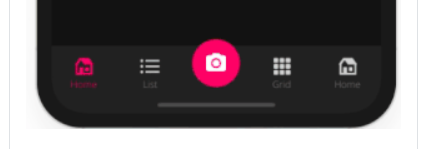
在这种情况下,建议使用Sharpnado.Presentation.Forms nuget,您可以随意定制您的选项卡:
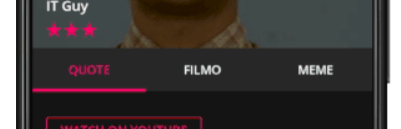
https://github.com/roubachof/Sharpnado.Presentation.Forms
https://stackoverflow.com/questions/62075163
复制相似问题
腾讯云开发者

Copyright © 2013 - 2026 Tencent Cloud. All Rights Reserved. 腾讯云 版权所有
深圳市腾讯计算机系统有限公司 ICP备案/许可证号:粤B2-20090059  粤公网安备44030502008569号
腾讯云计算(北京)有限责任公司 京ICP证150476号 | 京ICP备11018762号