
BS4 -网络抓取-搜索div。类=
BS4 -网络抓取-搜索div。类=
提问于 2020-05-25 02:22:35
我试图从下面的图像中抓取'95%喜欢这个电影‘,但是当我通过下面的类视图代码指定标签时,没有得到任何结果。知道我怎么能做到这一点吗?
import bs4, requests
from bs4 import BeautifulSoup
res = requests.get('https://www.google.com/search?rlz=1C5CHFA_enUS879US879&sxsrf=ALeKk00cw9xBpC8OWgCnKhMSIGOi4xb3sw%3A1590372307467&ei=0yfLXrSQHNHa9AOzh6jIAg&q=titanic+google+play&oq=Titanic+&gs_lcp=CgZwc3ktYWIQAxgAMgQIIxAnMgoIABCDARAUEIcCMgcIABCDARBDMgUIABCRAjIFCAAQkQIyBwgAEIMBEEMyBAgAEEMyBwgAEIMBEEMyBAgAEEMyBAgAEEM6BAgAEEc6AggAOgUIABCDAVCcLFjMOmCEQ2gBcAN4AIABbIgBigaSAQM4LjGYAQCgAQGqAQdnd3Mtd2l6&sclient=psy-ab')

res.raise_for_status()
soup = bs4.BeautifulSoup(res.text, 'html.parser')
news = [p.text.strip() for p in soup.select('h1 ~ p') if p.find('font')]

soup = BeautifulSoup(res.content, 'html.parser')
content = BeautifulSoup(res.content, 'html.parser')
content.find_all(class="srBp4.Vrkhme")`
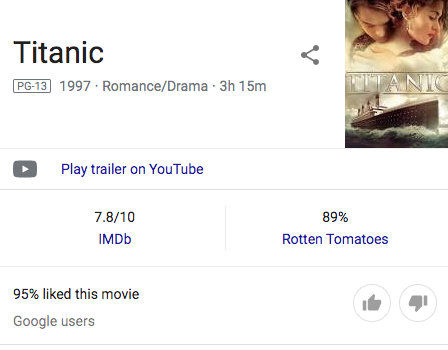
]1
回答 1
Stack Overflow用户
回答已采纳
发布于 2020-05-25 23:10:37
谷歌使用JavaScript来显示结果-为了获得95% ...,我不得不使用Selenium来控制真正的web浏览器,后者可以运行JavaScript。我不得不使用查询titanic movie而不是titanic google play。
import selenium.webdriver

url = 'https://www.google.com/search?q=titanic+movie'

#driver = selenium.webdriver.Chrome()
driver = selenium.webdriver.Firefox()
driver.get(url)

item = driver.find_element_by_class_name('srBp4.Vrkhme')
print(item.text.strip())编辑:--我也在requests/BeautifulSoup中获得了它,但是我不得不使用完整的标题User-Agent。它不适用于短Mozilla/5.0
它需要没有点的类"srBp4 Vrkhme"。它必须是class_=和_
import requests
from bs4 import BeautifulSoup

headers = {'User-Agent': 'Mozilla/5.0 (X11; Linux x86_64; rv:78.0) Gecko/20100101 Firefox/78.0'}
r = requests.get('https://www.google.com/search?q=titanic+movie', headers=headers)

soup = BeautifulSoup(r.content, 'html.parser')
item = soup.find('div', class_="srBp4 Vrkhme")
print(item.get_text(strip=True, separator=' '))页面原文内容由Stack Overflow提供。腾讯云小微IT领域专用引擎提供翻译支持
原文链接:
https://stackoverflow.com/questions/61994836
复制相关文章
相似问题
腾讯云开发者

Copyright © 2013 - 2026 Tencent Cloud. All Rights Reserved. 腾讯云 版权所有
深圳市腾讯计算机系统有限公司 ICP备案/许可证号:粤B2-20090059  粤公网安备44030502008569号
腾讯云计算(北京)有限责任公司 京ICP证150476号 | 京ICP备11018762号