
如何使用引导程序在输入框中添加按钮
如何使用引导程序在输入框中添加按钮
提问于 2020-05-17 18:31:21
我正在设法在输入字段中输入一个按钮,如下所示:
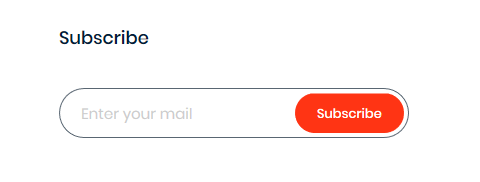
有人能给我建议吗?
回答 3
Stack Overflow用户
回答已采纳
发布于 2020-05-17 18:47:00
没有本地的引导解决方案。您可以使用自定义代码来完成此操作。
.custom-search {
  position: relative;
  width: 300px;
}
.custom-search-input {
  width: 100%;
  border: 1px solid #ccc;
  border-radius: 100px;
  padding: 10px 100px 10px 20px;
  line-height: 1;
  box-sizing: border-box;
  outline: none;
}
.custom-search-botton {
  position: absolute;
  right: 3px;
  top: 3px;
  bottom: 3px;
  border: 0;
  background: #d1095e;
  color: #fff;
  outline: none;
  margin: 0;
  padding: 0 10px;
  border-radius: 100px;
  z-index: 2;
}<div class="custom-search">
<input type="text" class="custom-search-input" placeholder="Enter your email">
<button class="custom-search-botton" type="submit">Subscribe</button>
</div>
引导混合解决方案,根据引导样式。
   .custom-search {
      position: relative;
    }
    .custom-search-input {
      width: 100%;
      padding-right: 100px !important;
      box-sizing: border-box;
    }
    .custom-search-botton {
      position: absolute;
      right: 3px;
      top: 3px;
      bottom: 3px;
      line-height: 1 !important;
      z-index: 4;
} <script src="https://code.jquery.com/jquery-3.5.1.min.js" integrity="sha256-9/aliU8dGd2tb6OSsuzixeV4y/faTqgFtohetphbbj0=" crossorigin="anonymous"></script>
<link href="https://stackpath.bootstrapcdn.com/bootstrap/4.5.0/css/bootstrap.min.css" rel="stylesheet" integrity="sha384-9aIt2nRpC12Uk9gS9baDl411NQApFmC26EwAOH8WgZl5MYYxFfc+NcPb1dKGj7Sk" crossorigin="anonymous">
<script src="https://stackpath.bootstrapcdn.com/bootstrap/4.5.0/js/bootstrap.min.js" integrity="sha384-OgVRvuATP1z7JjHLkuOU7Xw704+h835Lr+6QL9UvYjZE3Ipu6Tp75j7Bh/kR0JKI" crossorigin="anonymous"></script>
<div class="input-group custom-search">
<input type="text" class="form-control custom-search-input" placeholder="Enter your email">
<button class="btn btn-primary custom-search-botton" type="submit">Subscribe</button>
</div>
Stack Overflow用户
发布于 2020-05-17 19:25:12
您不能只使用引导将按钮放在输入字段中,但是可以使用自定义css将按钮移动到输入字段中。我为您创建了一个小示例(我使用了引导程序4):
input[type="text"] {
    width: 200px;
    height: 50px;
    padding-right: 50px;
}

.example {
    margin: 5px -90px 5px;
    height: 40px;
    width: 80px;
    z-index: 100;
}

.test-div {
    width: 200px;
}<link href="https://maxcdn.bootstrapcdn.com/bootstrap/4.0.0/css/bootstrap.min.css" rel="stylesheet" />
<div class="test-div">
<div class="input-group">
<input type="text" class="form-control" placeholder="Search for...">
<button class="btn btn-outline-secondary example" type="button">Button</button>
</div>
</div>
Stack Overflow用户
发布于 2021-07-04 19:04:53
我改变了你的来源使用字体太棒了。我觉得它变得更好了,不是吗?
.custom-search {
  position: relative;
}

.custom-search-input {
  width: 100%;
  padding-right: 100px !important;
  box-sizing: border-box;
}

.custom-search-botton {
  position: absolute;
  right: 35px;
  top: 1px;
  bottom: 3px;
  line-height: 1 !important;
  z-index: 4;
  border: none;
  border-radius: 50px;
}<script src="https://cdnjs.cloudflare.com/ajax/libs/jquery/3.3.1/jquery.min.js"></script>
<link href="https://cdn.jsdelivr.net/npm/bootstrap@5.0.2/dist/css/bootstrap.min.css" rel="stylesheet" integrity="sha384-EVSTQN3/azprG1Anm3QDgpJLIm9Nao0Yz1ztcQTwFspd3yD65VohhpuuCOmLASjC" crossorigin="anonymous">
<link rel="stylesheet" href="https://use.fontawesome.com/releases/v5.0.12/css/all.css" integrity="sha384-G0fIWCsCzJIMAVNQPfjH08cyYaUtMwjJwqiRKxxE/rx96Uroj1BtIQ6MLJuheaO9"
crossorigin="anonymous">
<div class="input-group custom-search" >
<input type="text" (keyup.enter)="onSearch()" class="form-control custom-search-input" placeholder="Search" aria-label="Search">
<i class="btn fas fa-search custom-search-botton" type="button"></i>
</div>
页面原文内容由Stack Overflow提供。腾讯云小微IT领域专用引擎提供翻译支持
原文链接:
https://stackoverflow.com/questions/61856781
复制相关文章
相似问题
腾讯云开发者

Copyright © 2013 - 2026 Tencent Cloud. All Rights Reserved. 腾讯云 版权所有
深圳市腾讯计算机系统有限公司 ICP备案/许可证号:粤B2-20090059  粤公网安备44030502008569号
腾讯云计算(北京)有限责任公司 京ICP证150476号 | 京ICP备11018762号