
将qrcode集成为壁纸
将qrcode集成为壁纸
提问于 2020-05-17 18:19:59
我使用以下库生成QRCodes:https://marcoagner.github.io/Flask-QRcode/
我想让用户可以选择下载这个QR并将其设置为壁纸。问题是,当我生成QRCode时,如果您通过按下图像几秒钟下载图像,您只需要下载qrcode,然后转到“照相机卷”并将其设置为壁纸,它如下所示:
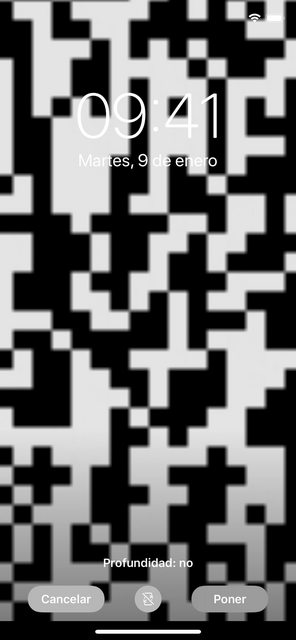
我的问题是:如何在QRcode周围设置白色边框,以便当用户下载图像时,他/她可以将其设置为正确的壁纸?
这是我的密码:
<center><img src="{{ qrcode("http://myherokuapp.com" + url_for('view', useraid=useraid),box_size=4 )}}"></center>提前谢谢你。
回答 1
Stack Overflow用户
回答已采纳
发布于 2020-05-17 18:49:13
我刚刚意识到这个库有一个边框选项,这正是我正在寻找的,所以我做了:
<center><img src="{{ qrcode("http://myherokuapp.com" + url_for('view', useraid=useraid),box_size=4, border=50 )}}"></center>页面原文内容由Stack Overflow提供。腾讯云小微IT领域专用引擎提供翻译支持
原文链接:
https://stackoverflow.com/questions/61856619
复制相关文章
相似问题
腾讯云开发者

Copyright © 2013 - 2026 Tencent Cloud. All Rights Reserved. 腾讯云 版权所有
深圳市腾讯计算机系统有限公司 ICP备案/许可证号:粤B2-20090059  粤公网安备44030502008569号
腾讯云计算(北京)有限责任公司 京ICP证150476号 | 京ICP备11018762号