
为什么路线列表和代理列表是空的?
我创建了一个WaypointsClass类:
using System.Collections;
using System.Collections.Generic;
using UnityEngine;
using System.Linq;
using System;
using UnityEngine.AI;

[Serializable]
public class WaypointsClass
{
    public List<Transform> points = new List<Transform>();
    public List<NavMeshAgent> agents = new List<NavMeshAgent>();
}
然后创建WaypointsAI脚本:
using System.Collections;
using System.Collections.Generic;
using UnityEngine;

public class WaypointsAI : MonoBehaviour
{
    public WaypointsClass waypoints;
    public float distanceToContinue;

    private float currentDistanceToPoint;
    private int lastPointIndex;
    private int goalPointIndex;


    void Start()
    {
        //Firstly check if the waypoints are set up correctly
        if (waypoints.points.Count < 1)
        {
            Debug.LogError("Set up the waypoints for this gameObject!");
        }
        else
        {
            //Now set up the path
            lastPointIndex = 0; //Start from the index 0
            waypoints.agents[0].transform.position = waypoints.points[0].position;
            if (waypoints.points.Count > 1)
            {
                goalPointIndex = 1; //Go to the [1] waypoint
            }
            else
            {
                goalPointIndex = 0;
            }
        }
    }

    void FixedUpdate()
    {
        for (int i = 0; i < waypoints.agents.Count; i++)
        {
            //Calculate the distance and check if it should move to the next waypoint.
            currentDistanceToPoint = Vector3.Distance(waypoints.agents[i].transform.position, waypoints.points[goalPointIndex].position);
            if (currentDistanceToPoint <= distanceToContinue)
            {
                //Save the old index, totally useless in this implementation though
                lastPointIndex = goalPointIndex;
                //Increase goal index to change the goal waypoint to the next, (Or maybe random one?)
                goalPointIndex++;
                if (goalPointIndex >= waypoints.points.Count)
                    goalPointIndex = 0;
            }

            //Now move towards the current waypoint, Change this to fit your code with navMesh anyway I think I did a lot for you anyway
            waypoints.agents[i].transform.LookAt(waypoints.points[goalPointIndex].position);
            waypoints.agents[i].transform.Translate(Vector3.forward * Time.deltaTime * 10);
        }
    }
}
然后为每组代理和路径点添加一个脚本。红色和蓝色:
using System.Collections;
using System.Collections.Generic;
using UnityEngine;
using UnityEngine.AI;

public class RedWaypoints : MonoBehaviour
{
    public GameObject[] redWaypoints;
    public NavMeshAgent redAgent;

    // Start is called before the first frame update
    void Start()
    {
        redWaypoints = GameObject.FindGameObjectsWithTag("Red_Waypoint");

        WaypointsClass wpc = new WaypointsClass();

        foreach (GameObject point in redWaypoints)
        {
            wpc.points.Add(point.transform);
        }

        wpc.agents.Add(redAgent);
    }

    // Update is called once per frame
    void Update()
    {

    }
}
蓝色:
using System.Collections;
using System.Collections.Generic;
using UnityEngine;
using UnityEngine.AI;

public class BlueWaypoints : MonoBehaviour
{
    public GameObject[] blueWaypoints;
    public NavMeshAgent blueAgent;

    // Start is called before the first frame update
    void Start()
    {
        blueWaypoints = GameObject.FindGameObjectsWithTag("Blue_Waypoint");

        WaypointsClass wpc = new WaypointsClass();

        foreach (GameObject point in blueWaypoints)
        {
            wpc.points.Add(point.transform);
        }

        wpc.agents.Add(blueAgent);
    }

    // Update is called once per frame
    void Update()
    {

    }
}
然后,我在层次结构和场景组中创建了红色路径点和红色字符,以及蓝色字符的蓝色路径点组:
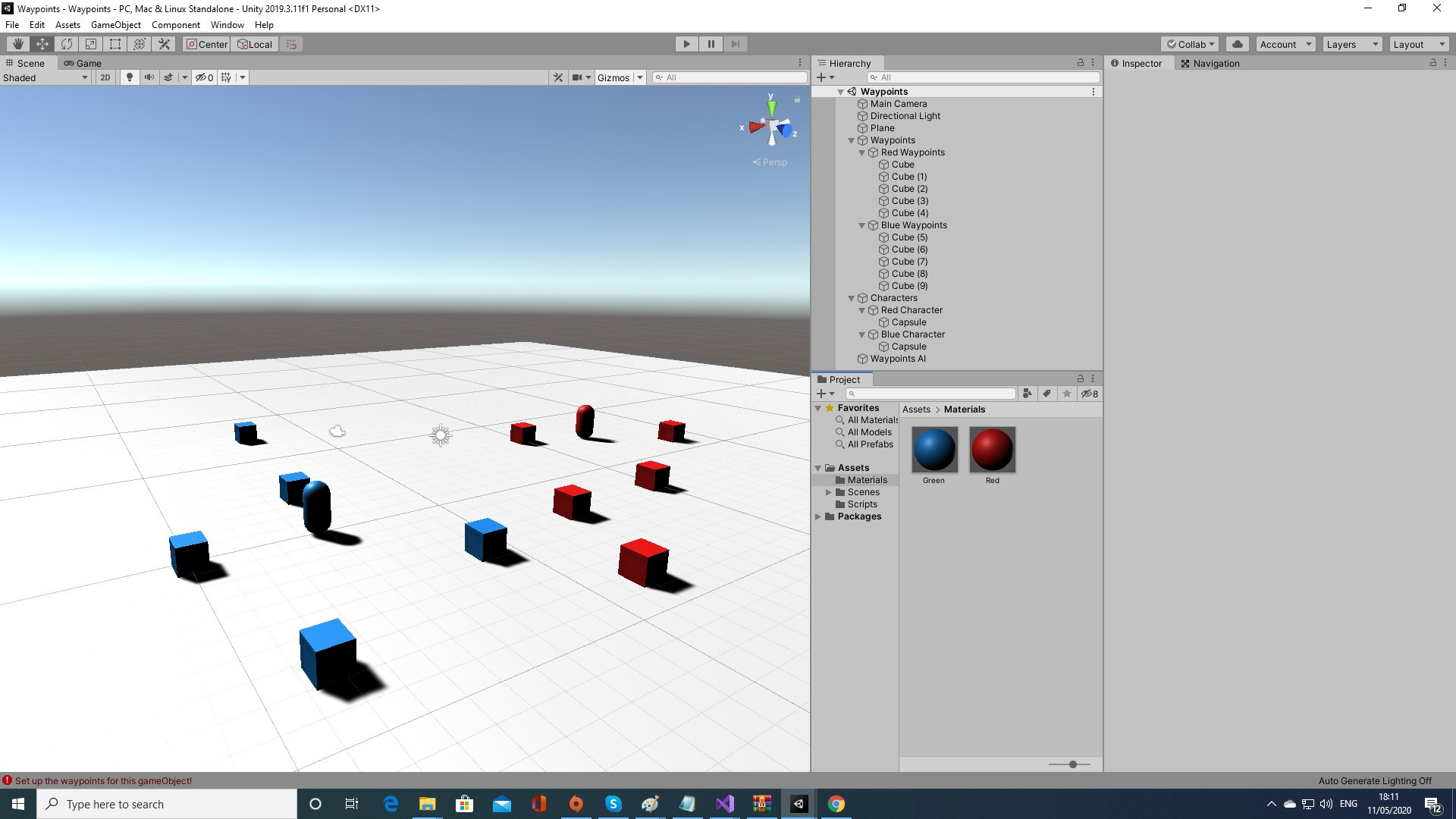
我想做的主要目标是使用相同的WaypointsAI脚本在蓝色路径点之间移动蓝色字符,并在红色路径点之间移动红色字符。如果蓝色组有5个字符,那么在蓝色路径点之间移动5个字符,如果红色组有50个字符,它们将在红色路径点之间移动。
现在的第一个问题是列表、点和代理在WaypointsAI脚本中是空的。我在这一行中添加了一个断点:
if (waypoints.points.Count < 1)两个名单都是空的。
我尝试将脚本RedWaypoints和BlueWaypoints中的Start()中的代码移动到WaypointsClass ()中,它为WaypointsClass类做了一个新实例,但是当它到达WaypointsAI脚本时,列表是空的。我搞不懂为什么。
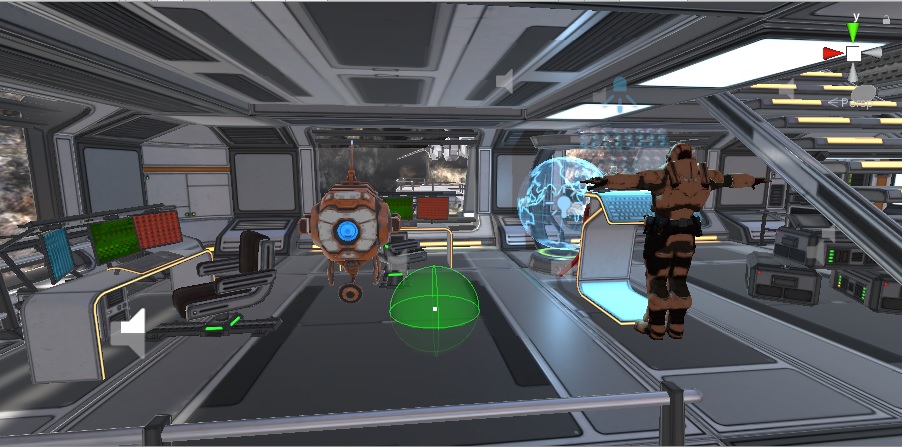
更简单的是,在这个截图中,我有两个角色,一个是t型角色,另一个是中间是蓝色圆圈的机器人。我希望每个人都能在其他点之间移动。一个可以爬上楼梯,另一个可以搬到窗口,然后向后移动:
回答 1
Stack Overflow用户
发布于 2020-05-11 16:51:09
您的问题:无法访问在另一个脚本中创建的类实例。
如果我理解你的问题..。我建议您使用静态类和静态列表,以便可以从任意脚本访问:
public static class Waypoints
{
    public static List<Transform> Redpoints = new List<Transform>();
    public static List<NavMeshAgent> Redagents = new List<NavMeshAgent>();
    public static List<Transform> Bluepoints = new List<Transform>();
    public static List<NavMeshAgent> Blueagents = new List<NavMeshAgent>();
}public class RedWaypoints : MonoBehaviour
{
public GameObject[] redWaypoints;
public NavMeshAgent redAgent;
// Start is called before the first frame update
void Start()
{
redWaypoints = GameObject.FindGameObjectsWithTag("Red_Waypoint");
foreach (GameObject point in redWaypoints)
{
Waypoints.Redpoints.Add(point.transform);
}
Waypoints.Redagents.Add(redAgent);
}
:
:
}public class BlueWaypoints : MonoBehaviour
{
public GameObject[] blueWaypoints;
public NavMeshAgent blueAgent;
// Start is called before the first frame update
void Start()
{
blueWaypoints = GameObject.FindGameObjectsWithTag("Blue_Waypoint");
foreach (GameObject point in blueWaypoints)
{
Waypoints.Bluepoints.Add(point.transform);
}
Waypoints.Blueagents.Add(blueAgent);
}
:
:
}从另一个脚本中,如果要访问第一个红点项,只需键入Waypoints.Redpoints[0],对于第一个红色代理,只需键入Waypoints.Redagents[0],而对于蓝色侧则是相同的
在WaypointsAI中,不需要声明public WaypointsClass waypoints;
https://stackoverflow.com/questions/61733230
复制相似问题
腾讯云开发者

Copyright © 2013 - 2026 Tencent Cloud. All Rights Reserved. 腾讯云 版权所有
深圳市腾讯计算机系统有限公司 ICP备案/许可证号:粤B2-20090059  粤公网安备44030502008569号
腾讯云计算(北京)有限责任公司 京ICP证150476号 | 京ICP备11018762号