
牛郎星:全球地图对中
牛郎星:全球地图对中
提问于 2020-04-04 07:41:22
我正在学习由牛郎星绘制地图,下面是图片库-世界投影的例子。
如何将地球地图的中心设置在我想要的拉特龙点?
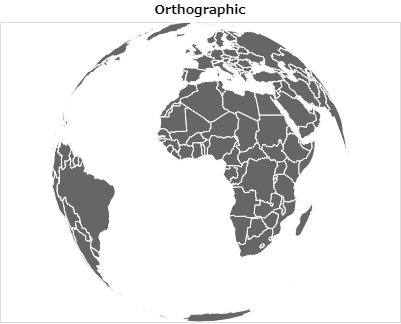
下面是我失败的代码,试图在Latitude= 40和Longitude=140周围对地图进行居中:
import altair as alt
from vega_datasets import data

countries = alt.topo_feature(data.world_110m.url, 'countries')

alt.Chart(countries).mark_geoshape(
    fill='#666666',
    stroke='white'
).project(
    type= 'orthographic'
).properties(
    title='Orthographic'
).configure_projection(
    center= [140,40]
)
正如你所看到的,地图仍然以大西洋为中心,可能在很长的地方,Lat = 0,0。
回答 1
Stack Overflow用户
回答已采纳
发布于 2020-04-04 12:29:26
对于正交投影,决定投影如何居中的是rotate属性,而不是center属性。rotate属性由围绕三个主轴的旋转度组成。例如,要构造围绕long=140,lat=40的投影,可以这样做:
import altair as alt
from vega_datasets import data

countries = alt.topo_feature(data.world_110m.url, 'countries')

alt.Chart(countries).mark_geoshape(
    fill='#666666',
    stroke='white'
).project(
    type= 'orthographic',
    rotate=[-140, -40 ,0]
).properties(
    title='Orthographic'
)
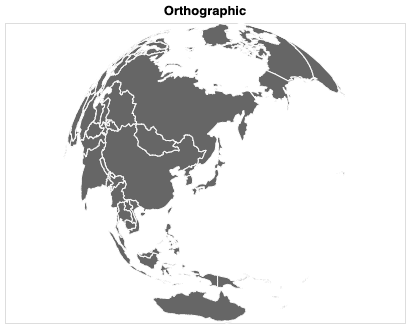
您可以在这个站点上动态地探索一些可用的投影及其配置:https://vega.github.io/vega/docs/projections/。
页面原文内容由Stack Overflow提供。腾讯云小微IT领域专用引擎提供翻译支持
原文链接:
https://stackoverflow.com/questions/61025130
复制相关文章
相似问题
腾讯云开发者

Copyright © 2013 - 2026 Tencent Cloud. All Rights Reserved. 腾讯云 版权所有
深圳市腾讯计算机系统有限公司 ICP备案/许可证号:粤B2-20090059  粤公网安备44030502008569号
腾讯云计算(北京)有限责任公司 京ICP证150476号 | 京ICP备11018762号