
JTAppleCalendarView:无法清除prepareForReuse中的DateCell
JTAppleCalendarView:无法清除prepareForReuse中的DateCell
提问于 2020-04-04 05:47:52
我试图清除prepareForReuse中的prepareForReuse,但是当选择包含Activities的DateCell时,我的实现似乎无法工作。
我有以下设置:
4月3日和4月4日的
- 虚拟数据只有
- ,当有
activities时,包含点的stackView将呈现在日期以下。
在以下情况下,我的实现工作良好(正确清理和重用单元格):
当没有selected
- Scrolling时,
- 向上和向下滚动,当不包含
activities的dateCells被选中时,
每当选择包含dateCell的activities时,就不再清理单元格(点开始在任意位置出现)。见gif:
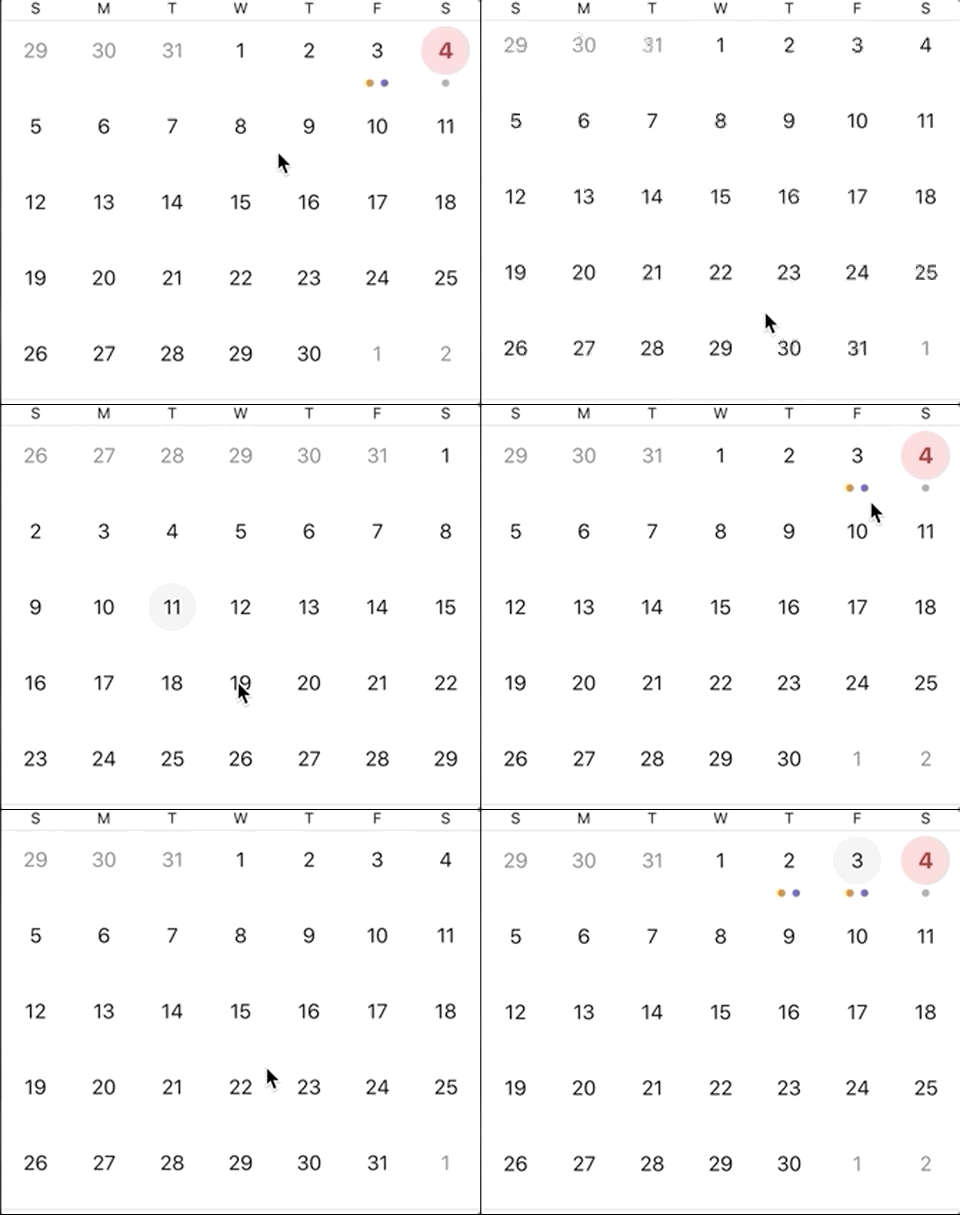
守则如下:
//At viewController: JTACMonthViewDelegate
func configureCell(view: JTACDayCell?, cellState: CellState) {
    guard let cell = view as? DateCell  else { return }
    cell.dateLabel.text = cellState.text
    handleCellTextColor(cell: cell, cellState: cellState)
    handleCellSelected(cell: cell, cellState: cellState)
    highlightTodaysDate(cell: cell, cellState: cellState)
    handleCellEvents(cell: cell, cellState: cellState)
}

func highlightTodaysDate(cell: DateCell, cellState: CellState) {
    dateFormatter.dateFormat = "YYYY MM dd"

    if dateFormatter.string(from: cellState.date) == dateFormatter.string(from: Date()) {
        cell.isToday = true
    } else {
        cell.isToday = false
    }
}

func handleCellTextColor(cell: DateCell, cellState: CellState) {
    if cellState.dateBelongsTo == .thisMonth {
        cell.dateLabel.textColor = UIColor.black
    } else {
        cell.dateLabel.textColor = UIColor.gray
    }
}

func handleCellSelected(cell: DateCell, cellState: CellState) {
    if cellState.isSelected {
        cell.selectedView.isHidden = false

        dateFormatter.dateFormat = "dd-MMM-yyyy"
        let dateString = dateFormatter.string(from: cellState.date)

        //a separate tableView is in viewController, here getting dataSource for that TV
        let filtered = calendarDataSource.filter { $0.key == dateString }
        tableViewDataSource = filtered[dateString] ?? []
        tableView.reloadData()

    } else {
        cell.selectedView.isHidden = true
    }
}

func handleCellEvents(cell: DateCell, cellState: CellState) {
    dateFormatter.dateFormat = "dd-MMM-yyyy"
    let dateString = dateFormatter.string(from: cellState.date)

    if calendarDataSource[dateString] == nil {
        cell.activities = []
    } else {
        cell.activities = calendarDataSource[dateString]
    }
}


//At DateCell
var isToday: Bool? {
    didSet {
        if isToday ?? false {
            //setup red selectedView bg
        } else {
            //setup gray selectedView bg
        }
    }
}
var activities: [Activity]? {
    didSet {
        if let activities = activities {
            if activities.count > 0 {
                setupStackView(activities)
            }
        } else {
            stackView.removeFromSuperview()
        }
    }
}

var stackView = UIStackView()

override init(frame: CGRect) {
    super.init(frame: frame)
    //Other setup work
}

func setupStackView(_ activities: [Activity]) {
    var dotViews: [UIView] = activities.map { (activity) -> DotView in
        let dotView = DotView()
        if activity.type == "1" {
            dotView.dotView.backgroundColor = .orange
        } else if activity.type == "2" {
            dotView.dotView.backgroundColor = .purple
        } else {
            dotView.dotView.backgroundColor = .lightGray

        }
        return dotView
    }

    if activities.count > 1 {
        dotViews.insert(UIView(), at: 0)
        dotViews.insert(UIView(), at: activities.count + 1)
    }

    stackView = UIStackView(arrangedSubviews: dotViews)
    stackView.translatesAutoresizingMaskIntoConstraints = false
    stackView.axis = .horizontal
    stackView.distribution = .fillEqually
    addSubview(stackView)

    stackView.topAnchor.constraint(equalTo: dateLabel.bottomAnchor).isActive = true
    stackView.bottomAnchor.constraint(equalTo: bottomAnchor).isActive = true
    stackView.leadingAnchor.constraint(equalTo: leadingAnchor).isActive = true
    stackView.trailingAnchor.constraint(equalTo: trailingAnchor).isActive = true

}

override func prepareForReuse() {
    super.prepareForReuse()
    //Other UI reset work here

    stackView.removeFromSuperview()
}
一个人如何清理细胞,使其不出现在不应该出现的地方?
回答 1
Stack Overflow用户
回答已采纳
发布于 2020-04-04 06:15:47
我认为每次重新加载单元时都需要删除stackView。不仅仅是在没有活动的时候。每次装上电池,你都要把板子擦干净。
var activities: [Activity]? {
    didSet {
        stackView.removeFromSuperview()
        if let activities = activities {
            if activities.count > 0 {
                setupStackView(activities)
            }
        }
    }
}页面原文内容由Stack Overflow提供。腾讯云小微IT领域专用引擎提供翻译支持
原文链接:
https://stackoverflow.com/questions/61024273
复制相关文章
相似问题
腾讯云开发者

Copyright © 2013 - 2026 Tencent Cloud. All Rights Reserved. 腾讯云 版权所有
深圳市腾讯计算机系统有限公司 ICP备案/许可证号:粤B2-20090059  粤公网安备44030502008569号
腾讯云计算(北京)有限责任公司 京ICP证150476号 | 京ICP备11018762号