
通过PowerShell检索Azure AD应用程序的"API权限“
出于报告和监视的目的,我是否希望检索应用程序(应用程序注册)的Azure门户中显示的有关"API权限“的信息。
我尝试了以下代码
$app = Get-AzureADApplication -ObjectId 'aa7e174d-2639-4ac7-9b11-6799466c3c9b'
$app.Oauth2Permissions
但这只会产生以下信息:
AdminConsentDescription : Allow the application to access foobar_HVV on behalf of the signed-in user.
AdminConsentDisplayName : Access foobar_HVV
Id                      : h1285f9d5-b00d-4bdb-979d-c4d6487fa000
IsEnabled               : True
Type                    : User
UserConsentDescription  : Allow the application to access foobar_HVV on your behalf.
UserConsentDisplayName  : Access foobar_HVV
Value                   : user_impersonation
但是,应用程序"foobar_HVV“的"API权限”显示了完全不同的权限。特别是我的报告需要使用"Typ“(代表、应用程序)和每个权限的”状态“。
回答 2
Stack Overflow用户
发布于 2020-03-23 02:25:13
如果您想获得API permissions,您需要使用下面的命令。
$app = Get-AzureADApplication -ObjectId '<object-id of the App Registration>'
$app.requiredResourceAccess | ConvertTo-Json -Depth 3
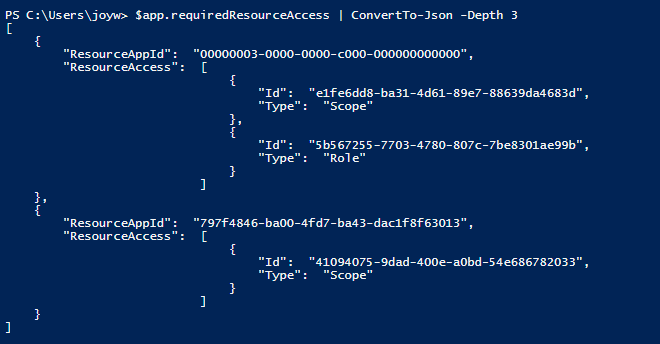
ResourceAppId是API的服务主体的Application ID,例如Microsoft Graph,ResourceAccess包含添加到应用程序的权限,Scope表示Delegated permission,Role表示Application permission。
我的API权限:
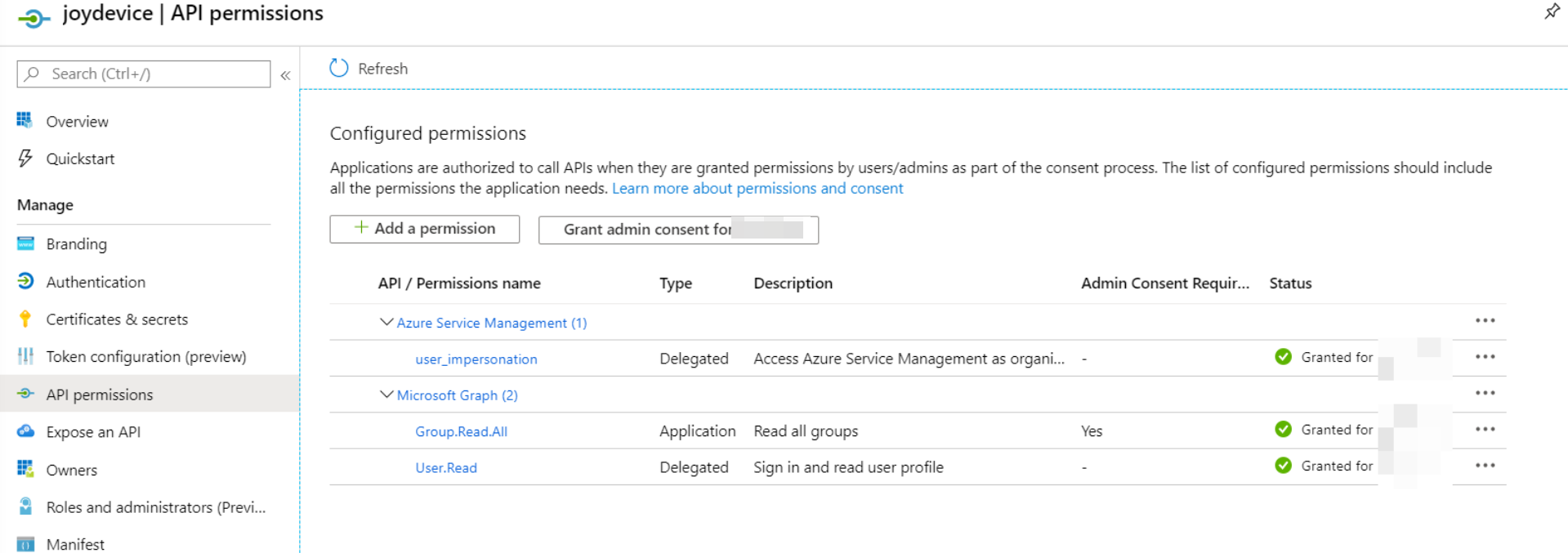
要检查API权限的详细信息,您需要使用下面的命令。例如,我们想知道屏幕截图中Id是5b567255-7703-4780-807c-7be8301ae99b的权限的细节,它的Type是Role,所以我们需要使用$sp.AppRoles。
$sp = Get-AzureADServicePrincipal -All $true | Where-Object {$_.AppId -eq '00000003-0000-0000-c000-000000000000'}
$sp.AppRoles | Where-Object {$_.Id -eq '5b567255-7703-4780-807c-7be8301ae99b'}

如果您想获得Delegated permission(Type is Scope),我们需要使用:
$sp = Get-AzureADServicePrincipal -All $true | Where-Object {$_.AppId -eq '00000003-0000-0000-c000-000000000000'}
$sp.Oauth2Permissions | Where-Object {$_.Id -eq 'e1fe6dd8-ba31-4d61-89e7-88639da4683d'}

要检查Status,没有直接的方法,您需要检查服务主体的管理员在AAD租户中授予的与App相对应的权限。
首先,获取服务主体$appsp
$app = Get-AzureADApplication -ObjectId '<object-id of the App Registration>'
$appsp = Get-AzureADServicePrincipal -All $true | Where-Object {$_.AppId -eq $app.AppId}获取已被授予的Delegated permissions (Status是Granted):
Get-AzureADServicePrincipalOAuth2PermissionGrant -ObjectId $appsp.ObjectId -All $true | ConvertTo-Json
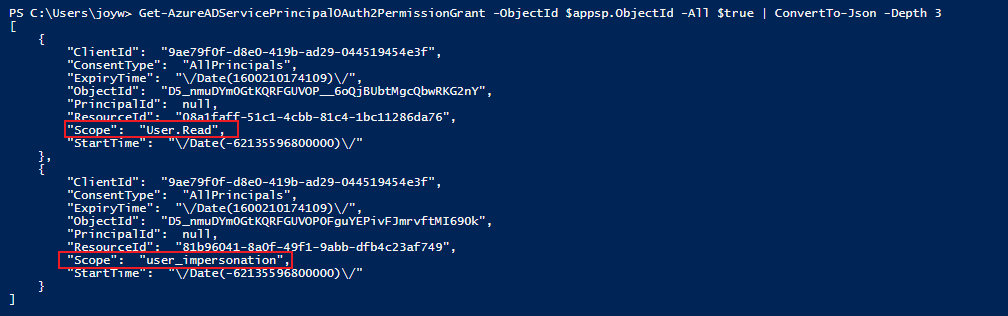
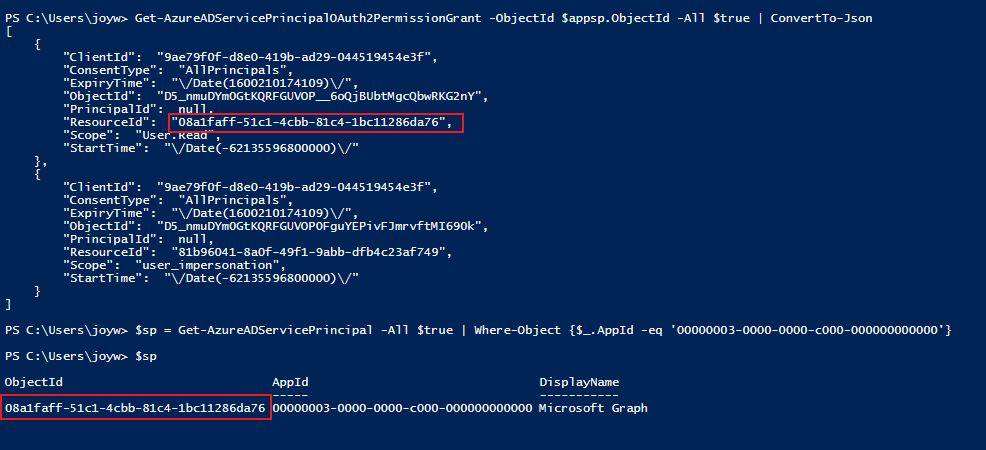
ResourceId是API的服务主体的Object Id:
获取已被授予的Application permissions (Status是Granted):
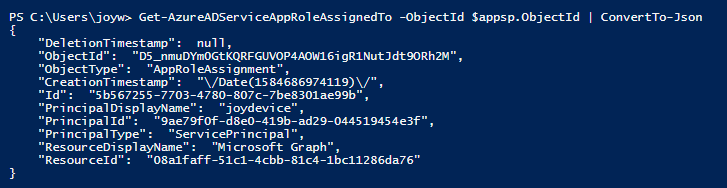
Get-AzureADServiceAppRoleAssignedTo -ObjectId $appsp.ObjectId | ConvertTo-JsonId是第一个屏幕截图中ResourceAccess中的Id。
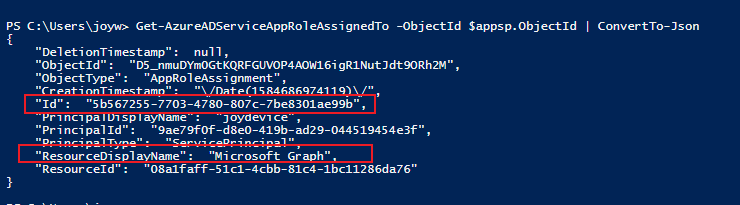
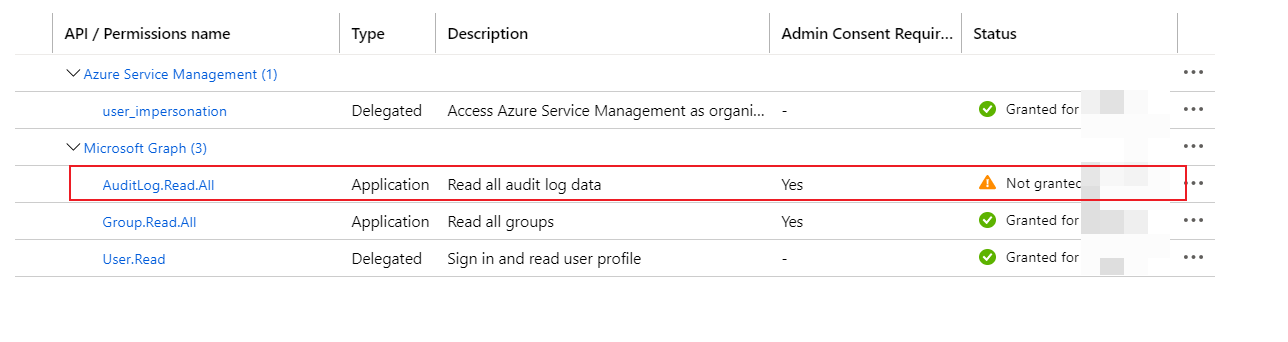
如果未授予权限(Status为Not Granted),则不会使用上面的命令获得权限。
例如,我在门户中添加了一个新的Application permission,然后再次运行命令,我们仍然可以获得已授予的权限。
Stack Overflow用户
发布于 2021-11-08 22:19:32
使用7.1 PowerShell和Az客户端来处理一个新的解决方案,我编写了如下脚本来解决这个问题:
# loop in all Applications then every Application Loop this one to
$sp = $sp = az ad app list --display-name "yourapplication"
$spIdList = ($sp |ConvertFrom-Json -AsHashtable).requiredResourceAccess.resourceAccess
# retreive the ID from Bucket
$RoleAppID = ($sp| ConvertFrom-Json ).requiredResourceAccess.resourceAppId
## receive all Roles and lookup inside
$appRolesArray = (az ad sp show --id $RoleAppID | ConvertFrom-Json -AsHashtable ).appRoles

$listRoles = @()
foreach ($itemSpId in $spIdList) {
    $itemSpId.id

    foreach($item in $appRolesArray ) {
        if ( $item.id -eq $itemSpId.id ){
            $listRoles += $item
            $item
        }
    }
}
$listRoles.count
现在,您可以对这些对象的列表做您想做的任何事情。
目标是使用"az客户端“
https://stackoverflow.com/questions/60769329
复制相似问题
腾讯云开发者

Copyright © 2013 - 2026 Tencent Cloud. All Rights Reserved. 腾讯云 版权所有
深圳市腾讯计算机系统有限公司 ICP备案/许可证号:粤B2-20090059  粤公网安备44030502008569号
腾讯云计算(北京)有限责任公司 京ICP证150476号 | 京ICP备11018762号