
带芯片的过滤器
带芯片的过滤器
提问于 2020-03-16 16:13:10
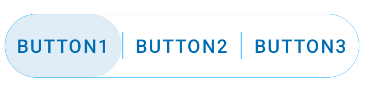
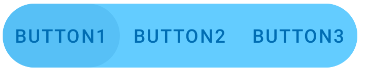
我想问你是否存在于一个无线电按钮的组件中,但它是像这张图像这样的芯片的格式。当你想搜索一个游戏时,它是Google游戏中的一个组件


感谢我们的回应
回答 1
Stack Overflow用户
回答已采纳
发布于 2020-05-17 08:30:58
这并不是你想要的,但你可以使用:
一个带有圆角的容器,比如一个带有圆角的LinearLayout
- single
Button,对于每个项目
- 添加动画到
onClick事件
类似于:
   <LinearLayout
        android:id="@+id/ll_container"
        ..>

             <com.google.android.material.button.MaterialButton
                 style="@style/materialButtonOutlinedStyle"
                  .../>

              <View
                 android:layout_width="1dp"
                 android:layout_height="..."
                 ../>

              <com.google.android.material.button.MaterialButton
                  style="@style/materialButtonOutlinedStyle"
                  ..>

              <!-- ..... -->

        </LinearLayout>
通过以下方式:
  <style name="materialButtonOutlinedStyle" parent="Widget.MaterialComponents.Button.TextButton">
    <item name="strokeWidth">0dp</item>
    <item name="shapeAppearanceOverlay">@style/rounded_button</item>
    <item name="android:insetTop">0dp</item>
    <item name="android:insetBottom">0dp</item>
  </style>

  <style name="rounded_button">
    <item name="cornerFamily">rounded</item>
    <item name="cornerSize">50%</item>
</style>对于容器,可以用圆角的CardView包装按钮,也可以简单地将其应用于LinearLayout,如下所示:
float radius = getResources().getDimension(R.dimen.default_corner_radius);
LinearLayout linearLayout= findViewById(R.id.ll_container);
ShapeAppearanceModel shapeAppearanceModel = new ShapeAppearanceModel()
    .toBuilder()
    .setAllCorners(CornerFamily.ROUNDED,radius)
    .build();

MaterialShapeDrawable shapeDrawable = new MaterialShapeDrawable(shapeAppearanceModel);
shapeDrawable.setFillColor(ContextCompat.getColorStateList(this,R.color.white));
shapeDrawable.setStrokeWidth(1.0f);
shapeDrawable.setStrokeColor(ContextCompat.getColorStateList(this,R.color...));


ViewCompat.setBackground(linearLayout,shapeDrawable);
页面原文内容由Stack Overflow提供。腾讯云小微IT领域专用引擎提供翻译支持
原文链接:
https://stackoverflow.com/questions/60709469
复制相关文章
相似问题
腾讯云开发者

Copyright © 2013 - 2026 Tencent Cloud. All Rights Reserved. 腾讯云 版权所有
深圳市腾讯计算机系统有限公司 ICP备案/许可证号:粤B2-20090059  粤公网安备44030502008569号
腾讯云计算(北京)有限责任公司 京ICP证150476号 | 京ICP备11018762号