
如何获得在Windows 10中运行Python代码的权限
如何获得在Windows 10中运行Python代码的权限
提问于 2020-03-11 05:17:10
我试图在终端的windows 10上运行这个decrypt.py代码,我已经在我的Windows中安装了Python3,这个代码在驱动器D中运行,这个终端在Visual中运行。
#!/usr/bin/python3

from Crypto import Random
from Crypto.Cipher import AES
import os
import os.path
from os import listdir
from os.path import isfile, join
import time


class Encryptor:
    def __init__(self, key):
        self.key = key

    def pad(self, s):
        return s + b"\0" * (AES.block_size - len(s) % AES.block_size)

    def encrypt(self, message, key, key_size=256):
        message = self.pad(message)
        iv = Random.new().read(AES.block_size)
        cipher = AES.new(key, AES.MODE_CBC, iv)
        return iv + cipher.encrypt(message)

    def encrypt_file(self, file_name):
        with open(file_name, 'rb') as fo:
            plaintext = fo.read()
        enc = self.encrypt(plaintext, self.key)
        with open(file_name + ".enc", 'wb') as fo:
            fo.write(enc)
        os.remove(file_name)

    def decrypt(self, ciphertext, key):
        iv = ciphertext[:AES.block_size]
        cipher = AES.new(key, AES.MODE_CBC, iv)
        plaintext = cipher.decrypt(ciphertext[AES.block_size:])
        return plaintext.rstrip(b"\0")

    def decrypt_file(self, file_name):
        with open(file_name, 'rb') as fo:
            ciphertext = fo.read()
        dec = self.decrypt(ciphertext, self.key)
        with open(file_name[:-4], 'wb') as fo:
            fo.write(dec)
        os.remove(file_name)

    def getAllFiles(self):
        dir_path = os.path.dirname(os.path.realpath(__file__))
        dirs = []
        for dirName, subdirList, fileList in os.walk(dir_path):
            for fname in fileList:
                if (fname != 'script.py' and fname != 'mykeys.txt.enc'):
                    dirs.append(dirName + "\\" + fname)
        return dirs

    def encrypt_all_files(self):
        dirs = self.getAllFiles()
        for file_name in dirs:
            self.encrypt_file(file_name)

    def decrypt_all_files(self):
        dirs = self.getAllFiles()
        for file_name in dirs:
            self.decrypt_file(file_name)


key = b'[EX\xc8\xd5\xbfI{\xa2$\x05(\xd5\x18\xbf\xc0\x85)\x10nc\x94\x02)j\xdf\xcb\xc4\x94\x9d(\x9e'
enc = Encryptor(key)
clear = lambda: os.system('cls')

if os.path.isfile('mykeys.txt.enc'):

    while True:
        mykeys = str(input("Enter keys: "))
        enc.decrypt_file("mykeys.txt.enc")
        p = ''
        with open("mykeys.txt", "r") as f:
            p = f.readlines()
        if p[0] == mykeys:
            enc.encrypt_file("mykeys.txt")
            break

    while True:
        clear()
        choice = int(input(
            "1. Press '1' to encrypt file.\n2. Press '2' to decrypt file.\n3. Press '3' to Encrypt all files in the directory.\n4. Press '4' to decrypt all files in the directory.\n5. Press '0' to exit.\n"))
        clear()
        if choice == 1:
            enc.encrypt_file(str(input("Enter name of file to encrypt: ")))
        elif choice == 2:
            enc.decrypt_file(str(input("Enter name of file to decrypt: ")))
        elif choice == 3:
            enc.encrypt_all_files()
        elif choice == 4:
            enc.decrypt_all_files()
        elif choice == 0:
            exit()
        else:
            print("Please select a valid option!")

else: print("You don't have permission to read file.")
然而,当我运行它时,终端给了我这个答复。
PS D:\project\temp-and-humidity> & C:/Users/bleac/AppData/Local/Microsoft/WindowsApps/python.exe d:/project/temp-and-humidity/decrypt.py
You don't have permission to read file.
PS D:\project\temp-and-humidity>
要获得在Windows 10上运行此文件的权限,需要做什么?我在搜索与sudo类似的运行方法,但我对如何使用runas命令感到困惑。此外,当我右键单击该文件时,它没有“以管理员身份运行”选项。
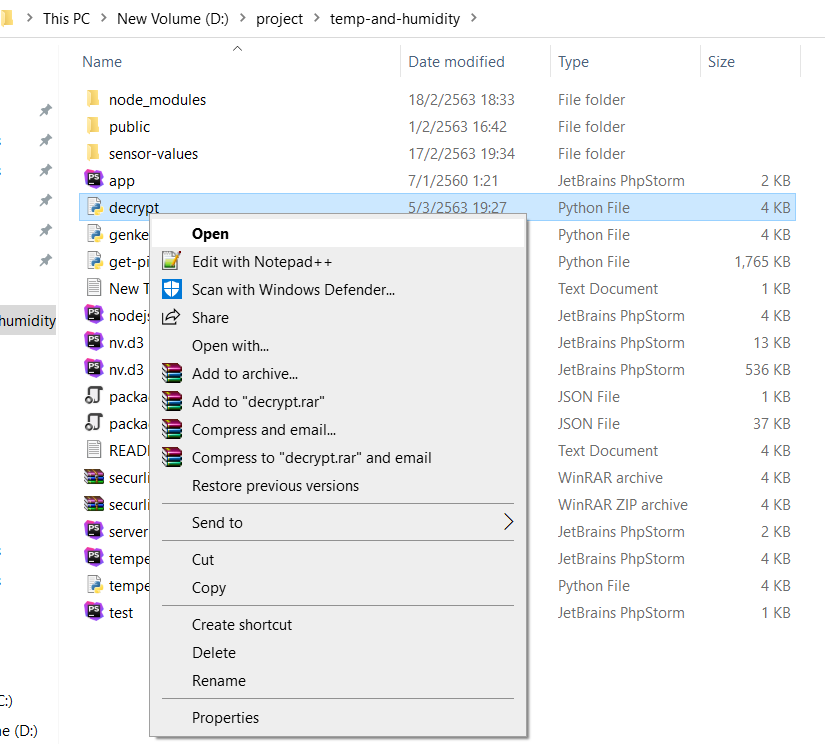
编辑:我会在这里张贴文件,文件是在这个拉链在谷歌驱动器。
回答 2
Stack Overflow用户
回答已采纳
发布于 2020-03-11 05:32:32
您是从Windows安装Python 3的,这就是在尝试运行脚本时获得有限权限的原因。尝试卸载它,然后从官方网络专家e中安装
https://www.python.org/downloads/
顺便说一句,下面是您可能感兴趣的相关问题,#59148628
Stack Overflow用户
发布于 2020-03-11 05:23:33
在小路上打开终点站。并编写此代码python decrypt.py按ENTER键
页面原文内容由Stack Overflow提供。腾讯云小微IT领域专用引擎提供翻译支持
原文链接:
https://stackoverflow.com/questions/60629648
复制相关文章
相似问题
腾讯云开发者

Copyright © 2013 - 2026 Tencent Cloud. All Rights Reserved. 腾讯云 版权所有
深圳市腾讯计算机系统有限公司 ICP备案/许可证号:粤B2-20090059  粤公网安备44030502008569号
腾讯云计算(北京)有限责任公司 京ICP证150476号 | 京ICP备11018762号