
角材质着色应用程序背景动态不工作
我正在努力实现我的应用程序的背景是由当前使用的主题定义的颜色。这实际上不起作用。
我试过的是:Angular Material2 theming - how to set app background?。我尝试使用这个帖子的公认的解决方案,但对我来说,只有所有组件的背景被设置并被主题覆盖。我不知道怎么处理。
它的外观(没有内容的白色部分也应该是黑色的):
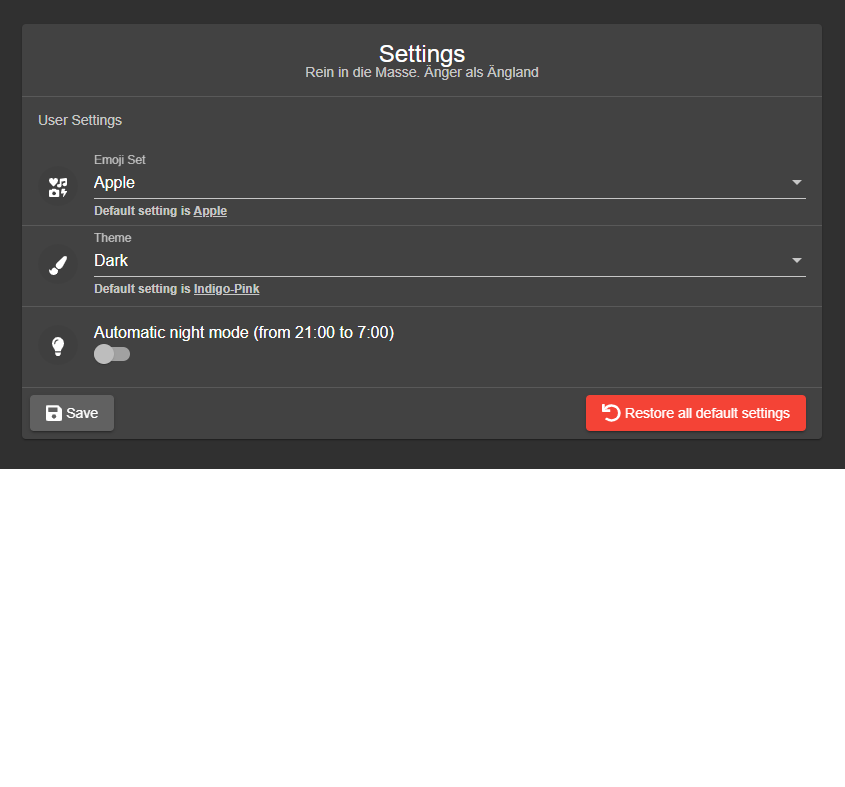
我复制了本教程中的主题操作,在这里一切都很好:https://medium.com/grensesnittet/dynamic-themes-in-angular-material-b6dc0c88dfd7
app.component.html:
<div
  [ngClass]="{'default-theme': (selectedTheme | async) === 'default-theme', 'dark-theme': (selectedTheme | async) === 'dark-theme', 'light-theme': (selectedTheme | async) === 'light-theme', 'nature-theme': (selectedTheme | async) === 'nature-theme'}">
  <div class="mat-app-background">
    <app-header></app-header>
    <router-outlet></router-outlet>
  </div>
</div>
index.html:
<body class="mat-app-background">
  <app-root>
  </app-root>
</body>
材料-主题。
@import "~@angular/material/theming";
@import "./component-themes";

@include mat-core();

$primary: mat-palette($mat-indigo);
$accent: mat-palette($mat-pink, A200, A100, A400);
$warn: mat-palette($mat-red);
$theme: mat-light-theme($primary, $accent, $warn);

@include angular-material-theme($theme);
@include component-themes($theme);

.dark-theme {
  color: $light-primary-text;
  $dark-primary: mat-palette($mat-grey, 700, 300, 900);
  $dark-accent: mat-palette($mat-blue-grey, 400);
  $dark-warn: mat-palette($mat-red, 500);
  $dark-theme: mat-dark-theme($dark-primary, $dark-accent, $dark-warn);
  $bp: mat-palette($mat-red);

  @include angular-material-theme($dark-theme);
  @include component-themes($dark-theme);
}
styles.scss:
@import "./material-theme";
@import "~@angular/material/theming";

body {
  margin: 0;
  font-family: Roboto, sans-serif;
  // background-color: mat-color($bp);
}
主题通过应用程序组件设置:
  ngOnInit(): void {
    this.themeService.setTheme(localStorage.getItem("theme"));
    this.selectedTheme = this.themeService.theme;
    this.selectedTheme.subscribe(data => {
      const overlayContainerClasses = this.overlayContainer.getContainerElement()
        .classList;
      const themeClassesToRemove = Array.from(
        overlayContainerClasses
      ).filter((item: string) => item.includes("-theme"));
      if (themeClassesToRemove.length) {
        overlayContainerClasses.remove(...themeClassesToRemove);
      }
      overlayContainerClasses.add(data);
    });
  }
那么,做这件事最好的方法是什么呢?
回答 1
Stack Overflow用户
发布于 2020-08-07 21:02:40
在切换到暗主题和光主题时,我对背景色也有问题,因为更改OverlayContainer上的CSS类是不够的,我还必须更改body元素上的CSS类。
在这里,对我有用的代码:
(您可以在https://github.com/toongeorges/angular-electron-material-design/commit/4d91f9c21ed24b853da8284099e641676d620826找到一个完整的工作代码示例)
source/index.html:中的
<body class="mat-app-background">
  <app-root>Loading...</app-root>
</body>
src/styles.scss:中的
//default theme
@include angular-material-theme($dark-theme);

.light-theme {
    @include angular-material-theme($light-theme);
}

.dark-theme {
    @include angular-material-theme($dark-theme);
}
src/app/app.component.html:中的
    <button mat-raised-button color="accent" mat-button [matMenuTriggerFor]="menu" aria-label="Select Theme">
        Select Theme
    </button>
    <mat-menu #menu="matMenu">
        <button mat-menu-item (click)="onSetTheme('dark-theme')">
            <mat-icon svgIcon="brightness-2"></mat-icon>
            <span>Dark Theme</span>
        </button>
        <button mat-menu-item (click)="onSetTheme('light-theme')">
            <mat-icon svgIcon="brightness-7"></mat-icon>
            <span>Light Theme</span>
        </button>
    </mat-menu>
src/app/app.component.ts:中的
  onSetTheme(theme: string) {
    if (theme === this.componentCssClass) {
      //ignore change
    } else {
      if (theme == 'dark-theme') {
        this.resetTheme(theme);
      } else if (theme == 'light-theme') {
        this.resetTheme(theme);
      } else {
        console.error("Unknown theme: " + theme);
      }
    }
  }

  resetTheme(theme: string) {
    const body = document.getElementsByTagName('body')[0];

    if (this.componentCssClass) {
      //remove the old style
      body.classList.remove(this.componentCssClass);
      this.overlayContainer.getContainerElement().classList.remove(this.componentCssClass);
    }

    this.componentCssClass = theme;
    //set the new style
    body.classList.add(this.componentCssClass);
    this.overlayContainer.getContainerElement().classList.add(this.componentCssClass);
}https://stackoverflow.com/questions/60504511
复制相似问题
腾讯云开发者

Copyright © 2013 - 2026 Tencent Cloud. All Rights Reserved. 腾讯云 版权所有
深圳市腾讯计算机系统有限公司 ICP备案/许可证号:粤B2-20090059  粤公网安备44030502008569号
腾讯云计算(北京)有限责任公司 京ICP证150476号 | 京ICP备11018762号