
如何验证JSON的值并将其转换为react.js中的另一个词?
如何验证JSON的值并将其转换为react.js中的另一个词?
提问于 2020-03-03 08:58:18
这是API中的JSON文件
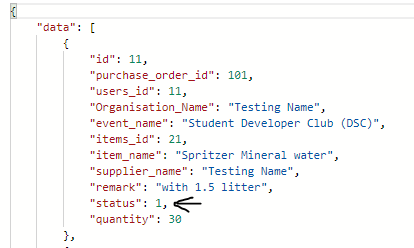
从上面的图片中,我的状态在int中返回,以表示状态的结果。状态1意味着是批准
下面是我如何获得api数据react.js的方法
  componentDidMount(){
    const users_id = localStorage.getItem('id');

    fetch(`http://localhost:9000/api/purchase-order/list/${users_id}`,)
     .then((resp)=>{
       resp.json().then((res)=>{
           console.log(res.data);
                this.setState({data: res.data});
       })
     })
   }

render(){
    const data = this.state.data
    return (
      <div>
       <Header />
       {/* <NavigationBar /> */}
        <div>
        { Object.keys(data).map((key) => <h1>Status:{data[key].status}</h1>) }
         //Here show the status in number, but I need to show the "Approve" on here instead of 1
        </div>
      </div>
    );
  }
是否有任何解决方案或方法可以帮助验证结果状态,并在UI页面中显示真正意义的单词?
仍然有一些状态在这里,1是批准,2是待定,3被拒绝
回答 3
Stack Overflow用户
回答已采纳
发布于 2020-03-03 09:01:25
将数字分配给数组
一个简单的解决方案可以是使用数字作为索引,并在上面打印一个单词。
const statusAry = ['broken', 'good', 'incomplete'];

...

{ Object.keys(data).map((key) => <h1>Status:{statusAry[data[key].status]}</h1>) }Stack Overflow用户
发布于 2020-03-03 09:00:37
您可以使用以下代码:
{ Object.keys(data).map((key) => <h1>Status:{data[key].status === 1 ? 'Approved' : 'Rejected'}</h1>) }Stack Overflow用户
发布于 2020-03-03 09:02:56
你可以这样做:
定义你的状态
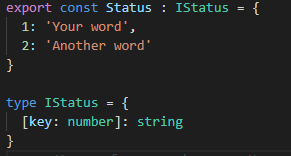
然后像这样使用它:
{Status[datakey.status]}
页面原文内容由Stack Overflow提供。腾讯云小微IT领域专用引擎提供翻译支持
原文链接:
https://stackoverflow.com/questions/60503485
复制相关文章
相似问题
腾讯云开发者

Copyright © 2013 - 2026 Tencent Cloud. All Rights Reserved. 腾讯云 版权所有
深圳市腾讯计算机系统有限公司 ICP备案/许可证号:粤B2-20090059  粤公网安备44030502008569号
腾讯云计算(北京)有限责任公司 京ICP证150476号 | 京ICP备11018762号