
QML/qdoc :如何为我的qml组件定义继承和重要语句?
我正在用QDoc为我的QML项目编写文档。到目前为止,我能够做一个简单的描述我的功能/信号/属性。现在,我想定义继承和Qt中的重要语句(参见下面)。
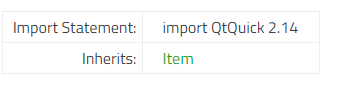
- 根据Qt文档,继承是用\inherits命令定义的。但是,当我希望使我的对象从Item继承时,我没有看到任何结果,并且在运行qdoc时没有任何警告/错误。
- 根据Qt wiki,QDoc将命令中指定的版本视为导入语句。按照这个示例,我试图定义我自己的导入语句,因为我的qml文件仅可用于特定的导入(假设这里是MyLib 2.0 )。与继承一样,qdoc似乎不理解,因为我有以下结果:

知道我错过了什么吗?您可以在下面找到我所拥有的一个简单示例( css文件非常简单,因此我认为它与显示它无关)。
我的环境:
- QT5.10.10与msvc2015
- LLVM 9.0.0 (用于qdoc)
config.qdocconf
sourcedirs = .
headerdirs = .
imagedirs = .

sources.fileextensions = "*.qml"


outputdir  =    ./doc/
outputformats = HTML

HTML.stylesheets = style.css
HTML.headerstyles = "<link rel=\"stylesheet\" type=\"text/css\" href=\"style/style.css\"/>\n"
CustomItem.qml
import QtQuick 2.10;

/*!
    MyLib 2.0    //!  What should I write to get the import statement?

   \qmltype CustomItem
   \inherits Item //! What should I write to get the "Inherits"?


   \brief A simple example of object that inherits of Item.

   I can safely assume that the properties and signals work well.
*/

Item {
    id: customItem;

    /*!
        prop1 description
    */
    property color prop1;

    /*!
        prop2 description
    */
    property int prop2: 6;
}
谢谢你的帮助!
回答 2
Stack Overflow用户
发布于 2020-03-03 12:48:43
我认为您需要使用\inqmlmodule属性和module.qdoc文件指定QML模块。
Mylib.qdoc的示例:
/*!
    \qmlmodule MyLib 2.0
    \title MyLib 2.0 QML types

    MyLib is a collection of types ...

    ...
*/
在QML类型文件中:
import QtQuick 2.10;

/*!
   \qmltype CustomItem
   \inherits Item
   \inqmlmodule MyLib
 ...
*/

Item {
 ...
}
对于继承,可以在类型的前面加上它的模块:
\inherits QtQuick::Item如果您的类型是在C++类中定义的,还可以添加\instanciates属性:
\instanciates MyType 完整的例子:
/*!
    \qmltype CustomType
    \inqmlmodule MyLib
    \inherits QtQuick::Item
    \brief Provides a custom item type.

    CustomType provides a component for use as ...
*/Stack Overflow用户
发布于 2021-08-26 13:17:47
为了使\inherits工作,它继承的类型必须定义在QDoc可以找到的某个地方。因为Item是Qt提供的类型,所以您的.qdocconf文件必须依赖于为Item提供文档的模块。
您可以通过向.qdocconf文件中添加以下行来完成此操作。
depends += \
qtquick相关章节:
“依赖”变量定义了该项目所依赖的用于解析类型继承的链接目标以及文档需要链接到的其他任何其他文档项目的列表。
但是,您还需要告诉QDoc这些依赖项的索引文件在哪里。
在具有依赖关系并使用依赖变量的项目上调用QDoc时,必须将一个或多个-indexdir路径作为命令行选项传递。QDoc使用这些路径搜索依赖项的索引文件。
qdoc mydoc.qdocconf -outputdir $PWD/html -indexdir $QT_INSTALL_DOCS有了上面的内容,QDoc将搜索一个文件$QT_INSTALL_DOCS/qtQuick.index,以获取对qt腿的依赖关系。如果找不到依赖项的索引文件,QDoc将输出警告。
这意味着您需要构建Qt文档并将已安装文档的位置传递给qdoc。
一旦您这样做了,使用\inherits Item应该在您生成的文档中提供以下行。
继承:项目
https://stackoverflow.com/questions/60493159
复制相似问题
腾讯云开发者

Copyright © 2013 - 2026 Tencent Cloud. All Rights Reserved. 腾讯云 版权所有
深圳市腾讯计算机系统有限公司 ICP备案/许可证号:粤B2-20090059  粤公网安备44030502008569号
腾讯云计算(北京)有限责任公司 京ICP证150476号 | 京ICP备11018762号