
“角9”和“故事本”:添加@角/本地化/init填充
当更新到角9时,我会得到下面的故事簿错误。

这个错误说我需要为国际化添加一个多边形填充,但是我不知道如何。
我需要配置webpack,并在那里添加填充,但我无法使它工作。
有人知道怎么解决这个问题吗?
干杯
编辑:为了澄清我在角项目中运行了ng add @angular/localize。
尽管如此,“故事本”并没有捡到它。
这是我的polyfills.ts文件。
/***************************************************************************************************
 * Load `$localize` onto the global scope - used if i18n tags appear in Angular templates.
 */
import '@angular/localize/init';
/**
 * This file includes polyfills needed by Angular and is loaded before the app.
 * You can add your own extra polyfills to this file.
 *
 * This file is divided into 2 sections:
 *   1. Browser polyfills. These are applied before loading ZoneJS and are sorted by browsers.
 *   2. Application imports. Files imported after ZoneJS that should be loaded before your main
 *      file.
 *
 * The current setup is for so-called "evergreen" browsers; the last versions of browsers that
 * automatically update themselves. This includes Safari >= 10, Chrome >= 55 (including Opera),
 * Edge >= 13 on the desktop, and iOS 10 and Chrome on mobile.
 *
 * Learn more in https://angular.io/docs/ts/latest/guide/browser-support.html
 */

/***************************************************************************************************
 * BROWSER POLYFILLS
 */

/** IE9, IE10 and IE11 requires all of the following polyfills. **/
import 'core-js/es/symbol';
import 'core-js/es/object';
import 'core-js/es/function';
import 'core-js/es/parse-int';
import 'core-js/es/parse-float';
import 'core-js/es/number';
import 'core-js/es/math';
import 'core-js/es/string';
import 'core-js/es/date';
import 'core-js/es/array';
import 'core-js/es/regexp';
import 'core-js/es/map';
import 'core-js/es/set';

/** IE10 and IE11 requires the following for NgClass support on SVG elements */
// import 'classlist.js';  // Run `npm install --save classlist.js`.

/** Evergreen browsers require these. **/
// Used for reflect-metadata in JIT. If you use AOT (and only Angular decorators), you can remove.
import 'core-js/es/reflect';

/**
 * Required to support Web Animations `@angular/platform-browser/animations`.
 * Needed for: All but Chrome, Firefox and Opera. http://caniuse.com/#feat=web-animation
 **/
// import 'web-animations-js';  // Run `npm install --save web-animations-js`.


/***************************************************************************************************
 * Zone JS is required by default for Angular itself.
 */
import 'zone.js/dist/zone';  // Included with Angular CLI.


/***************************************************************************************************
 * APPLICATION IMPORTS
 */
/* https://github.com/aws/aws-amplify/issues/678 fix: */
(window as any).global = window;
/* https://github.com/aws/aws-amplify/issues/678 fix end */
EDIT2:
tsconfig.json
{
  "extends": "../src/tsconfig.app.json",
  "compilerOptions": {
    "types": [
      "node"
    ]
  },
  "exclude": [
    "../src/test.ts",
    "../src/**/*.spec.ts",
    "../projects/**/*.spec.ts",
    "../src/assets/webgl_2019_1/**/*"
  ],
  "include": [
    "../src/**/*",
    "../projects/**/*"
  ],
  "files": [
    "./typings.d.ts"
  ]
}回答 4
Stack Overflow用户
发布于 2020-02-26 13:03:06
TLDR:将import '@angular/localize/init';添加到.storybook文件夹中的config.js或preview.js中。
解释
问题是故事簿找不到多填充@angular/localize/init。由于故事书使用webpack服务故事书,我们需要添加多填充webpack。
向webpack添加一个多填充可以通过将它添加到entries数组中来完成。https://webpack.js.org/guides/shimming/
通过查看此页面(https://storybook.js.org/docs/configurations/custom-webpack-config/),您可以了解如何配置故事簿以添加您的填充内容。这里有一个名为This is what the config for storybook looks like when using CRA in dev-mode:的头
如果你展开它,它会在故事书中显示webpack的默认配置。在条目数组中,可以看到有以下一行:'<your-storybook-dir>/preview.js'。如果您在这个文件中添加了多个填充,那么它也将添加到webpack。
preview.js和config.js被视为同一个文件,因此向它们中的任何一个添加填充将起到这个作用。
Stack Overflow用户
发布于 2020-02-26 09:25:41
您必须在您的polyfills.ts中安装“角/本地化”并导入“@角/本地化/init”,您还可以添加“角/本地化”(为您安装并添加到多边形),或者将‘@角/本地化/init’导入到config.js中。
Stack Overflow用户
发布于 2021-07-20 08:46:37
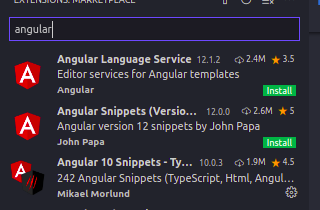
因为这个问题我改变了我的操作系统。昨天我发现了这个问题的原因。由于我在Visual代码中安装了一个插件,所以我遇到了这个问题。如果您使用的是Angular9,不要安装前两个插件。你可以安装第三个。
https://stackoverflow.com/questions/60410270
复制相似问题
腾讯云开发者

Copyright © 2013 - 2026 Tencent Cloud. All Rights Reserved. 腾讯云 版权所有
深圳市腾讯计算机系统有限公司 ICP备案/许可证号:粤B2-20090059  粤公网安备44030502008569号
腾讯云计算(北京)有限责任公司 京ICP证150476号 | 京ICP备11018762号