
Wildfly插件-命令似乎没有效果。
Wildfly插件-命令似乎没有效果。
提问于 2020-02-25 18:15:32
我正在使用Wildfly插件,它正在工作,因为它打开了运行web应用程序,但是我在定制配置上遇到了问题,即:
- 将根记录器和控制台记录器设置为调试模式
- 允许从
0.0.0.0:8080或本地主机以外的东西连接。
这是我的装置:
<plugin>
    <groupId>org.wildfly.plugins</groupId>
    <artifactId>wildfly-maven-plugin</artifactId>
    <version>2.0.2.Final</version>
    <executions>
        <execution>
            <phase>install</phase>
            <goals>
                <goal>run</goal>
            </goals>
        </execution>
    </executions>
    <configuration>
        <java-opts>
            <java-opt>-agentlib:jdwp=transport=dt_socket,server=y,suspend=n,address=1044</java-opt>
        </java-opts>
        <commands>
            <!-- **These are the commands that aren't going through** -->
            <command>/subsystem=logging/root-logger=ROOT:write-attribute(name="level", value="DEBUG") </command>
            <command>/subsystem=logging/console-handler=CONSOLE:write-attribute(name="level", value="DEBUG")</command>
            <command>/subsystem=logging/file-handler=debug:add(level=DEBUG,autoflush=true,file={"relative-to"=>"jboss.server.log.dir", "path"=>"debug.log"})</command>
            <command>/subsystem=logging/logger=org.jboss.as:add(level=DEBUG,handlers=[debug])</command>
            <command>/subsystem-----Enable Remote access here?</command>
        </commands>
        <add-user>
            <users>
                <user>
                    <username>admin</username>
                    <password>admin.1234</password>
                </user>
                <user>
                    <username>admin-user</username>
                    <password>user.1234</password>
                    <groups>
                        <group>admin</group>
                        <group>user</group>
                    </groups>
                    <application-user>true</application-user>
                </user>
                <user>
                    <username>default-user</username>
                    <password>user.1234</password>
                    <groups>
                        <group>user</group>
                    </groups>
                    <application-user>true</application-user>
                </user>
            </users>
        </add-user>
    </configuration>
</plugin>我知道当我从终端开始的时候,一个人会使用这个:./standalone.sh -b 0.0.0.0 -bmanagement 0.0.0.0,但是我直接从Maven运行演示程序,并且需要从另一台机器上访问我的when应用程序。
注意-在页面中,我可以手动将根Logger和Console Logger设置为调试模式,然后适当的调试日志就会流出来。
例如,我可以手动转到这里:http://127.0.0.1:9990/console/index.html#logging-configuration,然后手动将日志记录从默认的信息级别更改为调试:
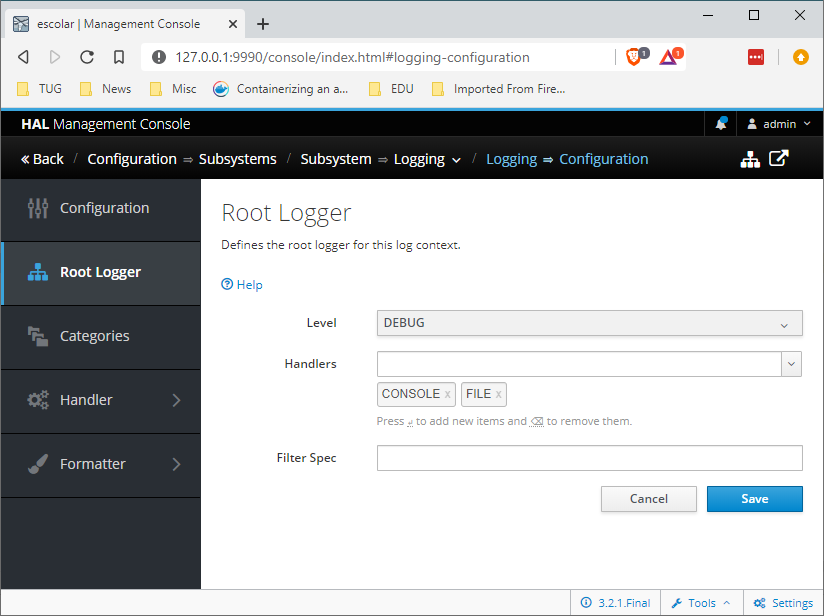
因此,我的问题是,在允许远程访问的同时,如何将日志记录级别作为命令更改为maven通配符插件。
回答 1
Stack Overflow用户
回答已采纳
发布于 2020-02-26 09:13:38
您需要将插件版本升级到2.1.0.Beta1以使其正常工作。2.0.x版本不具备从运行或部署目标执行CLI命令的能力。
如果您需要坚持使用所使用的版本,则需要定义execute-commands目标。然后,您可以使用嵌入式服务器来配置服务器。
<commands>
    <!-- **These are the commands that aren't going through** -->
    <command>embed-server</command>
    <command>/subsystem=logging/root-logger=ROOT:write-attribute(name="level", value="DEBUG") </command>
    <command>/subsystem=logging/console-handler=CONSOLE:write-attribute(name="level", value="DEBUG")</command>
    <command>/subsystem=logging/file-handler=debug:add(level=DEBUG,autoflush=true,file={"relative-to"=>"jboss.server.log.dir", "path"=>"debug.log"})</command>
    <command>/subsystem=logging/logger=org.jboss.as:add(level=DEBUG,handlers=[debug])</command>
    <command>/subsystem-----Enable Remote access here?</command>
    <command>stop-embedded-server</command>
</commands>页面原文内容由Stack Overflow提供。腾讯云小微IT领域专用引擎提供翻译支持
原文链接:
https://stackoverflow.com/questions/60400876
复制相关文章
相似问题
腾讯云开发者

Copyright © 2013 - 2026 Tencent Cloud. All Rights Reserved. 腾讯云 版权所有
深圳市腾讯计算机系统有限公司 ICP备案/许可证号:粤B2-20090059  粤公网安备44030502008569号
腾讯云计算(北京)有限责任公司 京ICP证150476号 | 京ICP备11018762号