
MS没有返回移动电话、办公电话等所有用户信息
我正在使用下面的代码获取所有的用户信息,如DisplayName,Office,Manager名称,Office电话等。
但是对于很少的用户来说,它不返回手机和Office手机信息。
using Microsoft.Graph;
using Microsoft.Identity.Client;
using System;

namespace MSGraphAPI
{
    class Program
    {


        private static string clientId = "XXXXXXXXXX";


        private static string tenantID = "XXXXX";


        private static string objectId = "XXXXX";


        private static string clientSecret = "XXXX";

        static async System.Threading.Tasks.Task Main(string[] args)
        {


            //     IConfidentialClientApplication confidentialClientApplication = ConfidentialClientApplicationBuilder
            //.Create(clientId)
            //.WithTenantId(tenantID)
            //.WithClientSecret(clientSecret)
            //.Build();

            //        ClientCredentialProvider authProvider = new ClientCredentialProvider(confidentialClientApplication);

            //        GraphServiceClient graphClient = new GraphServiceClient(authProvider);

            //        var users = await graphClient.Users
            //            .Request()
            //            .GetAsync();

            int Flag = 0;
            var tenantId = "XXXXX.onmicrosoft.com";

            // The client ID of the app registered in Azure AD
            var clientId = "XXXX";

            // *Never* include client secrets in source code!
            var clientSecret = "XXXXX"; // Or some other secure place.

            // The app registration should be configured to require access to permissions
            // sufficient for the Microsoft Graph API calls the app will be making, and
            // those permissions should be granted by a tenant administrator.
             var scopes = new string[] { "https://graph.microsoft.com/.default" };


            // Configure the MSAL client as a confidential client
            var confidentialClient = ConfidentialClientApplicationBuilder
                .Create(clientId)
                .WithAuthority($"https://login.microsoftonline.com/XXXX.onmicrosoft.com/v2.0")
                .WithClientSecret(clientSecret)
                .Build();

            // Build the Microsoft Graph client. As the authentication provider, set an async lambda
            // which uses the MSAL client to obtain an app-only access token to Microsoft Graph,
            // and inserts this access token in the Authorization header of each API request.
            GraphServiceClient graphServiceClient =
                new GraphServiceClient(new DelegateAuthenticationProvider(async (requestMessage) => {

        // Retrieve an access token for Microsoft Graph (gets a fresh token if needed).
        var authResult = await confidentialClient
            .AcquireTokenForClient(scopes)
            .ExecuteAsync();

        // Add the access token in the Authorization header of the API request.
        requestMessage.Headers.Authorization =
            new System.Net.Http.Headers.AuthenticationHeaderValue("Bearer", authResult.AccessToken);
                })
                );

            // Make a Microsoft Graph API query
            var users = await graphServiceClient.Users.Request().GetAsync();


            // var groups = await graphServiceClient.Groups.Request().GetAsync();

            //   IGraphServiceUsersCollectionPage userss = await graphServiceClient.Users.Request().GetAsync();


            do
            {
                        foreach (User user in users)
                        {


                            Console.WriteLine(user.DisplayName);
                            Console.WriteLine(user.BusinessPhones);
                            Console.WriteLine(user.MobilePhone);


                           // Console.WriteLine($"{user.Id}");
                            Flag++;
                        }
                    }
                    while (users.NextPageRequest != null && (users = await users.NextPageRequest.GetAsync()).Count > 0);

                    Console.WriteLine("------");


            Console.WriteLine(Flag);
        }
    }
}
我尝试了以下范围:
变量作用域=新的string[] { "https://graph.microsoft.com/User.ReadWrite.All"};
但是,这引发了一个例外:
MsalServiceException: AADSTS70011:提供的请求必须包括一个“作用域”输入参数。为输入参数“作用域”提供的值无效。范围https://graph.microsoft.com/User.ReadWrite.All无效。追踪ID: XXXX c578-42af-8bd2-7ddd54ee9201
我交叉签入Azure Active Directory Portal,所有用户都配置了商务电话和移动电话。请帮帮忙。
回答 2
Stack Overflow用户
发布于 2020-02-20 18:06:41
首先,您的
scope减速是不正确的。Microsoft Graph不支持多个scope赋值,因为您试图将其赋值为字符串列表,而这些字符串的格式也不正确。另外,不是scopes,而是scope
在C#中,字符串数组通常声明为List<string>
您可以尝试按照预期工作良好的代码片段。
    //Token Request End Point
    string tokenUrl = $"https://login.microsoftonline.com/YourTenant.onmicrosoft.com/oauth2/v2.0/token";
    var tokenRequest = new HttpRequestMessage(HttpMethod.Post, tokenUrl);

    //I am Using client_credentials as It is mostly recommended
    tokenRequest.Content = new FormUrlEncodedContent(new Dictionary<string, string>
    {
        ["grant_type"] = "client_credentials",
        ["client_id"] = "b6695c7be-a695-4aea-ad87-e6921e61f659",
        ["client_secret"] = "Vxf1SluKbgu4PF0Nf_Your_Secret_Yp8ns4sc=",
        ["scope"] = "https://graph.microsoft.com/.default"
    });

    dynamic json;
    AccessTokenClass results = new AccessTokenClass();
    HttpClient client = new HttpClient();

    var tokenResponse = await client.SendAsync(tokenRequest);

    json = await tokenResponse.Content.ReadAsStringAsync();
    results = JsonConvert.DeserializeObject<AccessTokenClass>(json);


    //New Block For Accessing Data from Microsoft Graph Rest API
    HttpClient _client = new HttpClient();
    HttpRequestMessage request = new HttpRequestMessage(HttpMethod.Get, string.Format("https://graph.microsoft.com/v1.0/users"));
    //Passing Token For this Request
    request.Headers.Authorization = new AuthenticationHeaderValue("Bearer", results.access_token);
    HttpResponseMessage response = await _client.SendAsync(request);
    //Get User List With Business Phones and Mobile Phones
dynamic objGpraphUserList = JsonConvert.DeserializeObject<dynamic>(await response.Content.ReadAsStringAsync());使用的类:
 public class AccessTokenClass
    {
        public string token_type { get; set; }
        public string expires_in { get; set; }
        public string resource { get; set; }
        public string access_token { get; set; }
    }
我收到了这样的回复见下面的截图:
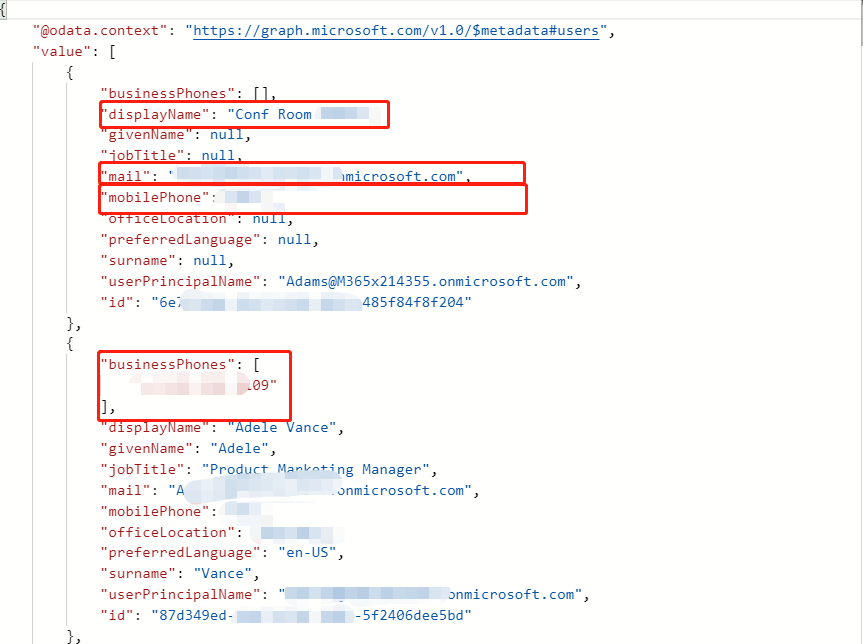
希望这能帮到你。
Stack Overflow用户
发布于 2020-02-24 11:42:00
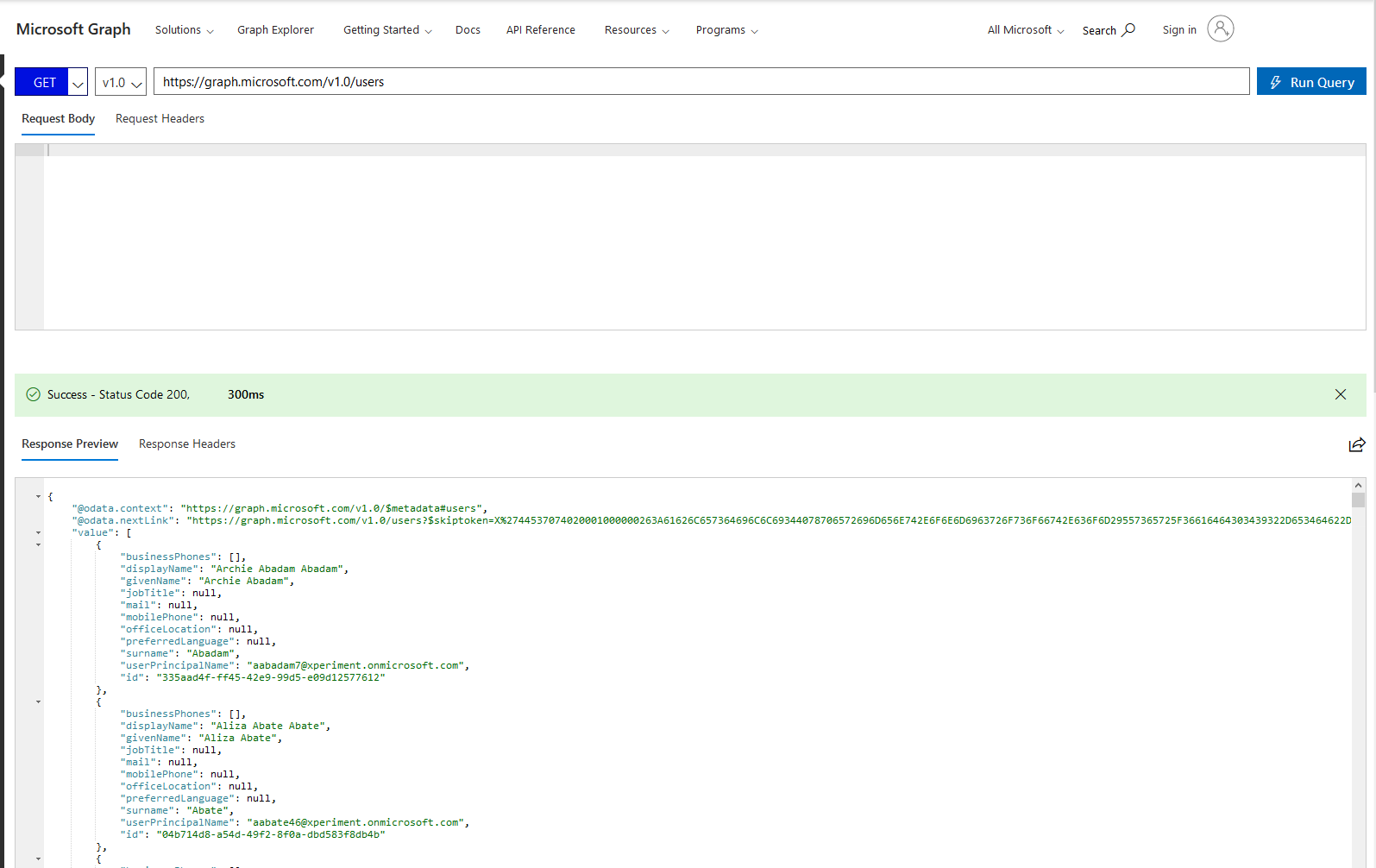
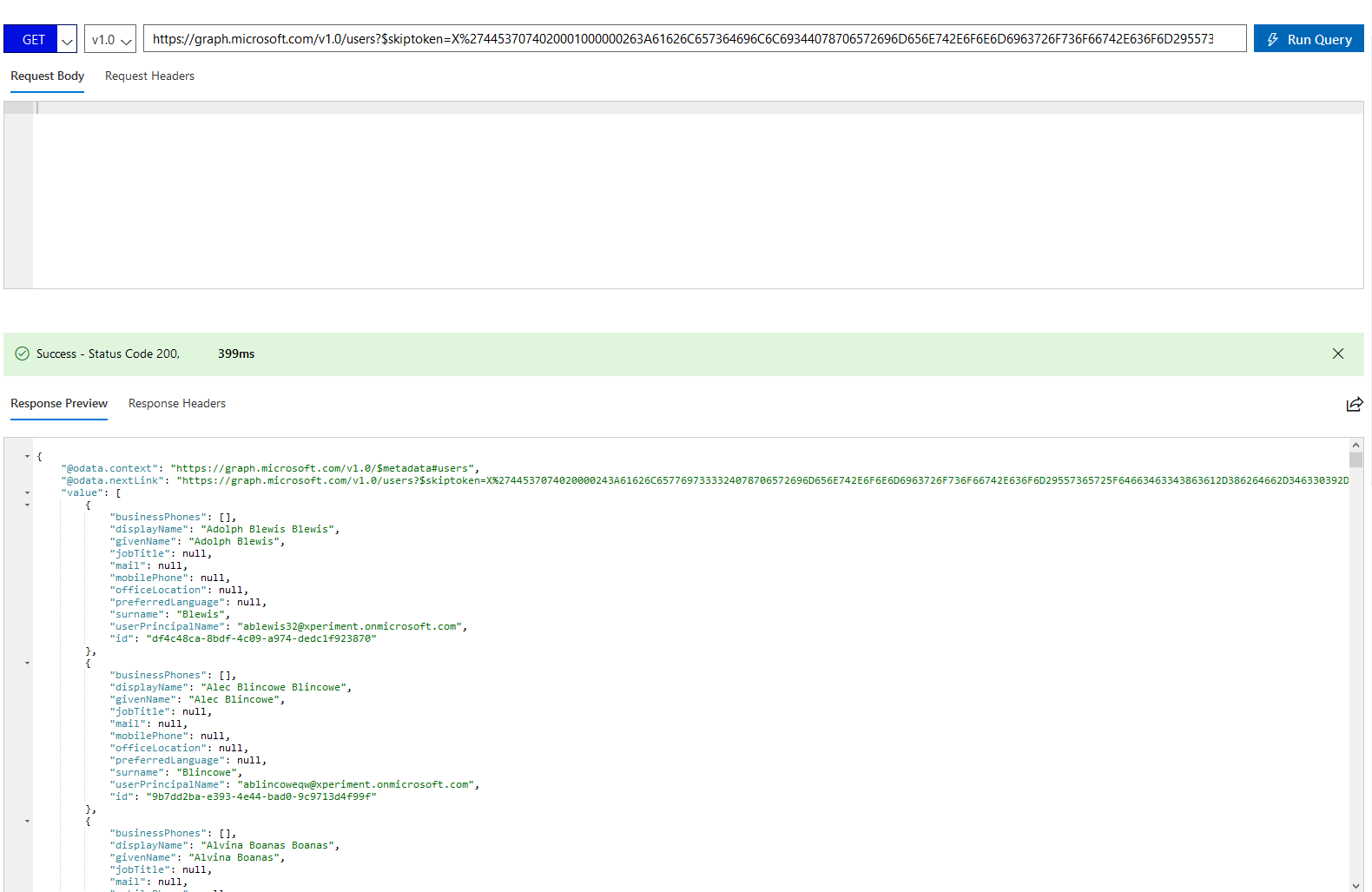
Microsoft以分页格式返回用户,因此要获得下一个用户列表,您必须查询当前响应的@odata.nextLink中提到的url,这将为您提供下一组用户。
要实现这一点,您可以运行一个for循环,直到@odata.nextLink返回空值。
更新:
- 查询图api以获取用户
- 用"@odata.nextLink“查询图形api以获得下一组用户。
https://stackoverflow.com/questions/60322842
复制相似问题
腾讯云开发者

Copyright © 2013 - 2026 Tencent Cloud. All Rights Reserved. 腾讯云 版权所有
深圳市腾讯计算机系统有限公司 ICP备案/许可证号:粤B2-20090059  粤公网安备44030502008569号
腾讯云计算(北京)有限责任公司 京ICP证150476号 | 京ICP备11018762号