
Azure Storage检查Blob是否是分层存储中的目录
我有一个Azure存储帐户的层次存储打开。我正在获取容器中的blob列表,并试图确定某个特定的blob是否是一个目录。
我让它在REST客户机中工作,如下所示:
public async Task<List<StoragePath>> ListPathsAsync(string filesystem)
{
    string uri = $"https://{accountName}.{dnsSuffix}/{filesystem}?recursive=true&resource=filesystem";
    var result = await SendRequestAsync<StoragePathList>(HttpMethod.Get, uri, CancellationToken.None, true);
    return result.Content.Paths?.ToList();
}

public class StoragePath
{
    [JsonProperty(PropertyName = "isDirectory")]
    public bool IsDirectory { get; set; }

    // other properties
}SendRequestAsync<T>方法只是使用JsonConvert来反序列化API响应的内容。
var result = JsonConvert.DeserializeObject<T>(await response.Content.ReadAsStringAsync());现在,我试图弄清楚如何使用.net SDK做同样的事情,但我在任何地方都看不到IsDirectory属性。
public async Task<List<StoragePath>> ListPathsAsync(string filesystem)
    {
        var containerClient = new BlobContainerClient(connectionString, filesystem);
        var list = new List<StoragePath>();
        var enumerator = containerClient.GetBlobsByHierarchyAsync().GetAsyncEnumerator();

        while (await enumerator.MoveNextAsync())
        {
            var current = enumerator.Current;
            list.Add(new StoragePath()
            {
                Name = current.Blob.Name,
                //IsDirectory = current.Blob.Properties.
            });
        }

        return list;
    }
还有什么其他的东西我应该检查一下吗?
回答 2
Stack Overflow用户
发布于 2020-05-05 16:50:13
几个月后,我使用Microsoft.WindowsAzure.Storage, Version=9.3.1.0回到了这个问题。CloudBlobContainer.ListBlobsSegmentedAsync(....)方法返回IListBlobItem的集合。您可以通过检查每个目录的具体类型来确定其是否为目录。
我有一个这样的模型类:
public class StoragePath
{
    public bool IsDirectory { get; set; }
    public string Name { get; set; }
}
我可以使用Automapper配置文件填充这些值,如下所示:
public class StorageProfile : Profile
{
    public StorageProfile()
    {
        CreateMap<IListBlobItem, StoragePath>()
            .ForMember(dest => dest.IsDirectory, prop => prop.MapFrom(src => src is CloudBlobDirectory))
            .ForMember(dest => dest.Name, prop => prop.MapFrom(src => GetName(src)));
    }

    private string GetName(IListBlobItem src)
    {
        switch (src)
        {
            case CloudBlobDirectory dir:
                return dir.Prefix;
            case CloudBlob blob:
                return blob.Name;
            default:
                throw new NotSupportedException();
        }
    }
}Stack Overflow用户
发布于 2020-02-20 23:25:21
正如在文档中解释的那样
Blob服务基于平面存储方案,而不是分层方案。但是,您可以在blob名称中指定一个字符或字符串分隔符来创建虚拟层次结构。
但是,对于.NET Azure Storage (V12),blobContainerClient.GetBlobs()方法将直接返回带完整路径的blob。

但是,对于.NET Azure Storage (V11),它将只检索下一级目录和blobs:
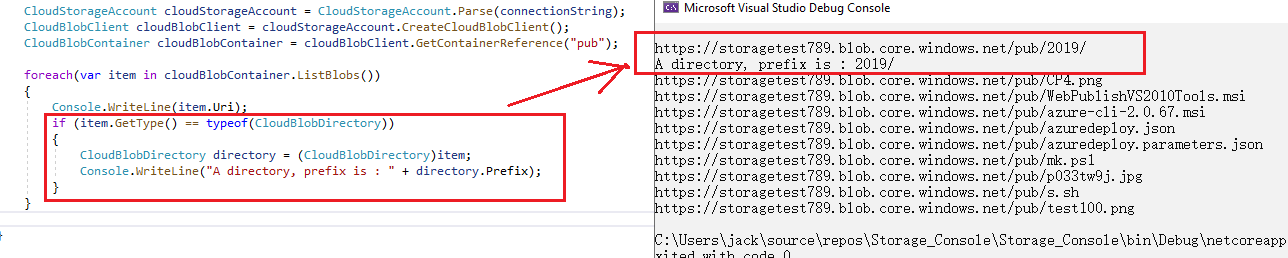
因此,您可以使用v11 SDK,并手动检查该项是目录还是blob。
CloudStorageAccount cloudStorageAccount = CloudStorageAccount.Parse(connectionString);
CloudBlobClient cloudBlobClient = cloudStorageAccount.CreateCloudBlobClient();
CloudBlobContainer cloudBlobContainer = cloudBlobClient.GetContainerReference(containerName);

foreach(var item in cloudBlobContainer.ListBlobs())
{
    Console.WriteLine(item.Uri);
    if (item.GetType() == typeof(CloudBlobDirectory))
    {
        CloudBlobDirectory directory = (CloudBlobDirectory)item;
        Console.WriteLine("A directory, prefix is : " + directory.Prefix);
    }
}https://stackoverflow.com/questions/60319339
复制相似问题
腾讯云开发者

Copyright © 2013 - 2026 Tencent Cloud. All Rights Reserved. 腾讯云 版权所有
深圳市腾讯计算机系统有限公司 ICP备案/许可证号:粤B2-20090059  粤公网安备44030502008569号
腾讯云计算(北京)有限责任公司 京ICP证150476号 | 京ICP备11018762号