
使用VBA和HTML单击自动完成列表中的项
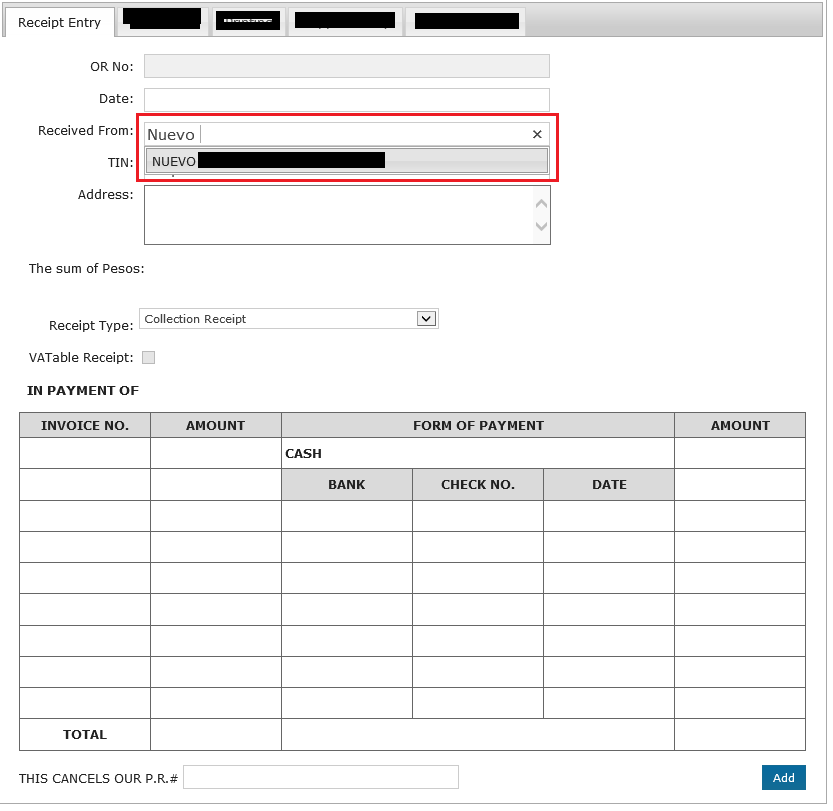
我已经创建了一个自动化,它将允许我输入一个网站的细节(虽然我不能分享,因为它是内部的)。我下面的代码只起作用,直到它输入一个关于“收到”的文本。然而,这个“接收自”字段有一个自动完成列表,我需要选择它,以填充其他字段,如TIN和Address。
自动完成列表与https://jqueryui.com/autocomplete/或http://demos.codexworld.com/autocomplete-textbox-using-jquery-php-mysql/中的列表非常相似。
下面是我的代码:
Sub Automate_IE_Enter_Data()
'This will load a webpage in IE
Dim i               As Long
Dim Url             As String
Dim IE              As InternetExplorer
Dim objElement      As Object
Dim objCollection   As Object
Dim HWNDSrc         As Long
Dim wsTemplate      As Worksheet
Dim objEvent        As Object
Dim li_arr          As Variant
Dim NodeList        As Object
Dim x               As Long


Set wsTemplate = ThisWorkbook.Sheets("Template")

'Create InternetExplorer Object
Set IE = New InternetExplorerMedium

'Set IE.Visible = True to make IE visible, or False for IE to run in the background
IE.Visible = True

'Define URL by getting the value in rngURL; can be found in the main sheet
Url = "http://URL Path"

'Navigate to URL
IE.Navigate Url

' Statusbar let's user know website is loading
Application.StatusBar = Url & " is loading. Please wait..."

Do
DoEvents
Loop Until IE.ReadyState = READYSTATE_COMPLETE

'Webpage Loaded
Application.StatusBar = Url & " Loaded"

'Get Window ID for IE so we can set it as activate window
HWNDSrc = IE.hwnd
'Set IE as Active Window
SetForegroundWindow HWNDSrc
ShowWindow IE.hwnd, SW_SHOWMAXIMIZED

Dim Doc As HTMLDocument
Set Doc = IE.document

inputString = "Nuevo"

With Doc.getElementById("supName")

    .Focus
    SendKeys inputString 'Trigger the field to show autocomplete list

End With

'----THIS IS WHERE I AM TRYING TO CLICK THE AUTOCOMPLETE LIST THAT IS BEING DISPLAYED-----
'-----HOWEVER, CLICKING DOESN'T SEEM TO WORK.-----

Set NodeList = Doc.querySelectorAll(".ui-active-menuitem[role=""menuitem""]")

For x = 0 To NodeList.Length - 1
'Debug.Print NodeList.Item(x).Click '<==this way
NodeList.Item(x).Focus
NodeList(x).Click   '<==Or this method

Next x


MsgBox "Done"

'Unload IE
endmacro:
Set IE = Nothing
Set objElement = Nothing
Set objCollection = Nothing

End Sub下面的是我认为有助于理解我的问题的HTML:
'----- NAME OF THE FIELD THAT HAS AN AUTOCOMPLETE LIST----
<INPUT name=supName class="required-placeholder simple-placeholder ui-autocomplete-input placeholding" id=supName role=textbox aria-haspopup=true aria-autocomplete=list type=text value=Required jQuery17102032699680461189="39" placeholder="Required" autocomplete="off">

<UL class="ui-autocomplete ui-menu ui-widget ui-widget-content ui-corner-all" role=listbox aria-activedescendant=ui-active-menuitem style="WIDTH: 400px; LEFT: 751px; Z-INDEX: 1; DISPLAY: none; TOP: 287px" jQuery17102032699680461189="42"><LI class=ui-menu-item role=menuitem jQuery17102032699680461189="104"><A tabIndex=-1 class=ui-corner-all jQuery17102032699680461189="114">List 0</A></LI>

<LI class=ui-menu-item role=menuitem jQuery17102032699680461189="105"><A tabIndex=-1 class=ui-corner-all jQuery17102032699680461189="115">List 1</A></LI>
<LI class=ui-menu-item role=menuitem jQuery17102032699680461189="106"><A tabIndex=-1 class=ui-corner-all jQuery17102032699680461189="116">List 2</A></LI>
<LI class=ui-menu-item role=menuitem jQuery17102032699680461189="107"><A tabIndex=-1 class=ui-corner-all jQuery17102032699680461189="117">List 3</A></LI>
<LI class=ui-menu-item role=menuitem jQuery17102032699680461189="108"><A tabIndex=-1 class=ui-corner-all jQuery17102032699680461189="118">List 4</A></LI>
<LI class=ui-menu-item role=menuitem jQuery17102032699680461189="109"><A tabIndex=-1 class=ui-corner-all jQuery17102032699680461189="119">List 5</A></LI>
<LI class=ui-menu-item role=menuitem jQuery17102032699680461189="110"><A tabIndex=-1 class=ui-corner-all jQuery17102032699680461189="120">List 6</A></LI>
<LI class=ui-menu-item role=menuitem jQuery17102032699680461189="111"><A tabIndex=-1 class=ui-corner-all jQuery17102032699680461189="121">List 7</A></LI>
<LI class=ui-menu-item role=menuitem jQuery17102032699680461189="112"><A tabIndex=-1 class=ui-corner-all jQuery17102032699680461189="122">List 8</A></LI>
<LI class=ui-menu-item role=menuitem jQuery17102032699680461189="113"><A tabIndex=-1 class=ui-corner-all jQuery17102032699680461189="123">List 9</A></LI></UL>
自动完成列表的示例屏幕截图:
更多的HTML:
<DIV class="ui-tabs-panel ui-widget-content ui-corner-bottom" id=ui-tabs-1 jQuery17109198838813964318="12">
<FORM id=receiptEntryForm action=/ReceiptEntry/SaveReceipt method=post jQuery17109198838813964318="40">
<DIV id=receipt-entry>
<DIV class=receipt-content>
<DIV class=content-label>
<LABEL>OR No:</LABEL>
<LABEL>Date:</LABEL>
<LABEL>Received From:</LABEL>
<LABEL>TIN:</LABEL>
<LABEL>Address:</LABEL> </DIV>
<DIV class=content-input>
<INPUT name=ReceiptNumber disabled id=ReceiptNumber type=text data-val-required="The ReceiptNumber field is required." data-val-number="The field ReceiptNumber must be a number." data-val="true">
<INPUT name=printDate class="datepicker hasDatepicker" id=printDate type=text jQuery17109198838813964318="38">
<INPUT name=supName class="required-placeholder simple-placeholder ui-autocomplete-input placeholding" id=supName role=textbox aria-haspopup=true aria-autocomplete=list type=text value=Required jQuery17109198838813964318="39" placeholder="Required" autocomplete="off">
<INPUT name=SupplierCode id=SupplierCode type=hidden data-val-required="The SupplierCode field is required." data-val="true" data-val-length-max="20" data-val-length="You&#39;ve reached the maximum length allowed.">
<INPUT name=SupTIN class="required-placeholder placeholding simple-placeholder" id=SupTIN type=text value=Required jQuery17109198838813964318="41" placeholder="Required" ,>
<TEXTAREA name=SupAdd class="textarea-wide required-placeholder" id=SupAdd rows=3 cols=48 placeholder="Required"></TEXTAREA>
</DIV>
</DIV>
<DIV class=editor-label>
<LABEL id=sum-label>The sum of ****:</LABEL>
<LABEL class=grayed-out id=total-amount-words></LABEL>
<LABEL class=right id=total-amount></LABEL>
</DIV>
<BR>
<BR>
<BR>
<DIV id=receipt-selection>
<DIV class=content-label>
<LABEL id=receipt-type-label>Receipt Type:</LABEL>
<LABEL for=chk-vatable>VATable Receipt:</LABEL>
<H5>IN PAYMENT OF</H5>
<BR>
</DIV>
<DIV class=content-iput>
<SELECT id=receiptentry-type jQuery17109198838813964318="36">
<OPTION value=cr selected>Collection Receipt</OPTION>
<OPTION value=or>Official Receipt</OPTION>
</SELECT>
<BR>
<INPUT disabled id=chk-vatable type=checkbox jQuery17109198838813964318="37"> </DIV>
<DIV id=receiptentry-receipt-table>
<DIV>
<TABLE>
<THEAD>
<TR>
<TH>INVOICE NO.</TH>
<TH>AMOUNT</TH>
<TH colSpan=3>FORM OF PAYMENT</TH>
<TH>AMOUNT</TH>
</TR>
</THEAD>
<TBODY id=receipt-entry-table1>
<TR>
<TD>
<SPAN class="table1-invoice left-align" id=invoice0 contentEditable=true></SPAN>
</TD>
<TD>
<SPAN class="table1-amount1 right-align" id=invamount0 contentEditable=true jQuery17109198838813964318="44"></SPAN>
</TD>
<TD class="bold left-align" colSpan=3>CASH</TD>
<TD>
<SPAN class="table1-amount2 right-align" id=table1-cash-amount contentEditable=true jQuery17109198838813964318="53"></SPAN>
</TD>
</TR>
<TR>
<TD>
<SPAN class="table1-invoice left-align" id=invoice1 contentEditable=true></SPAN>
</TD>
<TD>
<SPAN class="table1-amount1 right-align" id=invamount1 contentEditable=true jQuery17109198838813964318="45"></SPAN>
</TD>
<TH>BANK</TH>
<TH>CHECK NO.</TH>
<TH>DATE</TH>
<TD>
<SPAN class="table1-amount2 right-align" jQuery17109198838813964318="54"></SPAN>
</TD>
</TR>
<TR>
<TD>
<SPAN class="table1-invoice left-align" id=invoice2 contentEditable=true></SPAN>
</TD>
<TD>
<SPAN class="table1-amount1 right-align" id=invamount2 contentEditable=true jQuery17109198838813964318="46"></SPAN>
</TD>
<TD>
<SPAN class="table1-bank left-align" id=bankname0 contentEditable=true></SPAN>
</TD>
<TD>
<SPAN class="table1-check left-align" id=bankcheck0 contentEditable=true></SPAN>
</TD>
<TD>
<SPAN class="table1-date center-align" id=bankdate0 contentEditable=true name="date"></SPAN>
</TD>
<TD>
<SPAN class="table1-amount2 right-align" id=bankamount0 contentEditable=true jQuery17109198838813964318="55"></SPAN>
</TD>
</TR>
<TR>
<TD>
<SPAN class="table1-invoice left-align" id=invoice3 contentEditable=true></SPAN>
</TD>
<TD>
<SPAN class="table1-amount1 right-align" id=invamount3 contentEditable=true jQuery17109198838813964318="47"></SPAN>
</TD>
<TD>
<SPAN class="table1-bank left-align" id=bankname1 contentEditable=true></SPAN>
</TD>
<TD>
<SPAN class="table1-check left-align" id=bankcheck1 contentEditable=true></SPAN>
</TD>
<TD>
<SPAN class="table1-date center-align" id=bankdate1 contentEditable=true name="date"></SPAN>
</TD>
<TD>
<SPAN class="table1-amount2 right-align" id=bankamount1 contentEditable=true jQuery17109198838813964318="56"></SPAN>
</TD>
</TR>
<TR>
<TD>
<SPAN class="table1-invoice left-align" id=invoice4 contentEditable=true></SPAN>
</TD>
<TD>
<SPAN class="table1-amount1 right-align" id=invamount4 contentEditable=true jQuery17109198838813964318="48"></SPAN>
</TD>
<TD>
<SPAN class="table1-bank left-align" id=bankname2 contentEditable=true></SPAN>
</TD>
<TD>
<SPAN class="table1-check left-align" id=bankcheck2 contentEditable=true></SPAN>
</TD>
<TD>
<SPAN class="table1-date center-align" id=bankdate2 contentEditable=true name="date"></SPAN>
</TD>
<TD>
<SPAN class="table1-amount2 right-align" id=bankamount2 contentEditable=true jQuery17109198838813964318="57"></SPAN>
</TD>
</TR>
<TR>
<TD>
<SPAN class="table1-invoice left-align" id=invoice5 contentEditable=true></SPAN>
</TD>
<TD>
<SPAN class="table1-amount1 right-align" id=invamount5 contentEditable=true jQuery17109198838813964318="49"></SPAN>
</TD>
<TD>
<SPAN class="table1-bank left-align" id=bankname3 contentEditable=true></SPAN>
</TD>
<TD>
<SPAN class="table1-check left-align" id=bankcheck3 contentEditable=true></SPAN>
</TD>
<TD>
<SPAN class="table1-date center-align" id=bankdate3 contentEditable=true name="date"></SPAN>
</TD>
<TD>
<SPAN class="table1-amount2 right-align" id=bankamount3 contentEditable=true jQuery17109198838813964318="58"></SPAN>
</TD>
</TR>
<TR>
<TD>
<SPAN class="table1-invoice left-align" id=invoice6 contentEditable=true></SPAN>
</TD>
<TD>
<SPAN class="table1-amount1 right-align" id=invamount6 contentEditable=true jQuery17109198838813964318="50"></SPAN>
</TD>
<TD>
<SPAN class="table1-bank left-align" id=bankname4 contentEditable=true></SPAN>
</TD>
<TD>
<SPAN class="table1-check left-align" id=bankcheck4 contentEditable=true></SPAN>
</TD>
<TD>
<SPAN class="table1-date center-align" id=bankdate4 contentEditable=true name="date"></SPAN>
</TD>
<TD>
<SPAN class="table1-amount2 right-align" id=bankamount4 contentEditable=true jQuery17109198838813964318="59"></SPAN>
</TD>
</TR>
<TR>
<TD>
<SPAN class="table1-invoice left-align" id=invoice7 contentEditable=true></SPAN>
</TD>
<TD>
<SPAN class="table1-amount1 right-align" id=invamount7 contentEditable=true jQuery17109198838813964318="51"></SPAN>
</TD>
<TD>
<SPAN class="table1-bank left-align" id=bankname5 contentEditable=true></SPAN>
</TD>
<TD>
<SPAN class="table1-check left-align" id=bankcheck5 contentEditable=true></SPAN>
</TD>
<TD>
<SPAN class="table1-date center-align" id=bankdate5 contentEditable=true name="date"></SPAN>
</TD>
<TD>
<SPAN class="table1-amount2 right-align" id=bankamount5 contentEditable=true jQuery17109198838813964318="60"></SPAN>
</TD>
</TR>
<TR>
<TD>
<SPAN class="table1-invoice left-align" id=invoice8 contentEditable=true></SPAN>
</TD>
<TD>
<SPAN class="table1-amount1 right-align" id=invamount8 contentEditable=true jQuery17109198838813964318="52"></SPAN>
</TD>
<TD>
<SPAN class="table1-bank left-align" id=bankname6 contentEditable=true></SPAN>
</TD>
<TD>
<SPAN class="table1-check left-align" id=bankcheck6 contentEditable=true></SPAN>
</TD>
<TD>
<SPAN class="table1-date center-align" id=bankdate6 contentEditable=true name="date"></SPAN>
</TD>
<TD>
<SPAN class="table1-amount2 right-align" id=bankamount6 contentEditable=true jQuery17109198838813964318="61"></SPAN>
</TD>
</TR>
<TR>
<TD class=td-title>TOTAL</TD>
<TD>
<SPAN class=right-align id=table1-amount1-total contentEditable=true></SPAN>
</TD>
<TD colSpan=3></TD>
<TD>
<SPAN class=right-align id=table1-amount2-total contentEditable=true></SPAN>
</TD>
</TR>
</TBODY>
</TABLE>
</DIV>
</DIV>
</DIV>
<BR>
<LABEL>THIS CANCELS OUR P.R.#</LABEL>
<INPUT name=CancelPrNo id=CancelPrNo type=text data-val="true" data-val-length-max="50" data-val-length="You&#39;ve reached the maximum length allowed.">
<INPUT class="right button-style" id=add-receipt type=button value=Add jQuery17109198838813964318="43"> </DIV>
</FORM>
</DIV>Chrome控制台:
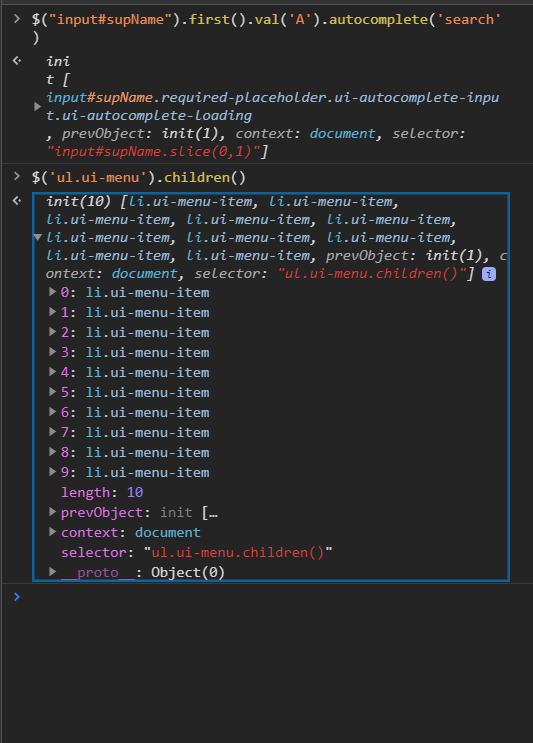
自动完成列表的检查元素:
<UL class="ui-autocomplete ui-menu ui-widget ui-widget-content ui-corner-all" role=listbox aria-activedescendant=ui-active-menuitem style="WIDTH: 400px; LEFT: 559px; Z-INDEX: 1; DISPLAY: block; TOP: 287px" jQuery17100985129077826366="42">
<LI class=ui-menu-item role=menuitem jQuery17100985129077826366="62" sizcache02782874225672333="1" sizset="0">
<A tabIndex=-1 class=ui-corner-all jQuery17100985129077826366="63">
*TEXT RESULT OF THE AUTOCOMPLETE LIST*
</A>
</LI></UL>回答 2
Stack Overflow用户
发布于 2020-02-20 11:16:44
我希望示例页面与您的页面非常相似。我用它来告诉你如何处理这些事情。你脑子里需要想的是一个页面的动态。我已经对宏观作了详细评论。请仔细阅读每一件事来理解它。该解决方案由以下三个部分组成。全部复制到一个模块中。
First:一种使中断时间小于1秒的方法。我们可以使用Windows函数来实现这一点:
'With the following Windows api function we can do breaks less than 1 second
'It works with Excel 32 bit an Excel 64 bit
#If Win64 Then
  'For 64 Bit Systems
  Public Declare PtrSafe Sub Sleep Lib "kernel32" (ByVal dwMilliseconds As LongPtr)
#Else
  'For 32 Bit Systems
  Public Declare Sub Sleep Lib "kernel32" (ByVal dwMilliseconds As Long)
#End If第二部分:是通过弹出菜单单击的主要部分。
Sub JQueryAutocomplete()

  Dim url As String
  Dim browser As Object
  Dim nodeInput As Object
  Dim nodeUi As Object
  Dim nodeLi As Object
  Dim countOfLi As Long
  Dim controlValue As Long
  Dim searchString As String
  Dim countOfLiDone As Boolean
  Dim result As String

  'Initializing variables and load page
  '-------------------------------------------------------------------------------------------
  'Part of the string to autocomplete
  searchString = "h"

  'The controlValue shows the number of next li-tag in pop-up menu to pass through
  controlValue = 1

  'We use the iFrame document from the JQuery sample page directly
  'So we have less code overhead to reach the point we need in the HTML code
  url = "https://jqueryui.com/resources/demos/autocomplete/default.html"

  'Initialize Internet Explorer, set visibility,
  'call URL and wait until page is fully loaded
  Set browser = CreateObject("internetexplorer.application")
  browser.Visible = True 'You can set this to False because this macro don't use sendkeys()
  browser.navigate url
  Do Until browser.ReadyState = 4: DoEvents: Loop
  '-------------------------------------------------------------------------------------------

  'Try to get textbox for input
  '-------------------------------------------------------------------------------------------
  On Error Resume Next
  Set nodeInput = browser.document.getElementByID("tags")
  On Error GoTo 0

  'Check if nodeInput could be created
  If Not nodeInput Is Nothing Then
    'Loop over all auto completed strings in the pop-up menu
    'Yes, we start the loop before we know anything obout the pop-up menu
    '-----------------------------------------------------------------------------------------
    Do
      'Insert part of search string
      '---------------------------------------------------------------------------------------
      'Everytime we want to place text into the textbox, we must prepare it to react with the
      'pop-up menu. We do this by triggering the input HTML event of the textbox
      '(You do this with sendkeys in your macro. But sendkeys should be avoided if possible)
      Call TriggerEvent(browser.document, nodeInput, "input")

      'Insert text
      nodeInput.Value = searchString

      'Wait briefly to open the pop-up menu
      'It may be that with your computer speed and your internet speed (ping) it must be a
      'larger value or it may be a smaller value. 1 counts 1 millisecond. So 100 is a tenth
      'of a second and 1000 is one second
      Sleep (500)
      '---------------------------------------------------------------------------------------

      'Count generated li tags if not done in the past
      '---------------------------------------------------------------------------------------
      If countOfLiDone = False Then
        'Try to get pop-up menu
        'It may be that there is no pop-up menu if the string does not provide auto-completion
        'It is important to know this to be able to exit the loop
        On Error Resume Next
        Set nodeUi = browser.document.getElementByID("ui-id-1")
        On Error GoTo 0

        'Check if nodeUi could be created
        'If nodeUi couldn't be created, no pop-up menu. The variable countOfLi is 0 by default
        'and less than controlValue, which is 1 by initializing. The termination condition of
        'the loop is thus reached immediately
        If Not nodeUi Is Nothing Then
          'Count li tags in the pop-up
          countOfLi = nodeUi.getElementsByTagName("li").Length
          countOfLiDone = True
        End If
      End If
      '---------------------------------------------------------------------------------------

      'Go on if there is a pop-up menu
      '---------------------------------------------------------------------------------------
      If countOfLi > 0 Then
        'To get the text from the next li tag into the input textbox we must click the li tag
        nodeUi.getElementsByTagName("li")(controlValue - 1).Click

        'Here you can do what you want with the new situation of the page
        '-------------------------------------------------------------------------------------
        'If there come up new contents you need at first a short break after the click for the
        'same reason we wait earlier in the macro, after inserting our searchString
        Sleep (500)

        'I don't know what you want to da but on the example page nothing hapen than the
        'clicked text is now in the input textbox. So we gather all clicks in a string
        'to show something at the end of macro runtime
        result = result & nodeInput.Value & Chr(13)
        '---------------------------------------------------------------------------------------
      End If
      '---------------------------------------------------------------------------------------

      'Prepare next loop pass
      '---------------------------------------------------------------------------------------
      controlValue = controlValue + 1
      '---------------------------------------------------------------------------------------
    Loop Until controlValue > countOfLi
    '-----------------------------------------------------------------------------------------
  Else
    'nodeInput couldn't be created
    result = "Textbox to insert search string not found"
  End If
  '-------------------------------------------------------------------------------------------

  'Clean up
  '-------------------------------------------------------------------------------------------
  browser.Quit
  Set browser = Nothing
  Set nodeInput = Nothing
  Set nodeUi = Nothing
  Set nodeLi = Nothing
  '-------------------------------------------------------------------------------------------

  'Show the result of this demo
  '-------------------------------------------------------------------------------------------
  MsgBox result
  '-------------------------------------------------------------------------------------------
End Sub第三步:函数以触发HTML。所以您不需要sendkey()
Private Sub TriggerEvent(htmlDocument As Object, htmlElementWithEvent As Object, eventType As String)

  Dim theEvent As Object

  htmlElementWithEvent.Focus
  Set theEvent = htmlDocument.createEvent("HTMLEvents")
  theEvent.initEvent eventType, True, False
  htmlElementWithEvent.dispatchEvent theEvent
End SubStack Overflow用户
发布于 2020-02-19 20:55:47
查看LI项是如何包含标记的。你应该试着点击第一个孩子。
而不是:
NodeList.Item(x).Focus
NodeList(x).Click
尝试:
NodeList.Item(x).Focus
NodeList(x).FirstChild.Click https://stackoverflow.com/questions/60183571
复制相似问题
腾讯云开发者

Copyright © 2013 - 2026 Tencent Cloud. All Rights Reserved. 腾讯云 版权所有
深圳市腾讯计算机系统有限公司 ICP备案/许可证号:粤B2-20090059  粤公网安备44030502008569号
腾讯云计算(北京)有限责任公司 京ICP证150476号 | 京ICP备11018762号